
- 17 переглядів
You have an Azure subscription that contains the virtual machines shown in the following table.
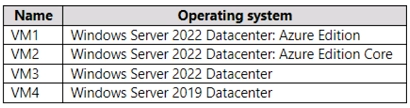
You plan to implement Azure Automanage for Windows Server.
You need to identify the operating system prerequisites.
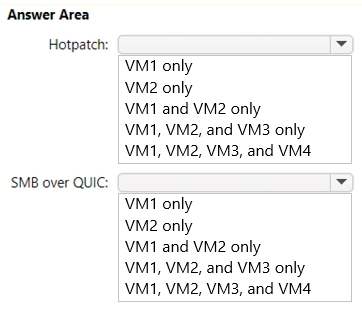
Which virtual machines support Hotpatch, and which virtual machines support SMB over QUIC? To answer, select the appropriate options in the answer area.
NOTE: Each correct selection is worth one point.
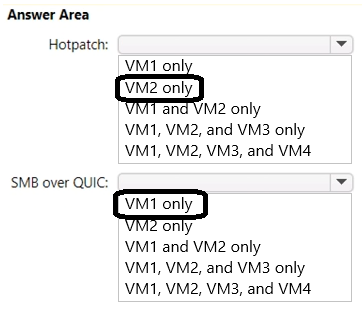
The suggested answer is correct
To use SMB over QUIC, you need the following things:
- An SMB server running on one of the following operating systems.
- Windows Server 2022 Datacenter: Azure Edition (Microsoft Server Operating Systems) or later
- Any edition of Windows Server 2025 or later
- A Windows 11 device (Windows for business)
The following table lists the exact combinations of publisher, OS offer, and SKU that support Hotpatching for Windows Server 2022 and Windows Server 2025 on Azure. Virtual machines (VMs) you create on Azure Local using these combinations also support Hotpatching.
Note
Windows Server container base images, custom images, or any other combination of publisher, offer, and SKU aren't supported.
Not all regions currently support Windows Server 2025: Azure Edition images. If you try to use this feature in a region that doesn't currently support Windows Server 2025: Azure Edition, you might see an HTTP 400 client error. To work around this issue, use a different region that does currently support this feature, such as UK South, East Asia, or West Central US.
Publisher OS Offer SKU MicrosoftWindowsServer WindowsServer 2022-Datacenter-Azure-Edition-Core MicrosoftWindowsServer WindowsServer 2022-Datacenter-Azure-Edition-Core-smalldisk MicrosoftWindowsServer WindowsServer 2022-Datacenter-Azure-Edition-Hotpatch MicrosoftWindowsServer WindowsServer 2022-Datacenter-Azure-Edition-Hotpatch-smalldisk MicrosoftWindowsServer WindowsServer 2025-Datacenter-Azure-Edition MicrosoftWindowsServer WindowsServer 2025-Datacenter-Azure-Edition-smalldisk MicrosoftWindowsServer WindowsServer 2025-Datacenter-Azure-Edition-Core MicrosoftWindowsServer WindowsServer 2025-Datacenter-Azure-Edition-Core-smalldisk
Kuikz
Highly Voted 7 months, 2 weeks ago
Hotpatch: VM1 and VM2 SMB over QUIC: VM1 and VM2
upvoted 5 times
Ksk08
Most Recent 3 weeks, 6 days ago
Hotpatch: VM1, VM2, SMB over QUIC: VM1, VM2,
upvoted 1 times
andib126
4 months ago
https://learn.microsoft.com/en-us/windows-server/get-started/editions-comparison-windows-server-2022?tabs=full-comparison VM1 and VM2 for both
upvoted 2 times
004b54b
2 months, 3 weeks ago
According to your link, all versions of Win Server 2022 support Hotpatch, but not Win Serv 2019, so first answer is VM1 + VM2 + VM3 Only Win Serv 2022 Datacenter Azure edition supports SMB over QUIC, so only VM1 + VM2 for the second answer
upvoted 1 times
rknichols01
10 months, 2 weeks ago
sorry, did not post the hot patch support list. Hotpatch is supported only on VMs and Azure Stack HCI created from images with the exact combination of publisher, offer and sku from the below OS images list. Windows Server container base images or Custom images or any other publisher, offer, sku combinations aren't supported. Publisher OS Offer Sku MicrosoftWindowsServer WindowsServer 2022-Datacenter-Azure-Edition-Core MicrosoftWindowsServer WindowsServer 2022-Datacenter-Azure-Edition-Core-smalldisk MicrosoftWindowsServer WindowsServer 2022-Datacenter-Azure-Edition-Hotpatch MicrosoftWindowsServer WindowsServer 2022-Datacenter-Azure-Edition-Hotpatch-smalldisk https://learn.microsoft.com/en-us/windows-server/get-started/hotpatch
upvoted 1 times
rknichols01
10 months, 2 weeks ago
the answers are correct. Automanage supports the following Windows versions: Windows Server 2012 R2 Windows Server 2016 Windows Server 2019 Windows Server 2022 Windows Server 2022 Azure Edition Windows 10 https://learn.microsoft.com/en-us/azure/automanage/automanage-windows-server Create an Azure VM with the Windows Server 2022 Datacenter: Azure Edition image to get the Automanage for Windows Server capabilities, including SMB over QUIC. https://learn.microsoft.com/en-us/azure/automanage/automanage-smb-over-quic
upvoted 1 times
MR_Eliot
1 year, 2 months ago
Hotpatch: https://learn.microsoft.com/en-us/windows-server/get-started/hotpatch Supported platforms Hotpatch is supported on the following operating systems for VMs running on Azure and Azure Stack HCI: Windows Server 2022 Datacenter: Azure Edition Core Windows Server 2022 Datacenter: Azure Edition with Desktop Experience SMB over QUIC: https://learn.microsoft.com/en-us/windows-server/storage/file-server/smb-over-quic Prerequisites To use SMB over QUIC, you need the following things: -A file server running Windows Server 2022 Datacenter: Azure Edition (Microsoft Server Operating Systems) -A Windows 11 computer (Windows for business) Windows Admin Center (Homepage) A Public Key Infrastructure to issue certificates like Active Directory Certificate Server or access to a trusted third party certificate issuer like Verisign, Digicert, Let's Encrypt, and so on.
upvoted 4 times
ARZIMMADAR
11 months ago
so what would the answer be?
upvoted 1 times
MR_Eliot
1 year, 2 months ago
Windows Server 2022 is the latest Long-Term Servicing Channel (LTSC) release with five years of mainstream support + five years of extended support. Choose the image that is right for your application needs. - Server with Desktop Experience includes all roles and a graphical user interface (GUI). Server Core omits the GUI for a smaller OS footprint. - Azure Edition with Desktop Experience- includes additional new functionality such as >>Hotpatch, SMB over QUIC<<, extended network for Azure, and is optimized to run in Azure. - Azure Edition Core - includes additional new functionality such as >>Hotpatch, SMB over QUIC<<, extended network for Azure, and is optimized to run in Azure. So answer is "VM1" & "VM2" for both instances.
upvoted 8 times
AndsSkov
1 year, 2 months ago
Hotpatch should be VM1 and VM2: https://learn.microsoft.com/en-us/windows-server/get-started/hotpatch#:~:text=Windows%20Server%202022,with%20Desktop%20Experience SMB over QUIC is correct
upvoted 2 times
c7d45f4
1 year, 2 months ago
i think you are right as shown here as well https://learn.microsoft.com/en-us/windows-server/get-started/editions-comparison-windows-server-2022?tabs=version-differences
upvoted 1 times
c7d45f4
1 year, 2 months ago
eddit SMB over QUIC applies to vm1 and vm2 as well
upvoted 2 times