
- 7 переглядів
Your network contains an Active Directory Domain Services (AD DS) domain named contoso.com. The domain contains a server named Server1 that has the DFS Namespaces role service installed. Server1 hosts a domain-based Distributed File System (DFS) Namespace named Files.
The domain contains a file server named Server2. Server2 contains a shared folder named Share1. Share1 contains a subfolder named Folder1.
In the Files namespace, you create a folder named Folder1 that has a target of \\Server2.contoso.com\Share1\Folder1.
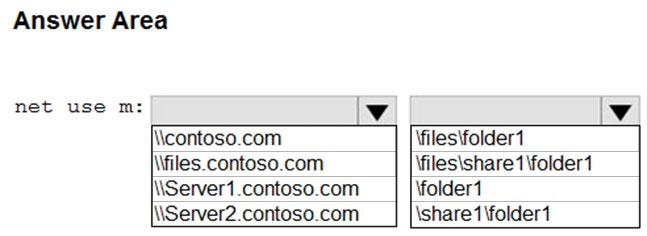
You need to configure a logon script that will map drive letter M to Folder1. The solution must use the path of the DFS Namespace.
How should you configure the command to map the drive letter? To answer, select the appropriate options in the answer area.
NOTE: Each correct selection is worth one point.
The suggested answer is correct
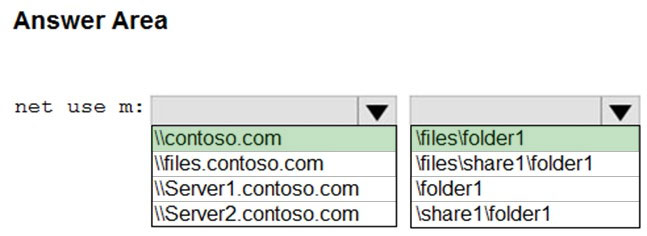
net use \\contoso.com\files\folder1
johosofat
Highly Voted 2 years ago
https://learn.microsoft.com/en-us/windows-server/storage/dfs-namespaces/dfs-overview
Close… look at the question again. in the Files namespace (\\contoso\files), you create a folder named Folder1 that has a target… - so the full namespace is \\contoso\files\folder1 the files and folder1 add to the root namespace contoso.com the target is added to the folder1 as a folder target, but we need none of that information to anwer the question
upvoted 15 times
Silviu
Highly Voted 2 years ago
No; be aware at the request: The solution must use the path of the DFS Namespace. So, the correct answer is \\contoso.com\Folder1
upvoted 8 times
Goofer
1 year, 10 months ago
You forgot the namespace Files Answer is \\contoso.com\Files\Folder1 (Server1 hosts a domain-based Distributed File System (DFS) Namespace named Files)
upvoted 18 times
monisshk
Most Recent 4 months ago
Correct answer: - \\server2.contoso.com\share1\folder1 Tested in LAB.
upvoted 2 times
egdeeptha
3 months, 3 weeks ago
Sure it works, But " The solution must use the path of the DFS Namespace."
upvoted 3 times
syu31svc
1 year, 8 months ago
https://learn.microsoft.com/en-us/windows-server/storage/dfs-namespaces/dfs-overview Namespace root - The namespace root is the starting point of the namespace. In the previous figure, the name of the root is Public, and the namespace path is \\Contoso\Public A user who browses to \\Contoso\Public\Software\Tools is transparently redirected to the shared folder \\LDN-SVR-01\Tools or \\NYC-SVR-01\Tools, depending on which site the user is currently located in https://adamtheautomator.com/net-use/ I would go with \\contoso.com\share1\folder1
upvoted 1 times
raulgar
1 year, 8 months ago
The answer is correct, \\contoso.com because you are using dfs, files because is the namespace publicated, and folder1 because is the folde resource, so \\contoso.com\files\folder1
upvoted 5 times
windowsmodulesinstallerworker
1 year, 2 months ago
correct only the dfs namespace path is relevant here the target dosent matter. the target could be anything. so \\contoso.com\files\folder1
upvoted 1 times
empee1977
1 year, 10 months ago
The command to map the drive letter should be "net use M: \contoso.com\Files\Folder1". This is because the DFS Namespace is hosted on Server1 and is named "Files", and the folder within the namespace that is being mapped to the drive letter is named "Folder1"
upvoted 1 times
scribe
1 year, 10 months ago
\\contoso.com\Folder1
upvoted 2 times
Lu5ck
1 year, 11 months ago
"In the Files namespace, you create a folder named Folder1 that has a target of \\Server2.contoso.com\Share1\Folder1" The answer is \\contoso.com\Folder1
upvoted 4 times
Teo
2 years, 1 month ago
Shouldn't \\Server2.contoso.com\Share1\Folder1 be the correct answer? Please explain.
upvoted 3 times
monisshk
4 months ago
you are right Teo, your answer is correct.
upvoted 1 times