
Your company has a main office and 10 branch offices that are connected by using WAN links. The network contains an Active Directory domain.
All users have laptops and regularly travel between offices.
You plan to implement BranchCache in the branch offices.
In each branch office, you install a server that runs Windows Server and the BranchCache feature. You register the servers in Active Directory.
You need to configure the laptops to use the local BranchCache server automatically. The solution must minimize administrative effort.
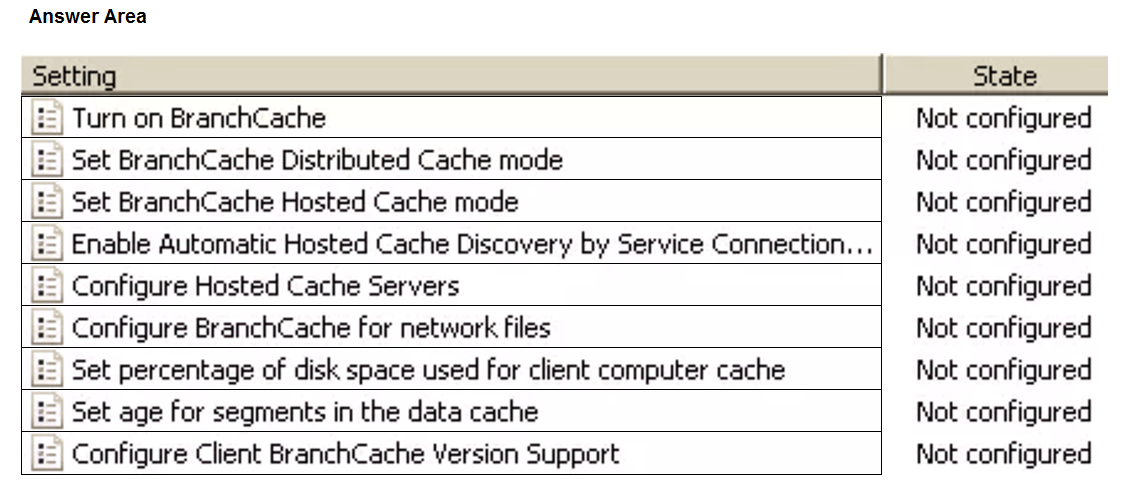
Which two Group Policy settings should you configure? To answer, select the settings in the answer area.
NOTE: Each correct selection is worth one point.
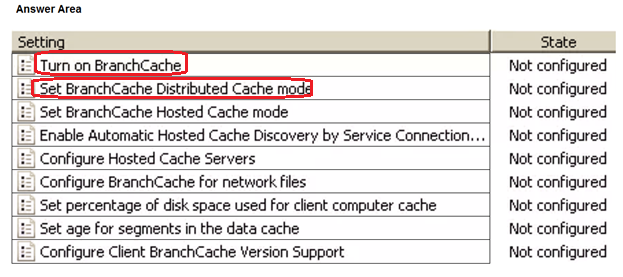
The suggested answer is incorrect
- Turn on BranchCache
- Enable Automatic Hosted Cache Discovery by Service Connection Point
If you enable this policy setting in addition to the "Turn on BranchCache" policy setting, BranchCache clients attempt to discover hosted cache servers in the local branch office. If client computers detect hosted cache servers, hosted cache mode is turned on. If they do not detect hosted cache servers, hosted cache mode is not turned on, and the client uses any other configuration that is specified manually or by Group Policy.
chadamantium
Highly Voted 1 year, 9 months ago
"Turn on BrancheCache" and "Enable Automatic Hosted Cache Discovery..." From the "Enable Automatic Hosted Cache Discovery..." GPO Help: If you enable this policy setting in addition to the "Turn on BranchCache" policy setting, BranchCache clients attempt to discover hosted cache servers in the local branch office.
upvoted 13 times
empee1977
Highly Voted 1 year, 9 months ago
Set the "Turn on BranchCache" policy to "Enabled". This will enable the BranchCache feature on the laptops. Set the "Configure BranchCache" policy to "Hosted Cache mode". This will configure the laptops to use the local BranchCache server automatically, without requiring any manual configuration.
upvoted 9 times
formacaotismic
Most Recent 6 days, 10 hours ago
To configure the laptops to use the local BranchCache server automatically and minimize administrative effort, you should configure the following two Group Policy settings: Trun on BranchCache Set BranchCache Distributed Cache Mode: These settings will ensure that the laptops are configured to use BranchCache and will automatically use the local BranchCache server in each branch office. If you have any more questions or need further assistance, feel free to ask!
upvoted 1 times
Ksk08
3 weeks ago
Turn on BranchCach - Enable Automatic Hosted Cache Discovery by Service Connection Point
upvoted 1 times
Joedn
6 months ago
Valid 05/28/2024
upvoted 1 times
Kuikz
7 months, 2 weeks ago
https://learn.microsoft.com/en-us/windows-server/networking/branchcache/deploy/use-group-policy-to-configure-domain-member-client-computers 7- In the Turn on BranchCache dialog box, click Enabled, and then click OK. 11- In the Enable Automatic Hosted Cache Discovery by Service Connection Point dialog box, click Enabled, and then click OK. When you enable both the Set BranchCache Distributed Cache mode and the Enable Automatic Hosted Cache Discovery by Service Connection Point policy settings, client computers operate in BranchCache distributed cache mode unless they find a hosted cache server in the branch office, at which point they operate in hosted cache mode.
upvoted 2 times
NazerRazer
1 year ago
--> Turn on BranchCache <--CORRECT --> Enable Automatic Hosted Cache Discovery by Service Connection ... <-- CORRECT WRONG -->Set BranchCache Hosted Cache mode<--- THIS IS A SETTING FOR THE SERVER
upvoted 7 times
afridi43
1 year, 2 months ago
In the scenario you've described, the main goal is to configure client laptops to use the local BranchCache server automatically when they are in a branch office. This is achieved primarily through the "Enable Automatic Hosted Cache Discovery by Service connection point" setting, which allows laptops to find and use the local cache server without manual configuration. So, to minimize administrative effort and ensure that laptops in each branch office automatically utilize the local BranchCache server, it's recommended to configure: 1. Turn on BranchCache (YES) 2. Enable Automatic Hosted Cache Discovery by Service connection point (YES) These settings will help client laptops discover and use the local cache server in their respective branch offices efficiently.
upvoted 3 times
skycrap
1 year, 5 months ago
"Turn on BranchCache" "Enable Automatic Hosted Cache Discovery by Service Connection Point" Why: question ask “The solution must minimize administrative effort”. If you use “Set BrancheCache Hosted mode” would work but you have to define in every site de name of the cache server.
upvoted 7 times
Maup33
1 year, 4 months ago
think so servers are registered in AD; register as a Service Connection Point in AD DS I wonder
upvoted 1 times
MiMojo
1 year, 7 months ago
The provided answer is wrong. "Turn on BranchCache" & "Enable Automatic Hosted Cache Discovery by Service Connection Point" is the correct answer.
upvoted 4 times
syu31svc
1 year, 8 months ago
Turn on branchcache is a must https://learn.microsoft.com/en-us/windows-server/networking/media/branchcache/bc_modes.jpg "In each branch office, you install a server that runs Windows Server and the BranchCache feature" Other answer is to set hosted cache mode
upvoted 2 times
raulgar
1 year, 8 months ago
I think that is turn on branchcache and setup branchcache hosted mode
upvoted 1 times
cris66
1 year, 9 months ago
I agree with chadamantium. "Turn on BranchCache", "Enable Automatic...". I can't see the option that empee1977 is talking about. "Configure BranchCache". Answer would be automatic while "Set BranchCache Hosted Cache Mode" and "Configure Hosted Cache Servers" require you configure the server name. https://learn.microsoft.com/en-us/windows-server/networking/branchcache/deploy/use-group-policy-to-configure-domain-member-client-computers#bkmk_gp When you enable both the Set BranchCache Distributed Cache mode and the Enable Automatic Hosted Cache Discovery by Service Connection Point policy settings, client computers operate in BranchCache distributed cache mode unless they find a hosted cache server in the branch office, at which point they operate in hosted cache mode.
upvoted 3 times
cris66
1 year, 9 months ago
This policy setting specifies whether client computers should attempt the automatic configuration of hosted cache mode by searching for hosted cache servers.
upvoted 1 times
wyindualizer
1 year, 10 months ago
Since in every branch office we have server, the hosted cache mode is better. https://learn.microsoft.com/en-us/windows-server/networking/branchcache/branchcache#BKMK_2
upvoted 5 times