
- 1 перегляд
Exam
Answer needs confirmation
Question
Your network contains an Active Directory Domain Services (AD DS) domain named contoso.com. The functional level of the forest and the domain is Windows
Server 2012 R2. The domain contains the domain controllers shown in the following table.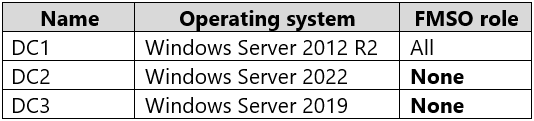
You need to raise the forest functional level to Windows Server 2016. The solution must meet the following requirements:
✑ Ensure that there are three domain controllers after you raises the level.
✑ Minimize how long the FSMO roles are unavailable.
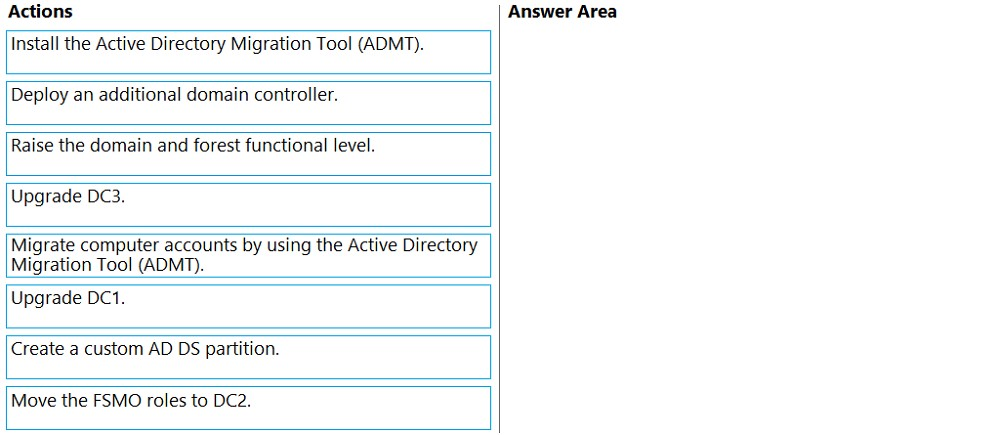
Which three actions should you perform in sequence? To answer, move the appropriate actions from the list of actions to the answer area and arrange them in the correct order.
Proposed answer
Select and Place:
Suggested answer
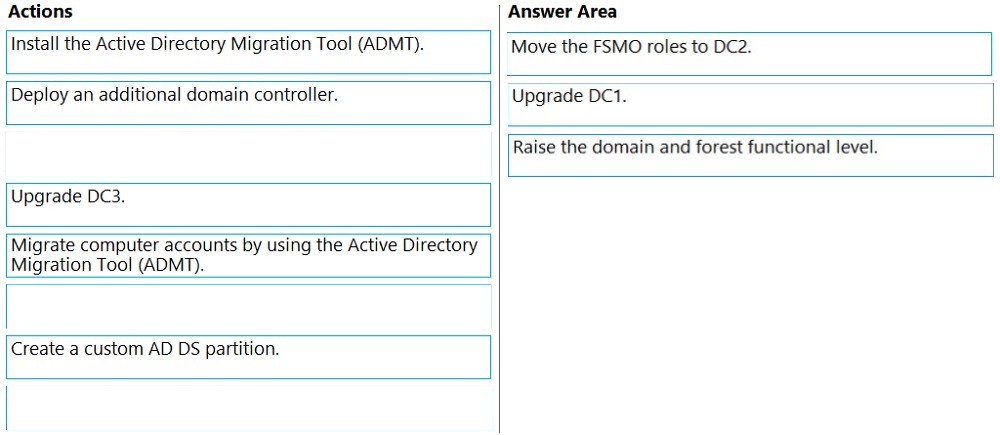
xxxxx85xx
Highly Voted 2 years, 9 months ago
Correct Answers Windows 2012 R2 is not compatible with the Windows Server 2016 functional levels and need to be upgraded.
upvoted 8 times
scribe
2 years ago
answer is correct but Microsoft says that is no option to inplace upgrade of Domain Controler - always promote new
upvoted 3 times
syu31svc
1 year, 9 months ago
https://learn.microsoft.com/en-us/windows-server/identity/ad-ds/active-directory-functional-levels Windows Server 2016 functional levels Supported domain controller operating systems: Windows Server 2022 Windows Server 2019 Windows Server 2016
upvoted 2 times
RJM
Highly Voted 2 years, 8 months ago
Funny answer in place upgrades are not considered best practice, even by Microsoft https://docs.microsoft.com/en-us/windows-server/identity/ad-ds/deploy/upgrade-domain-controllers
upvoted 6 times
WMG
2 years, 5 months ago
Reality and Best Practice have never ever seen eye to eye.
upvoted 4 times
starseed
Most Recent 4 months, 2 weeks ago
Naturally Correct answers
upvoted 1 times
raulgar
1 year, 8 months ago
The answers are correct, but it's tricky, microsoft not recomend you upgrade a dc in place.The correct way would be move the roles, depromotion the old dc and raise the funtional level
upvoted 2 times
syu31svc
1 year, 9 months ago
https://learn.microsoft.com/en-us/windows-server/identity/ad-ds/deploy/upgrade-domain-controllers In the PowerShell window, use the Move-ADDirectoryServerOperationMasterRole cmdlet to move the FSMO roles. Demote and remove the earlier Windows Server DC. (In this case upgrade would the option to select from given choices) After the server is demoted and removed, you can raise the forest functional and domain functional levels to the latest version of Windows Server. Answer is correct
upvoted 1 times
cris66
1 year, 11 months ago
It is not recommended but it is fully supported, and ADDS is upgradeable in-place. https://learn.microsoft.com/en-us/windows-server/get-started/upgrade-migrate-roles-features
upvoted 2 times