
- 1 перегляд
Exam
Answer needs confirmation
Question
You have the servers shown in the following table. 
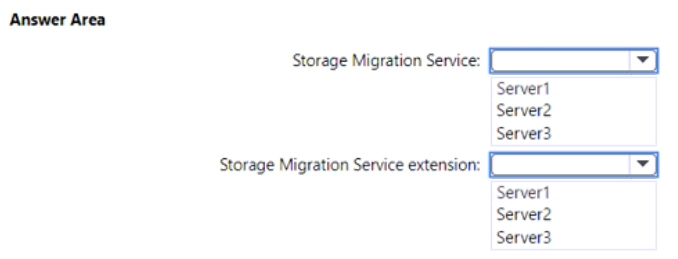
You plan to migrate file shares from Server1 to Server2.
You need to deploy the Storage Migration Service and the Storage Migration Service extension.
On which server should you install each component? To answer, select the appropriate options in the answer area.
NOTE: Each correct selection is worth one point.
Proposed answer
Suggested answer
ant_12
Highly Voted 1 year, 11 months ago
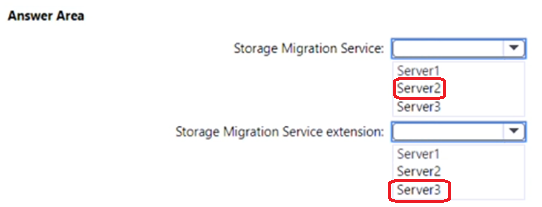
Check the Storage Migration Service requirements and install the latest version of Windows Admin Center on your PC or a management server if you haven't already. You also need the latest version of the Storage Migration Service extension, which is installed automatically by Windows Admin Center if Automatically update extensions is enabled in Settings > Extensions. -- That's server3 In Windows Admin Center, connect to the orchestrator server running Windows Server 2019 or Windows Server 2022. This is the server that you'll install Storage Migration Service on and use to manage the migration. If you're migrating only one server, you can use the destination server as long as it's running Windows Server 2019 or Windows Server 2022. We recommend you use a separate orchestration server for any multi-server migrations. -- This is Server2
upvoted 5 times
Onderka
11 months ago
You cannot install WAC on DC..
upvoted 2 times
smorar
Most Recent 7 months, 3 weeks ago
Yes, you can install Windows Admin Center on DCs, but Microsoft recommends not doing so for security (it increases the attack surface) and performance (it can consume a lot of resources and affect the performance of the DC). Recommends installing Windows Admin Center on a dedicated administration server instead of a domain controller. But in any case, we must forget about the WAC and Server3, which do not enter into the equation. Storage Migration Service: Server2 (The destination where data from Server1 is to be moved) Storage Migration Service extension: Server1 (the source server)
upvoted 3 times
smorar
7 months, 3 weeks ago
It was wrong. Server2 and Server2.
upvoted 1 times
firecloud
9 months ago
Server 1 and server 2 are server core, so only server 3 has desktop experience, wac must be installed on server 3
upvoted 1 times
Kuikz
8 months, 1 week ago
WAC installation is not supported on DCs https://learn.microsoft.com/en-us/windows-server/manage/windows-admin-center/plan/installation-options
upvoted 1 times
jajajaf342
11 months, 2 weeks ago
The Storage Migration Extension is installed via WAC. Installing WAC on a domain controller is not supported. It has to be Server2 for both answers.
upvoted 2 times
Kuikz
8 months, 1 week ago
Yeah.. i agree Must be Server 2 for both, anything else is not possible. WAC installation is not supported on DC WAC installation is not supported on Server 2012 https://learn.microsoft.com/en-us/windows-server/manage/windows-admin-center/plan/installation-options
upvoted 3 times
Bilal_U
1 month ago
I agree, you cannot install WAC on 2012, and DCs (NOT SUPPORTED as MS suggested). So both will be installed on Server 2.
upvoted 1 times
makonmakon
10 months, 2 weeks ago
agree. The Storage Migration Extension is an "element" of WAC. https://4sysops.com/archives/windows-server-2019-storage-migration-service/
upvoted 1 times
[Removed]
1 year, 2 months ago
To migrate file shares from Server1 to Server2 using the Storage Migration Service, you should deploy the Storage Migration Service on the destination server, which is the newer version of Windows Server, as it will be orchestrating the migration process. The Storage Migration Service extension, on the other hand, should be installed on the source server from which the files are being migrated. Therefore: Storage Migration Service should be installed on Server2, which runs Windows Server 2022. Storage Migration Service extension should be installed on Server1, which runs Windows Server 2012 R2. Fill in the Answer Area as follows: Storage Migration Service: Server2 Storage Migration Service extension: Server1
upvoted 2 times
Kuikz
8 months, 1 week ago
Installing WAC on Server 2012 is not supported -> not on Server 1 https://learn.microsoft.com/en-us/windows-server/manage/windows-admin-center/plan/installation-options
upvoted 1 times
Jfran
1 year, 5 months ago
why do the extensions have to be installed in the DC? I think they should be installed in the Server 2 also.
upvoted 1 times
tomasek88
1 year, 7 months ago
Can anyone explain why Storage Migration Service is Server 2 and why Storage Migration Service extensio Server 3 ? I don't understand.
upvoted 1 times
syu31svc
1 year, 9 months ago
From the link provided by shogoki69 An orchestrator server running Windows Server 2019 or Windows Server 2022 to manage the migration If you're migrating only a few servers, and one of the servers is running Windows Server 2019 or Windows Server 2022, you can use that as the orchestrator. If you're migrating more servers, use a separate orchestrator server. A PC or server running the latest Windows Admin Center to run the Storage Migration Service user interface, along with the latest Storage Migration Service tool (extension) available from the feed. The Windows Admin Center must be at least version 2103. Answer is correct
upvoted 3 times
shogoki69
2 years ago
Correct. https://learn.microsoft.com/en-us/windows-server/storage/storage-migration-service/overview#requirements
upvoted 4 times