
- 4 перегляди
Exam
Answer needs confirmation
Question
You have a server named Server1 that runs Windows Server.
On Server1, you create a Data Collector Set named CollectorSet1 based on the Basic template.
You need to configure CollectorSet1 to meet the following requirements:
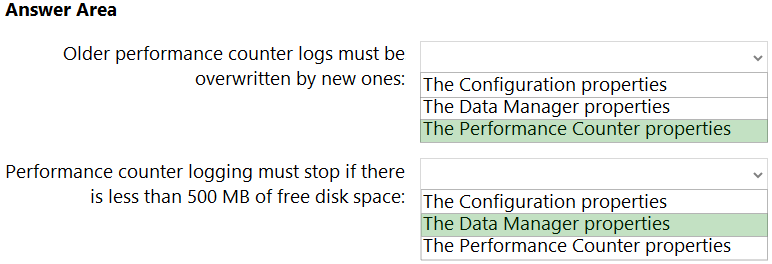
✑ Older performance counter logs must be overwritten by new ones.
✑ Performance counter logging must stop if there is less than 500 MB of free disk space.
What should you configure for each requirement? To answer, select the appropriate options in the answer area.
NOTE: Each correct selection is worth one point.
Proposed answer
Hot Area: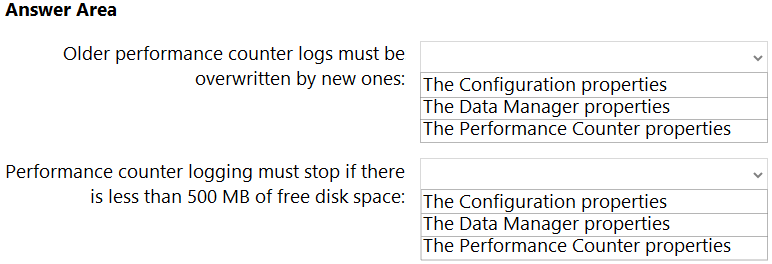
Suggested answer
Leocan
Highly Voted 2 years, 1 month ago
The answer given is correct. Tested.
upvoted 5 times
starseed
Most Recent 4 months, 2 weeks ago
Correct answer
upvoted 1 times
syu31svc
1 year, 9 months ago
And to conclude from my first 2 posts, answer is correct Try it yourself to believe it
upvoted 3 times
syu31svc
1 year, 9 months ago
To overwrite older performance counter logs by new ones, select the "Overwrite" option for the "File name" setting in the data collector set properties. You can access the properties by right-clicking on the data collector set in Performance Monitor and selecting "Properties". In the "Data Collector Set Properties" dialog box, click the "Log Files" tab, and then select "Overwrite" for the "File name" setting
upvoted 3 times
syu31svc
1 year, 9 months ago
https://learn.microsoft.com/en-us/previous-versions/windows/it-pro/windows-server-2008-R2-and-2008/cc765998(v=ws.11) Under Table "Data Manager Properties" The amount of disk space that must be available on the drive where log data is stored. If selected, previous data will be deleted according to the Resource policy that you choose when the limit is reached.
upvoted 1 times
valgaw
2 years, 6 months ago
2nd: Data Manager: Change the default settings when you configure a Data Collector Set on the Data Manager tab. For example, change the Minimum free disk space or Maximum folders setting https://docs.microsoft.com/en-us/troubleshoot/windows-server/performance/log-files-are-deleted
upvoted 3 times
GoforIT21
2 years, 4 months ago
Thanks for the link! Actually, for box 1 the answer should be Data Manager properties, too: "On the Data Manager tab, you can accept the default values or make changes according to your data retention policy. See the table below for details on each option. * When Minimum free disk or Maximum folders is selected, previous data will be deleted according to the Resource policy you choose (Delete largest or Delete oldest) when the limit is reached." (https://learn.microsoft.com/en-us/previous-versions/windows/it-pro/windows-server-2008-R2-and-2008/cc765998(v=ws.11))
upvoted 2 times
lukiduc9625
2 years, 3 months ago
In my opinion 1st box should be "Performance Counter properties" - in these properties on tab "File" you find option "Log mode" with following checkboxes: Overwrite, Append, Circular. Settings which you make in Data Manager tab will be applied only when some conditions will be fulfilled (too big root dir, too many subfolders, too less free space on disk)
upvoted 2 times
xxxxx85xx
2 years, 9 months ago
Correct Answer
upvoted 2 times