
- 5 views
Exam
Answer needs confirmation
Question
You have a Windows Server container host named Server1.
You start the containers on Server1 as shown in the following table.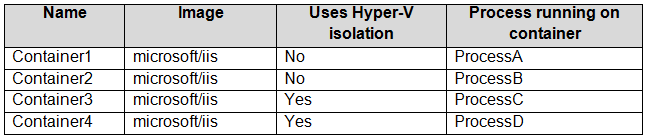
You need to validate the status of ProcessA and ProcessC.
Where can you verify that ProcessA and ProcessC are in a running state? To answer, select the appropriate options in the answer area.
NOTE: Each correct selection is worth one point.
Proposed answer
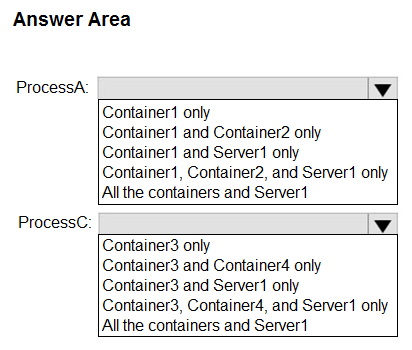
Suggested answer
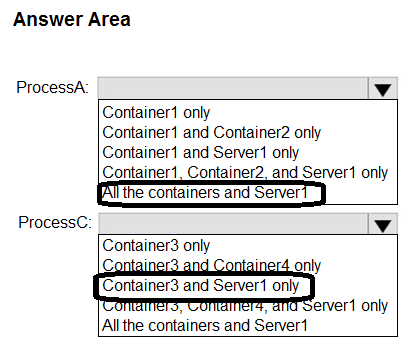
Correct answer
The suggested answer is correct
smith288
Highly Voted 1 year, 3 months ago
Incorrect. ProcessA is in a container that has process isolation. So, both Container1 and the host (Server1) can see the process. Per this article "When you have a Windows container running in process isolation mode, all processes are isolated between the containers so they have no influence on each other. However, the security boundary between container host and containers is simply the process isolation itself, which means the container host has visibility into the processes running inside the container."
https://argonsys.com/microsoft-cloud/library/how-to-identify-processes-running-inside-a-windows-container-from-the-container-host/
ProcessC is in a hyper-V isolation container in contrast, so only Container3 can see the process. So, Container1 and Server1 only for the first answer. Container3 only for the second one.
upvoted 27 times
MichalGr
7 months ago
All fine apart from the beginning "ProcessA is in a container that has process isolation." - not according to the table.
upvoted 2 times
sardonique
3 months, 1 week ago
you have 2 types of isolation: Process isolation and Kernel isolation. so ProcessA has definitely process isolation. Smith288 knows what he's talking about, you don't
upvoted 2 times
Ksk08
1 month ago
correct
upvoted 1 times
JackBauer
Highly Voted 1 year, 1 month ago
I would say ProcessA : Container 1, Container 2 and Server1 only. 1 and 2 are not using HyperV isolation so they can talk to each other, and the host can see them too. 3 and 4 are in hyper-v isolation so they cannot see anything outside of themselves. Process C is in hyperV isolation, so only itself can check processes. Even the host cannot. So Container3 only for the second box This question does not ask about process isolation, which would make the answers different.
upvoted 12 times
004b54b
2 months, 3 weeks ago
I did believe as you, but i was wrong: What gets isolated: Windows containers virtualize access to various operating system namespaces. A namespace provides access to information, objects, or resources via a name. For example, the file system is probably the best-known namespace. There are numerous namespaces on Windows that get isolated on a per-container basis: - file system - registry - network ports - **process** and thread ID **space** - Object Manager namespace (https://learn.microsoft.com/en-us/virtualization/windowscontainers/manage-containers/hyperv-container#what-gets-isolated) Then, smith288 is right: both Container1 and the host (Server1) can see the process.
upvoted 1 times
Jothar
Most Recent 2 days, 8 hours ago
This seems to support smith288: https://techcommunity.microsoft.com/blog/itopstalkblog/how-to-identify-processes-running-inside-a-windows-container-from-the-container-/3453297
upvoted 1 times
Ksk08
3 weeks, 6 days ago
ProcessA: Container1 and Server1 only ProcessC: Container3 only
upvoted 1 times