
AZ-801 / Q33 / T1
You have an on-premises server named Server1 that runs Windows Server.
You have an Azure subscription.
You need to onboard Server1 to Microsoft Defender for Cloud.
What should you install on Server1?
AZ-801 / Q28 / T1
You have an Azure subscription named Sub1 that contains a resource group named RG1. RG1 contains the resources shown in the following table.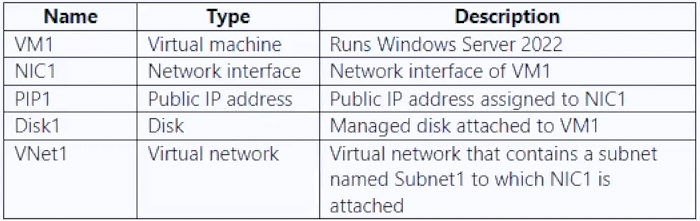
Sub1 has Microsoft Defender for Servers enabled. You are assigned the Contributor role for Sub1.
You need to implement just-in-time (JIT) VM access for VM1.
What should you do first?
AZ-801 / Q12 / T1
You have an Azure subscription that has Microsoft Defender for Cloud enabled.
You have 50 Azure virtual machines that run Windows Server.
You need to ensure that any security exploits detected on the virtual machines are forwarded to Defender for Cloud.
Which extension should you enable on the virtual machines?
AZ-801 / Q9 / T1
You have 100 Azure virtual machines that run Windows Server. The virtual machines are onboarded to Microsoft Defender for Cloud.
You need to shut down a virtual machine automatically if Microsoft Defender for Cloud generates the "Antimalware disabled in the virtual machine" alert for the virtual machine.
What should you use in Microsoft Defender for Cloud?
AZ-800 / Q3 / T11
You need to configure remote administration to meet the security requirements.
What should you use?
AZ-800 / Q30 / T4
You have an Azure virtual machine named VM1 that runs Windows Server.
You need to ensure that administrators request access to VM1 before establishing a Remote Desktop connection.
What should you configure?
AZ-800 / Q7 / T4
You have an Azure virtual machine named VM1 that runs Windows Server.
You need to configure the management of VM1 to meet the following requirements:
- Require administrators to request access to VM1 before establishing a Remote Desktop connection.
- Limit access to VM1 from specific source IP addresses.
- Limit access to VM1 to a specific management port.
What should you configure?
AZ-800 / Q7 / T2
You need to ensure that you can use the Azure Policy guest configuration feature to manage VM1.
What should you do?