
You deploy a new Active Directory Domain Services (AD DS) forest named contoso.com. The domain contains three domain controllers named DC1, DC2, and
DC3.
You rename Default-First-Site-Name as Site1.
You plan to ship DC1, DC2, and DC3 to datacenters in different locations.
You need to configure replication between DC1, DC2, and DC3 to meet the following requirements:
✑ Each domain controller must reside in its own Active Directory site.
✑ The replication schedule between each site must be controlled independently.
✑ Interruptions to replication must be minimized.
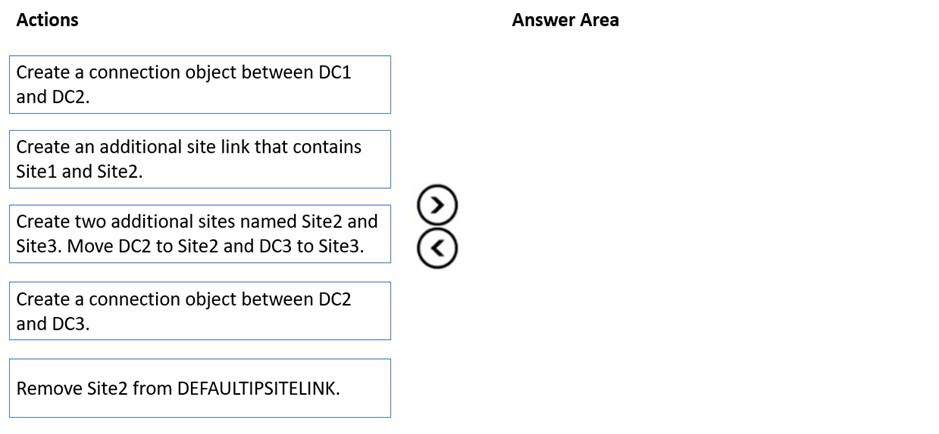
Which three actions should you perform in sequence in the Active Directory Sites and Services console? To answer, move the appropriate actions from the list of actions to the answer area and arrange them in the correct order.
Select and Place:
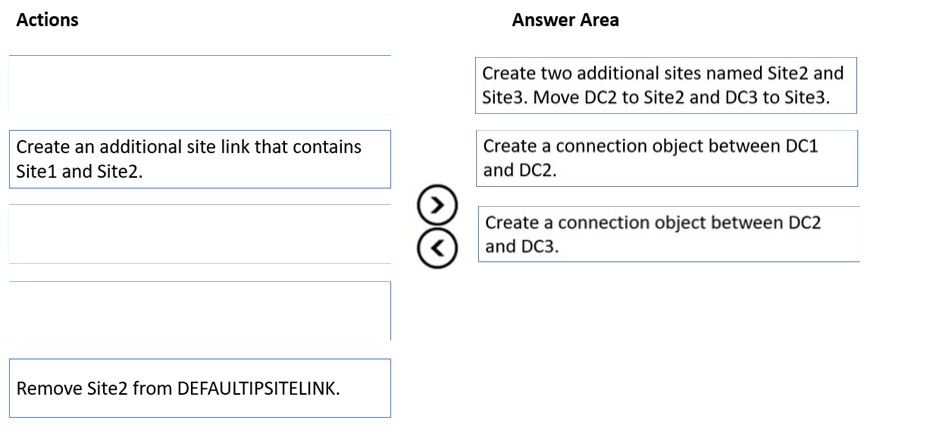
The suggested answer is correct
prepper666
Highly Voted 2 years, 6 months ago
Answer is wrong, nothing to do with Connection objects. To control Inter-site replication, configure the IPSITELINK properties and schedule. KCC generates connection objects and takes replication details from the site link. Correct answer is: 1. create 2 additional sites and move DC2 and DC3. 2. Create and additional site link between site 2 and site 3 (does this first so as not to disrupt site 1 and site 2) 3. remove Site 2 from Default sitelink (leaving site 1 and 3 to replicate. by default site-link Bridging is enabled so 1 to 2 and 1 to 3 bridges the link between 2 and 3)
upvoted 31 times
lukiduc9625
2 years, 2 months ago
1. Create two additional sites named Site2 and Site3. Move DC2 to Site2 and DC3 to Site3 - After this step Site2 and Site3 are linked to each other and to Site1 by DEFAULTSITELINK and in both new sites "automatically generated" connection objects will be created 2. Create and additional site link between site 2 and site 3 - but such action is not mentioned in available actions set. There is only "Create and additional site link between Site1 and Site2". I'm not sure, that adding Site1 and Site2 to new site link will disrupt replication between these sites. I don't think so. After this step: - Site1 is linked to Site2 by DEFAULTSITELINK and NewSiteLink - Site1 is linked to Site3 by only DEFAULTSITELINK - Site2 is linked to Site3 by only DEFAULTSITELINK 3. remove Site 2 from DEFAULTSITELINK - After this step: - Site1 is linked to Site2 by only NewSiteLink - Site1 is linked to Site3 by only DEFAULTSITELINK - Site2 is not directly linked to Site3 - replication must go through Site1 Two first requirements are fulfilled. But whether interruptions to replication is minimized? hmmm
upvoted 6 times
MR_Eliot
1 year, 2 months ago
I agree with this approach
upvoted 1 times
lukiduc9625
2 years, 2 months ago
I'm not sure - there is no action "Create and additional site link between site 2 and site 3"
upvoted 4 times
GoforIT21
2 years, 5 months ago
Thanks for your take on this! Would you have a source to document that approach?
upvoted 1 times
AnonymousJhb
2 years, 5 months ago
https://docs.microsoft.com/en-us/windows-server/identity/ad-ds/plan/creating-a-site-link-design
upvoted 1 times
Load full discussion...
loulouka
Highly Voted 2 years, 6 months ago
Correct order is 1)create two additinal sites 2)create an additinal site link that contains site1 & site 2 3)Remove site2 from defaultipsitelink
upvoted 14 times
Midoria
Most Recent 2 weeks, 5 days ago
Create two additional sites named Site2 and Site3. Move DC2 to Site2 and DC3 to Site3. Reason: Each domain controller must reside in its own site. Creating Site2 and Site3 and moving the domain controllers ensures proper placement and organization for replication. Create an additional site link that contains Site1 and Site2. Reason: By creating a new site link, you establish an independent replication path between Site1 (DC1) and Site2 (DC2) with its own schedule. Remove Site2 from DEFAULTIPSITELINK. Reason: Removing Site2 from the default site link ensures that it no longer uses the default replication path, which would otherwise conflict with the custom site link created in Step 2. This step helps maintain independent replication control.
upvoted 1 times
sardonique
8 months ago
the 3 DCs were in the same site, and replicated between themselves (intrasite) regardless of the default sitelink. so when you create new sites, the default sitelink comes into play and so the default site link along with the setting "site-link Bridging" enabled by default can guarantee communication between sites. I assume that the creation of connection objects is some sort of redundancy so the unterruptions to replication get minimized? if you remove the site2 from the defualt sitelink, you won't have anymore the mesh topology between the 3 sites, reducing the number of paths available for replication, which appears to be in contrast to the requirement to minimize interruptions
upvoted 1 times
pass601
1 year, 6 months ago
Correct order is 1)create two additinal sites 2)create an additinal site link that contains site1 & site 2 3)Remove site2 from defaultipsitelink
upvoted 2 times
syu31svc
1 year, 8 months ago
https://learn.microsoft.com/en-us/windows-server/identity/ad-ds/plan/creating-a-site-link-design Whenever you add sites to a newly created site link, determine if the site being added is a member of other site links, and change the site link membership of the site if needed. For example, if you make a site a member of the Default-First-Site-Link when you initially create the site, be sure to remove the site from the Default-First-Site-Link after you add the site to a new site link. If you do not remove the site from the Default-First-Site-Link, the Knowledge Consistency Checker (KCC) will make routing decisions based on the membership of both site links, which may result in incorrect routing. Answer is 1) Create additional sites (Each domain controller must reside in its own Active Directory site) 2) Create site link contains 1 and 2 3) Remove 2 from DEFAULTIPSITELINK
upvoted 4 times
sardonique
8 months ago
agree, so Site2 can replicate to site 3 thanks to site 1 being on both links, however removing site2 from the default link removes a replication path, so if the S1 has a network issue, S2 will not be able to replicate with S3
upvoted 1 times
Lu5ck
1 year, 11 months ago
Basically, all the DCs are created under "Site1" and shipped out. 1. Obviously, since all these DCs are now in different locations, they need to be placed in their own site. So, now we got Site1, Site2, Site3. 2. They want the "replication schedule" to be controlled "independently". You control this timing via "site link". At this moment, all the 3 site are dumped into "defaultipsitelink". So, what you need to do is create a site link for each of them like "site1-to-site2" and "site1-to-site3". So, the answer is.... 1. Create 2 additional sites for DC2 and DC3 2. Create a new site link 3. Remove one site from the default site link SIte/subnet is like node in a topology Site link is the communication between the nodes. So, DC can be geographically placed in different locations thus you are given the options to customize the communications between these sites through site link.
upvoted 2 times
johosofat
2 years, 1 month ago
Same answer but trying to make it more clear - 1. DC1, Dc2, Dc3 2. Rename Default site to Site1(dc1) 3. Create sites 2 and 3. -Add DC2 to site2 Add DC3 to site3 4. Add new site link to site 1 and 2 5. Remove site 2 from the default site link (now 1 and 3 are left)
upvoted 1 times
joehoesofat
2 years, 1 month ago
New Multi-site setup- create site 2 and 3 and rename default site to site1 1. DC1, Dc2, Dc3 2. Rename Default site to Site1(dc1) 3. Add DC2 to site2 Add DC3 to site3 4. Add site link new to site 1 and 2 5. Remove default site link from site 2
upvoted 2 times
lukiduc9625
2 years, 3 months ago
Hi, I think in same manner, but in my opinion one should first remove Site2 from DefaultSiteLink and afterwards Create an additional site link between Site2 and Site3.
upvoted 1 times