
Your network contains an Active Directory Domain Services (AD DS) domain named adatum.com. The domain contains a server named Server1 and the users shown in the following table.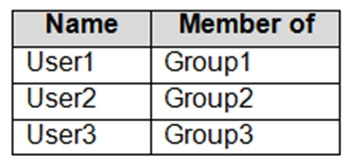
Server1 contains a folder named D:\Folder1. The advanced security settings for Folder1 are configured as shown in the Permissions exhibit. (Click the
Permissions tab.)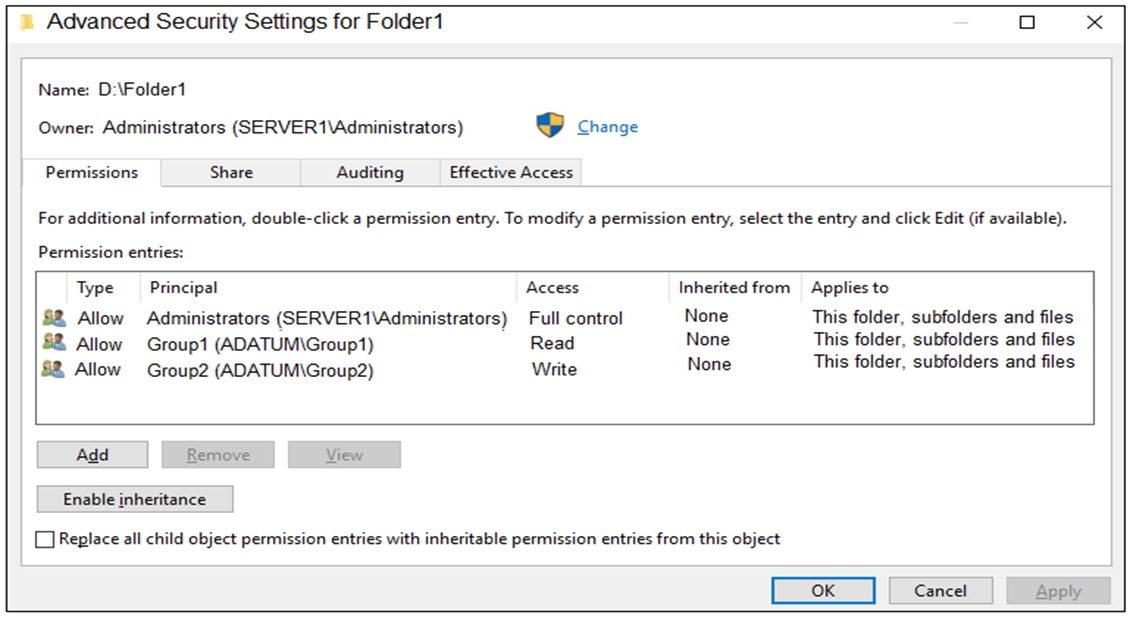
Folder1 is shared by using the following configurations:
The share permissions for Share1 are shown in the following table.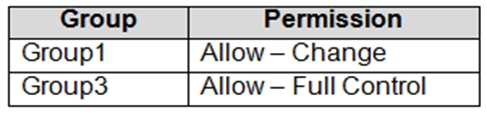
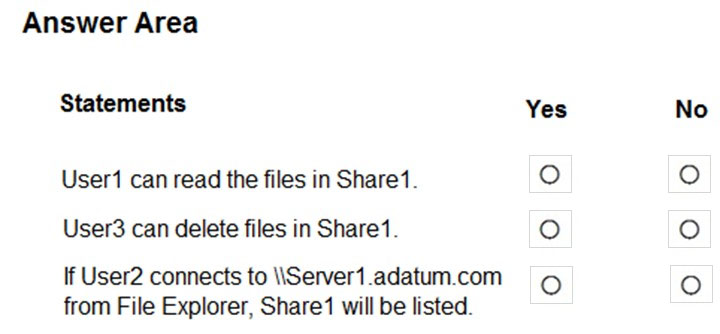
For each of the following statements, select Yes if the statement is true. Otherwise, select No.
NOTE: Each correct selection is worth one point.
Hot Area:
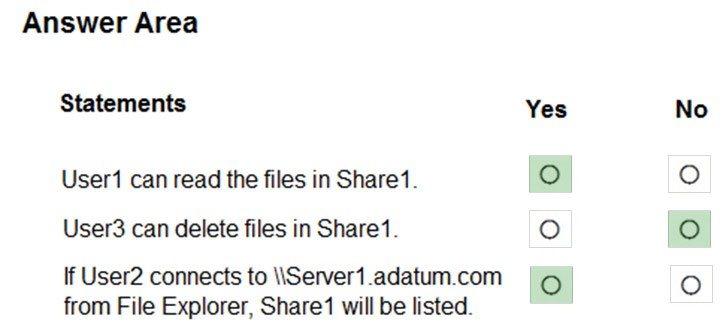
To access files in a shared folder, you need to be granted permissions on the folder (NTFS permissions) AND permissions on the share. The most restrictive permission of the folder permissions and share permissions apply.
- Box 1: Yes - Group1 has Read access to Folder1 and Change access to Share1. Therefore, User1 can read the files in Share1.
- Box 2: No - Group3 has Full Control access to Share1. However, Group3 has no permissions configured Folder1. Therefore, User3 cannot access the files in Share1.
- Box 3: Yes - Group2 has write permission to Folder1. However, Group2 has no permission on Share1. Therefore, users in Group2 cannot access files in the shared folder.
Access Based Enumeration when enabled hides files and folders that users do not have permission to access. However, Access Based Enumeration is not enabled on Share1. This is indicated by the FolderEnumerationMode - Unrestricted setting. Therefore, the share will be visible to User2 even though User2 cannot access the shared folder.
The suggested answer is absolutely correct and explained
johosofat
Highly Voted 2 years ago
User1 - Group1 - Has read (most restrictive) = can read so Y Group3/user3 - has full control of share1 but share permissions are unknown- So we cannot say we can delete files so {N} Group2/User2 - we have write permissions to share but unknown ntfs permissions- But Read is the goal. - In this case read depends on Folder enumeration unrestricted: means access based enumeration is off so file can be seen - without read permissions
upvoted 14 times
phi3nix
Highly Voted 1 year, 6 months ago
The answer is not correct. Very important are share permissions. User1 -> Group1 User2 > Group2 User3 > Group3
Permission on share: Group1 - Allow - Change Group3 - Allow - Full Control But on folder permissions Group1 Read Group2 Write User1 has access share and permissions. User2 has only access on file. User3 has access to to share but not permission on folder. Answer is: Y N N I also replicated it in LAB.
upvoted 12 times
Tiago_MP
1 year, 3 months ago
Spot on!
upvoted 1 times
Jothar
Most Recent 5 months, 1 week ago
For those testing in your own lab, turn OFF access-based enumeration. You will see that even though user2 does not have read rights, he can still see the file.
upvoted 2 times
dfdfws
5 months, 2 weeks ago
I see a lot of fuzz around the last answer: It is indeed correct because enumeration is unrestricted which means that the user still can see the folder but not access it.
upvoted 2 times
MR_Eliot
1 year, 2 months ago
Answers are correct: 1.[YES] User1 is member of Group1. Group1 has read (NTFS) permissions. Group1 has change (SHARE) permissions. 2.[NO] User 3 is memebr of Group3. Group3 doesn't have any (NTFS) permissions. 3.[YES] User is able to see the share name, but cannot open the share. I have tested this and this is 100% the correct answer.
upvoted 6 times
syu31svc
1 year, 8 months ago
User 1 in Group 1 with Read access for folder 1 so can read files User3 in Group 3 with no known permissions for folder 1 so cannot delete User2 in Group 2 with write permissions for folder 1 so can view files Yes No Yes Answer is correct
upvoted 4 times
ultrium
1 year, 5 months ago
Is not correct. User2 dont have share permissions
upvoted 2 times