
Exam
Answer confirmed
Question
Your network contains a single-domain Active Directory Domain Services (AD DS) forest named contoso.com. The forest contains the servers shown in the following exhibit table.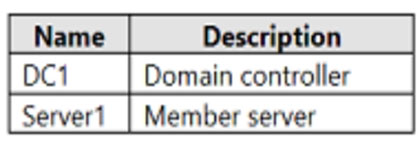
You plan to install a line-of-business (LOB) application on Server1. The application will install a custom Windows service.
A new corporate security policy states that all custom Windows services must run under the context of a group managed service account (gMSA). You deploy a root key.
You need to create, configure, and install the gMSA that will be used by the new application.
Which two actions should you perform? Each correct answer presents part of the solution.
NOTE: Each correct selection is worth one point
Proposed answer
- A. On Server1, run the setspn command.
- B. On DC1, run the New-ADServiceAccount cmdlet.
- C. On Server1, run the Install-ADServiceAccount cmdlet.
- D. On Server1, run the Get-ADServiceAccount cmdlet.
- E. On DC1, run the Set-ADComputer cmdlet.
- F. On DC1, run the Install-ADServiceAccount cmdlet.
Suggested answer
- B. On DC1, run the New-ADServiceAccount cmdlet.
- C. On Server1, run the Install-ADServiceAccount cmdlet.
Correct answer
The suggested answer is correct
JohnO1971
Highly Voted 2 years, 1 month ago
Selected Answer: BC
BC are the correct answers
upvoted 18 times
lukiduc9625
Highly Voted 2 years, 3 months ago
There is something wrong in answer for this question. In my opinion most suitable 2 action from given posibilities are: 1. On DC1, run the New-ADServiceAccount cmdlet 2. On Server1, run the Install-ADServiceAccount cmdlet Answer E (On DC1, run the Set-ADComputer cmdlet) does not help in configuration of gMSA at all. Maybe in original question answer E has form: "On DC1, run the Set-ADServiceAccount cmdlet" but without running Install-ADServiceAccount cmdlet gMSA will not be installed
upvoted 15 times
monisshk
Most Recent 4 months, 2 weeks ago
Selected Answer: BC
This question is valid Exam date - 27-07-2024
upvoted 2 times
SIAMIANJI
7 months, 2 weeks ago
B, C To create, configure, and install the Group Managed Service Account (gMSA) for the new application on Server1, you should perform the following actions: B. On DC1, run the New-ADServiceAccount cmdlet. This cmdlet creates a new gMSA account in Active Directory. C. On Server1, run the Install-ADServiceAccount cmdlet. This cmdlet installs the gMSA on Server1, allowing it to be used by the new application. Therefore, the correct actions to perform are: B. On DC1, run the New-ADServiceAccount cmdlet. C. On Server1, run the Install-ADServiceAccount cmdlet. These actions will create and install the gMSA on Server1, ensuring that the custom Windows service for the LOB application can run under the context of the gMSA as required by the corporate security policy.
upvoted 2 times
MR_Eliot
1 year, 2 months ago
Correct Answers: B & C A. On Server1, run the setspn command. ->[incorrect] not needed B. On DC1, run the New-ADServiceAccount cmdlet. ->[correct] This is the command which will create the service account, and allow specified domain computer, access the gMSA password. C. On Server1, run the Install-ADServiceAccount cmdlet. ->[Correct] This is the command, used to install the gMSA on the member server, where we will use the gMSA account. D. On Server1, run the Get-ADServiceAccount cmdlet. ->[incorrect] Returns the gMSA account, does nothing else. E. On DC1, run the Set-ADComputer cmdlet. ->[incorrect] Not needeed, command in "B" is enough. This is command is used when you need to change the configuration. In this case not required. F. On DC1, run the Install-ADServiceAccount cmdlet. ->[incorrect] this command should be used on the domain server, where the service account is going to be used. Explanation video: https://www.youtube.com/watch?v=ZS4vufyKEHo
upvoted 5 times
MondherBB
1 year, 4 months ago
Solution : B & C: Expl: normally, we should do the below 3 actions: 1- New-ADServiceAccount with parameters like name, description, and so.... 2- Add-ADComputerServiceAccount on DC (to add the service account to the computer Object Server1) 3- Add Powershell Module "ActiveDirectory" to Server1 (because it is not DC) 3- Install-ADServiceAccount on Server1 https://learn.microsoft.com/en-us/windows-server/security/group-managed-service-accounts/getting-started-with-group-managed-service-accounts
upvoted 4 times
pewpewvx
1 year, 7 months ago
Selected Answer: BC
B & C are correct.Account needs to be added, and then installed on the server that will use it.
upvoted 1 times
syu31svc
1 year, 8 months ago
Selected Answer: BC
Options A,D & E don't make sense so that leaves B,C & E "on server1" so B and C are the answers
upvoted 2 times
Duks
1 year, 9 months ago
Selected Answer: BC
BC are correct
upvoted 1 times
LauLauLauw
1 year, 9 months ago
Selected Answer: BC
Difference between gMSA and MSA is that its targeted on the group instead of the computeraccount. SInce we can only give two answers we need to presume that Server1 is already in a group. B is to create the gMSA C is to install it on Server1
upvoted 3 times
Telekon
1 year, 9 months ago
Selected Answer: BE
Set-adserviceaccount used for gMSA , install-adserviceaccount for MSA
upvoted 1 times
empee1977
1 year, 10 months ago
BC: To create, configure, and install the gMSA that will be used by the new application, you will need to perform the following actions: Create a new group managed service account (gMSA) by using the PowerShell cmdlet "New-ADServiceAccount -Name <gMSA_Name> -DNSHostName <gMSA_FQDN> -PrincipalsAllowedToRetrieveManagedPassword <Server1>" This cmdlet creates a new gMSA with a specific name and DNS hostname, and specifies the Server1 as the computer allowed to retrieve the managed password. Install the gMSA on the Server1 by using the PowerShell cmdlet "Install-ADServiceAccount -Identity <gMSA_Name>" This cmdlet installs the gMSA on the Server1, allowing the custom Windows service to use the gMSA to authenticate. These two actions will create and configure the gMSA that will be used by the new application, and install it on the Server1 so that the custom Windows service can use it for authentication. It's important to note that the gMSA should be installed before installing the LOB application.
upvoted 4 times
Robert69
1 year, 11 months ago
We need to: create, configure, and install the gMSA that will be used by the new application. The Set-ADComputer cmdlet modifies the properties of an Active Directory computer object. Install-ADServiceAccount Reference Feedback Module: ActiveDirectory Installs an Active Directory managed service account on a computer or caches a group managed service account on a computer. So from the link provided the answer is B,C
upvoted 4 times
Vitu
1 year, 11 months ago
B and E is correct, please see: https://learn.microsoft.com/en-us/windows-server/security/group-managed-service-accounts/getting-started-with-group-managed-service-accounts From link Microsoft: New-ADServiceAccount ITFarm1 -DNSHostName ITFarm1.contoso.com -PrincipalsAllowedToRetrieveManagedPassword ITFarmHosts$ -KerberosEncryptionType RC4, AES128, AES256 -ServicePrincipalNames http/ITFarm1.contoso.com/contoso.com, http/ITFarm1.contoso.com/contoso, http/ITFarm1/contoso.com, http/ITFarm1/contoso Set-ADServiceAccount [-Identity] ITFarm1 -PrincipalsAllowedToRetrieveManagedPassword Host1$,Host2$,Host3$
upvoted 2 times
jecawi9630
2 years ago
Selected Answer: BC
B C sent to be the correct options here
upvoted 3 times
sloky
2 years, 1 month ago
B and C
upvoted 2 times
Ciapek
2 years, 2 months ago
Answers B,C
upvoted 4 times
madmilkman
2 years, 2 months ago
Is B and C.
upvoted 8 times