
- 8 views
Overview
Contoso, Ltd. is a company that has a main office in Seattle and two branch offices in Los Angeles and Montreal.
Existing Environment
AD DS Environment
The network contains an on premises Active Directory Domain Services (AD DS) forest named contoso.com.
The forest contains two domains named contoso.com and canada.contoso.com.
The forest contains the domain controllers shown in the following table.
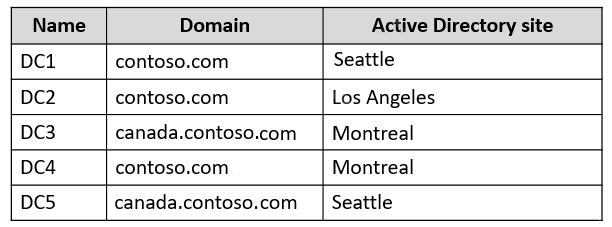
All the domain controllers are global catalog servers.
Server infrastructure
The network contains the servers shown in the following table.
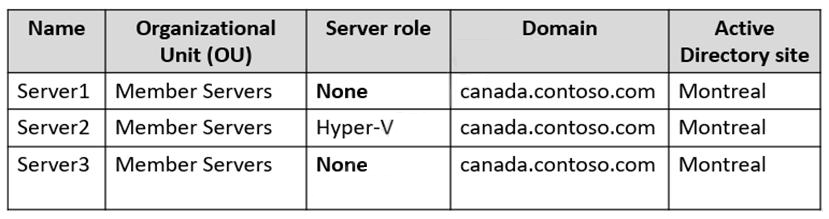
A server named Server4 runs Windows Server and is in a workgroup. Windows Firewall on Server4 uses the private profile.
Server2 hosts three virtual machines named VM1, VM2, and VM3.
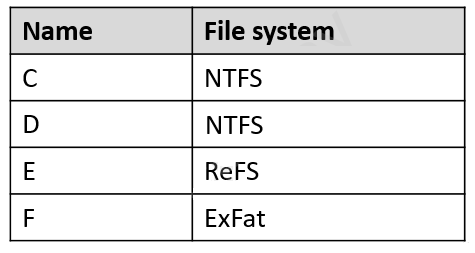
VM3 is a file server that stores data in the volumes shown in the following table.
Group Policies
The contoso.com domain has the Group Policies Objects (GPOs) shown in the following table.

Existing Identities
The forest contains the users shown in the following table.
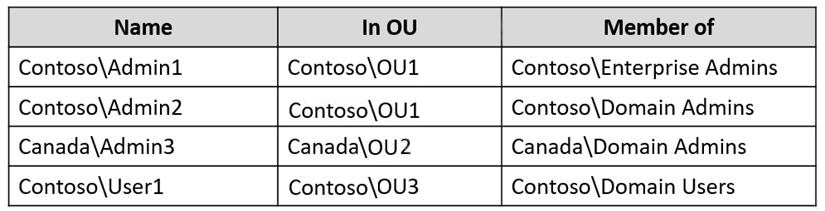
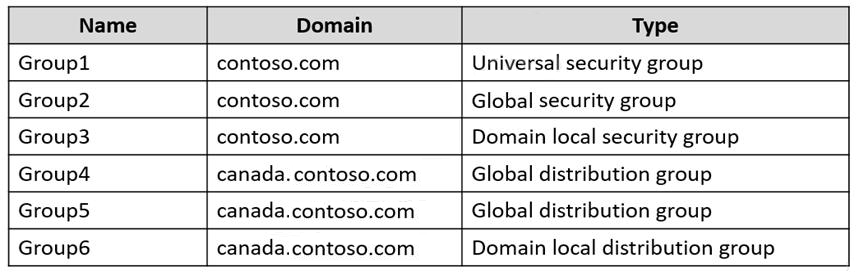
The forest contains the groups shown in the following table.
Current Problems
When an administrator signs in to the console of VM2 by using Virtual Machine Connection, and then disconnects from the session without signing out, another administrator can connect to the console session as the currently signed in user.
Requirements
Technical Requirements
Contoso identifies the following technical requirements:
- Change the replication schedule for all site links to 30 minutes.
- Promote Server1 to a domain controller in canada.contoso.com.
- Install and authorize Server3 as a DHCP server.
- Ensure that User1 can manage the membership of all the groups in Contoso\OU3.
- Ensure that you can manage Server4 from Server1 by using PowerShell remoting.
- Ensure that you can run virtual machines on VM1.
- Force users to provide credentials when they connect to VM2.
- On VM3, ensure that Data Deduplication on all volumes is possible.
You need to meet the technical requirements for Server3.
Which users can perform the required tasks?
- A. Admin3 only
- B. Admin1 and Admin3 only
- C. Admin1 only
- D. Admin1, Admin2, and Admin3
- E. Admin1 and Admin2 only
- C. Admin1 only
The suggested answer is correct
To Install and authorize Server3 as a DHCP server you need Enterprise Admins rights
rimvydukas
Highly Voted 2 years, 2 months ago
Selected Answer: C
My answer would be C because without any additional delegations only members of Enterprise Admins group are able to authorize DHCP servers.
upvoted 12 times
monisshk
Most Recent 4 months ago
Selected Answer: C
Correct Answer: - C Tested in LAB. Reason - As per the case study, Server3 is in canada.contoso.com so while authorizing DHCP in any other domain except the root admin. The account must be an Enterprise Admin. For root domain: - The account can be a part of Domain Admin or Enterprise Admin. So, answer is C. Admin 1 only.
upvoted 2 times
Joedn
6 months ago
Valid 05/28/2024
upvoted 1 times
SIAMIANJI
6 months, 4 weeks ago
Selected Answer: C
Only Admin1 who is Enterprise Admin.
upvoted 1 times
SanMan_NZ
9 months, 2 weeks ago
Selected Answer: C
As this is not a single domain environment, the following from MS.... "You must authorize the Windows Server DHCP Server role in AD DS before it can begin leasing IP addresses. It's possible to have a single DHCP server providing IP addresses for subnets that contain multiple AD DS domains. Because of this, you must use an Enterprise Administrator account to authorize the DHCP server. In a single-domain environment, membership in Domain Admins is sufficient to authorize a DHCP server." https://learn.microsoft.com/en-us/training/modules/deploy-manage-dynamic-host-configuration-protocol/3-install-configure-dynamic-host-configuration-protocol
upvoted 3 times
lucacose
1 year ago
Selected Answer: C
It's possible to have a single DHCP server providing IP addresses for subnets that contain multiple AD DS domains. Because of this, you must use an Enterprise Administrator account to authorize the DHCP server. In a single-domain environment, membership in Domain Admins is sufficient to authorize a DHCP server.
upvoted 3 times
MR_Eliot
1 year, 2 months ago
Selected Answer: C
C is true. I have tested this. even administrator account in child domain was not able to authorize the dhcp server. Only Enterprise admin, which is a group in the root forest.
upvoted 1 times
ahenriquez02
1 year, 3 months ago
C By default, only a administrator which is member of “Enterprise Admins” group can authorize the DHCP which is installed in domain environment. If the other accounts would like to authorize the DHCP server which is a member server in child domain, you may get “Access is denied“.
upvoted 2 times
skycrap
1 year, 5 months ago
Selected Answer: C
Only enterprise admin can authorize dhcp. There are ways to delegate but isout of the scope of this question. https://social.technet.microsoft.com/wiki/contents/articles/14456.windows-server-authorize-dhcp-server-without-enterprise-admin-privileges.aspx
upvoted 3 times
ala76nl
1 year, 6 months ago
C https://rakhesh.com/windows/authorizing-a-dhcp-server-in-a-child-domain-requires-enterprise-admin-rights-or-a-delegation/
upvoted 1 times
Troy06
1 year, 6 months ago
Selected Answer: C
Only an entreprice administrator can authorize a DHCP server https://learn.microsoft.com/en-us/training/modules/deploy-manage-dynamic-host-configuration-protocol/3-install-configure-dynamic-host-configuration-protocol Question of the quick review
upvoted 3 times
phi3nix
1 year, 6 months ago
The answer is B. Enterprise Admin can authorize the DHCP server in the child domain. Domain Admin in the child domain can authorize the DHCP server.
upvoted 1 times
Robs
1 year, 7 months ago
C for me. Only Enterprise Admin can authorize DHCP by default. Domain Admins can authorized DHCP servers if they are granted access first.
upvoted 2 times
NazerRazer
1 year ago
No, it is not the default behavior that only Enterprise Admins can authorize DHCP servers. The authorization of DHCP servers is typically a domain-specific task, and it doesn't require Enterprise Admin privileges. In a multi-domain forest, Enterprise Admins have wide-ranging administrative rights across the entire forest, but DHCP authorization is not within the scope of their typical responsibilities. Authorization of DHCP servers is usually handled at the domain level, and permissions for authorizing DHCP servers are delegated to Domain Admins or administrators with specific DHCP authorization rights. This delegation can be done within each domain without needing Enterprise Admin privileges.
upvoted 1 times
Tylosh
1 year, 7 months ago
Selected Answer: B
The Domain Admins group of the child domain (canada.contoso.com) and the Enterprise Admins group of the parent domain (contoso.com) can authorize DHCP servers in the child domain. Since the DHCP server is located in the child domain, the authorization process will need to be performed by a member of the Domain Admins group of canada.contoso.com or the Enterprise Admins group of contoso.com.
upvoted 2 times
syu31svc
1 year, 8 months ago
Selected Answer: B
Answer is B Try it out hands on to believe it
upvoted 1 times
raulgar
1 year, 8 months ago
Selected Answer: C
Correct answer C, you need a member of enterprise administrator or delegate permissions to authorizate the dhcp https://profadmins.com/2015/10/13/authorizing-dhcp-server-by-a-non-enterprise-administrator/
upvoted 4 times
Telekon
1 year, 9 months ago
Selected Answer: B
Server 3 resides in the Canada domain. Admin3 is a domain Admin for Canada, so would be able to install DHCP on that server.
upvoted 1 times
empee1977
1 year, 9 months ago
Selected Answer: B
A member of the DHCP Administrators group or the Enterprise Admins group can install and authorize a DHCP server.
upvoted 3 times
ant_12
1 year, 10 months ago
Admin1, Admin2 and Admin3
upvoted 1 times
Lu5ck
1 year, 11 months ago
Selected Answer: C
It is important to understand the scope of the authority. In this case, you are authorizing domain to have their own DNS. Domain admin only have authority within their own domain, they do not have authority on other domains, therefore, how can domain admin have any authority to authorize others? Root domain admin do have the authority, by default, to self-elevate themselves to obtain higher authority to do things. However, by default as well, they do not have that authority on the get go and assuming the default circumstances, only enterprise admin is the correct answer.
upvoted 2 times
Lu5ck
1 year, 11 months ago
Correction, I mean DHCP*.
upvoted 1 times
Lu5ck
1 year, 11 months ago
Another correction, I missed out the word "install".
upvoted 1 times
jecawi9630
1 year, 11 months ago
Selected Answer: B
I choose B as enterprise admin on root domain or domain admin in the required child domain, should both be able to install and authorize DHCP.
upvoted 1 times
rom3
2 years ago
agree with rimvydukas it should be c
upvoted 1 times
Leocan
2 years ago
Selected Answer: B
A domain joined DHCP server is authorized by a domain administrator in Active Directory Domain Services (AD DS). https://learn.microsoft.com/en-us/openspecs/windows_protocols/ms-dhcpe/56f8870b-a7c1-4db1-8a86-f69079fe5077
upvoted 2 times
tdienst
2 years ago
Selected Answer: E
Correct one is E. enterprise admins and also domain admins from the root domain can authorize a DHCP server
upvoted 1 times
tdienst
2 years ago
correction: answer C. A domain admin from the root domain can authorize a DHCP server but won't be able to install the DHCP server role in the child domain.
upvoted 3 times
johosofat
2 years ago
Selected Answer: C
its put well here you must be enterprise admin or domain admin in the root domain and have the permissions delegated to you - https://rakhesh.com/windows/authorizing-a-dhcp-server-in-a-child-domain-requires-enterprise-admin-rights-or-a-delegation/#:~:text=Windows%20(269)-,Authorizing%20a%20DHCP%20server%20in%20a%20Child%20Domain%20requires%20Enterprise,the%20rights%20delegated%20to%20you.
upvoted 2 times
JohnO1971
2 years ago
Selected Answer: B
B for me.
upvoted 1 times
Bruk
2 years, 1 month ago
Selected Answer: B
Its B for sure https://learn.microsoft.com/en-us/openspecs/windows_protocols/ms-dhcpe/b515ae92-3bc1-4022-bdab-d1fa3930fb1b
upvoted 1 times
[Removed]
2 years, 1 month ago
Correct answer B Here you are the "aky_no" URL and another one from the oficial site of Microsoft: https://learn.microsoft.com/en-us/openspecs/windows_protocols/ms-dhcpe/b515ae92-3bc1-4022-bdab-d1fa3930fb1b
https://learn.microsoft.com/en-us/openspecs/windows_protocols/ms-dhcpe/56f8870b-a7c1-4db1-8a86-f69079fe5077
A domain joined DHCP server is authorized by a domain administrator in Active Directory Domain Services (AD DS). "Enterprise admin can authorize becouse is domain admins of all domains"
upvoted 1 times
Teo
2 years, 1 month ago
Selected Answer: C
based on the note: To authorize a DHCP Server, the user account must be a member of the Enterprise Admins security group or an account with delegated permissions for the domain.
upvoted 1 times
JohnO1971
2 years, 1 month ago
Selected Answer: C
Answer C for me
upvoted 2 times
abojena
2 years, 1 month ago
Selected Answer: C
https://social.technet.microsoft.com/Forums/windowsserver/en-US/b5fb1ff6-4d64-4e55-93b6-a44404379319/credentials-to-authorize-dhcp-server?forum=winserver8gen
upvoted 2 times
aky_no
2 years, 1 month ago
Selected Answer: B
https://learn.microsoft.com/en-us/openspecs/windows_protocols/ms-dhcpe/b515ae92-3bc1-4022-bdab-d1fa3930fb1b
"A DHCP server that is domain joined is authorized by a domain administrator in the AD DS."
upvoted 1 times
rimvydukas
2 years, 1 month ago
Your answer is wrong. Please, do more extensive research before posting By default, only Enterprise admins can authorise DHCP servers. In addition, by default, Domain Admins from the root domain ca also authorize DHCP servers. Thats it.
upvoted 1 times
Bloodroz
1 year, 11 months ago
Admin 3 is a domain admin on the root domain Canada.....
upvoted 2 times