
Exam
Answer confirmed
Question
You need to ensure that the minimum password length for members of the BranchAdmins group is 12 characters. The solution must affect only the BranchAdmins group.
To complete this task, sign in the required computer or computers.
Suggested answer
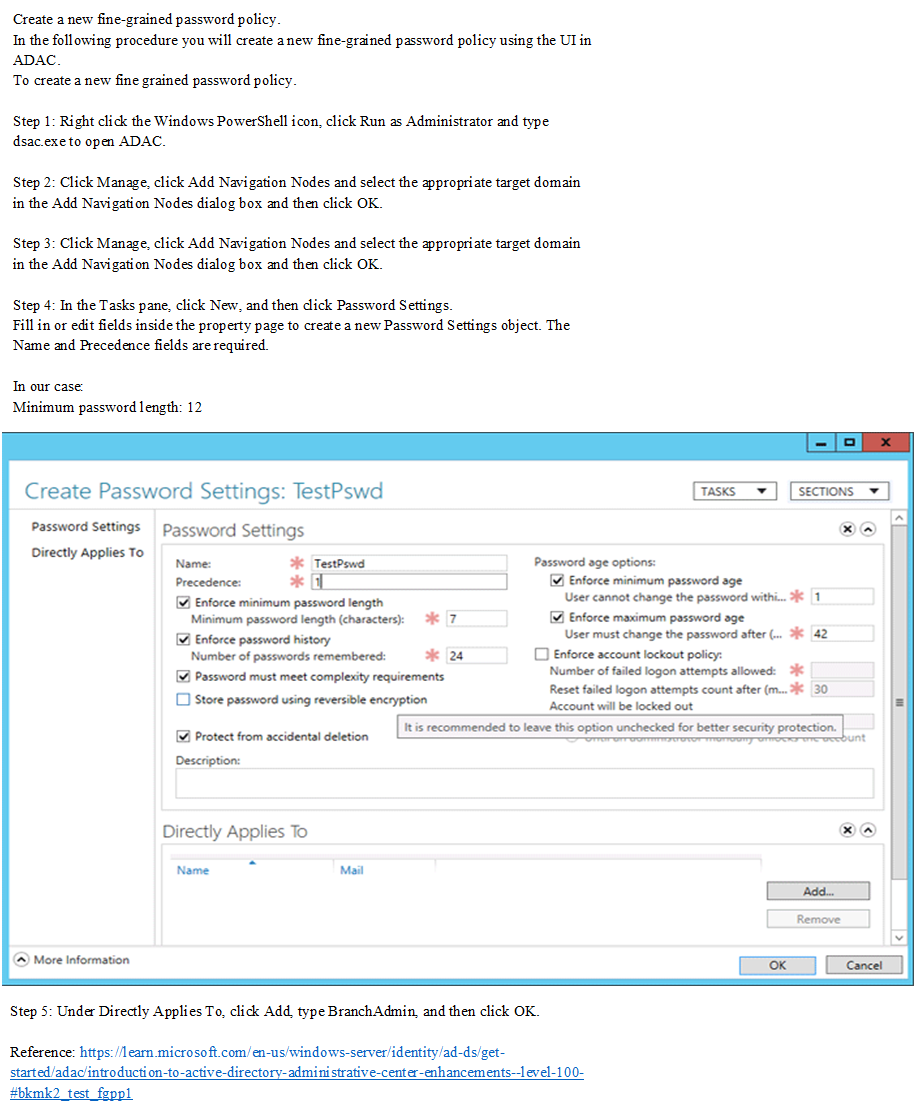
Correct answer
The suggested answer is correct
Az800
Highly Voted 1 year, 10 months ago
3. In the ADAC navigation pane, open the System container and then click Password Settings Container. https://learn.microsoft.com/en-us/windows-server/identity/ad-ds/get-started/adac/introduction-to-active-directory-administrative-center-enhancements--level-100-#to-create-a-new-fine-grained-password-policy
upvoted 16 times
Krayzr
3 months, 4 weeks ago
Thanks for the links Az800 & Maup33
upvoted 1 times
Maup33
1 year, 5 months ago
correct, https://activedirectorypro.com/create-fine-grained-password-policies/
upvoted 4 times
neilkraftmann
Most Recent 3 months, 3 weeks ago
Had this on my exam recently.
upvoted 2 times
Goofer
1 year, 10 months ago
1. Create group Policy /Computer Configuration/Windows Settings/Security Settings/Account Policies/Password Policy/Minimum password length (Enable + 12) 2. Add the group BranchAdmins in the Security Filtering 3. Link the GPO to the OU in which the group BranchAdmins is located
upvoted 4 times
VeiN
1 year, 8 months ago
Sorry but this will not work. This setting that you`re reffering works ALWAYS from root domain object (its in reality root domain object parameter, it`s a failswitch if someone would try to remove DDP GPO Link) and you can`t override those setting elswere. The given answer is correct. You need to user fine grained password and target the mentioned group.
upvoted 1 times
pewpewvx
1 year, 7 months ago
This is incorrect. The only plausible option is FGPP policy to control it. By default a PDC emulator honors those settings ONLY in a domain. All password changed are made by the PDCe and for this reason your suggestion wont work. If you run a gpresult or a gpedit you will see that the password settings will not apply and have a red cross on it, this means the settings didn't take effect since only the PDCe will receive the password settings for a domain joined machine.
upvoted 2 times