
- 7 views
Note: This question is part of a series of questions that present the same scenario. Each question in the series contains a unique solution that might meet the stated goals. Some question sets might have more than one correct solution, while others might not have a correct solution.
After you answer a question in this section, you will NOT be able to return to it. As a result, these questions will not appear in the review screen.
You have a failover cluster named Cluster1 that hosts an application named App1.
The General tab in App1 Properties is shown in the General exhibit. (Click the General tab.)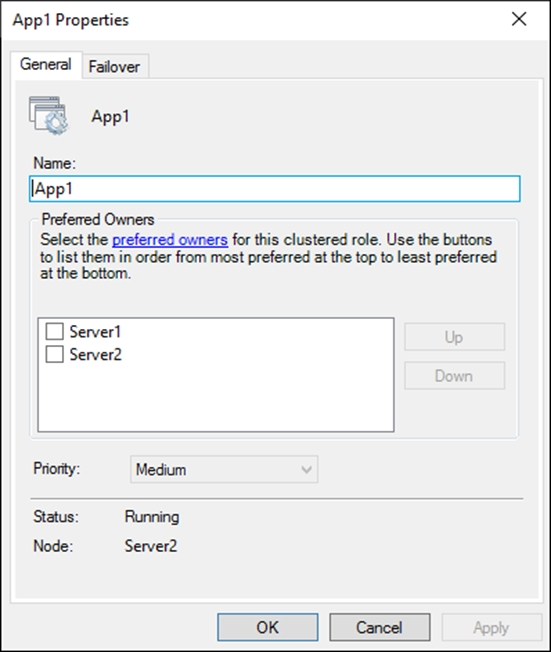
The Failover tab in App1 Properties is shown in the Failover exhibit. (Click the Failover tab.)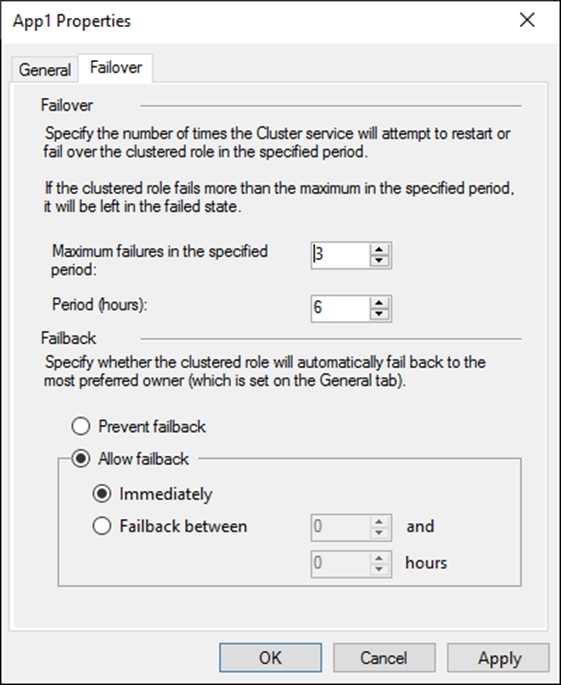
Server1 shuts down unexpectedly.
You need to ensure that when you start Server1, App1 continues to run on Server2.
Solution: From the Failover settings, you select Prevent failback.
Does this meet the goal?
- A. Yes
- B. No
- A. Yes
starseed
3 months ago
Yes A is the answer
upvoted 1 times
syu31svc
1 year, 7 months ago
Selected Answer: A
It is already running on Server2 (look closely and carefully at the bottom part of the General tab; Node: Server2) Answer is Yes
upvoted 2 times
Kurko
1 year, 9 months ago
Selected Answer: A
I think the point is in the "You need to ensure" part. In no case it should fallback to Server 1 but it seams that it is a two node cluster with no witness mentioned, so there's a 50% chance the whole cluster will go down if Server 1 is the voting one and it goes down since no quorum. When the cluster is up again it could fallback if the prevent fallback option isn't on or Server2 is not on top of the list and ticked as in the other question of this series.
upvoted 2 times
Lu5ck
1 year, 11 months ago
Selected Answer: A
Server 1 is the preferred owner, as shown in the list. Checking prevent failback will prevent the app from transferring back to the owner.
upvoted 4 times
Robrol
1 year, 10 months ago
Correct Answer is A - Yes. Server 1 is the preferred owner (the box does not have to be checked, in order to make the servers preferred, I think you just need to check the boxes if you want to move the given server up or down in the preferred owner list). The node is running on Server2 currently, if you switch off Server1, the node will still be running on Server2, but if you switch Server1 back on, then (as Server1 is the preferred owner), the app would run on Server1. That is why you need to select Prevent failback, so the node will not switch back from Server2 to Server1.
upvoted 3 times
prepper666
1 year, 8 months ago
Wrong, the server must be checked (ticked)
upvoted 4 times
Lu5ck
1 year, 11 months ago
Prevent failback will allow the apps to continue to run at the new location. Allow failback will make the apps return to the source location, depending if it is available immediately or within a period. I don't understand this question. App is already running on server 2. Server 1 shutting down will not make the app change its location. It will just keep running on server 2. So either answer is correct?
upvoted 2 times
Lu5ck
1 year, 11 months ago
Right, I am wrong. There is a precedent for the owner list. Server1 is higher than server 2 thus it is set as a preferred owner. We indeed need to check prevent failback to keep it running at server 2.
upvoted 2 times
amunator
1 year, 11 months ago
https://social.technet.microsoft.com/Forums/windowsserver/en-US/c424a475-bdfc-4f01-9d66-c4a509b05cac/would-there-be-an-issue-is-no-preferred-owners-is-identified?forum=winserverClustering
upvoted 2 times
amunator
1 year, 11 months ago
According to my understanding, as App1 is running on Server2, so there is no failover or failback while Server1 shuts down and starts up. Therefore I choose "NO".
upvoted 3 times
scribe
1 year, 11 months ago
Failback only occurs when you have defined a preferred nodes list for a resource group and failback is allowed for that resource group.
upvoted 1 times
DesolateMarauder
1 year, 11 months ago
Note - The box does not have to be checked for failback to occur in the preferred list. If nothing is checked it will failback to whatever is online.
upvoted 2 times
DesolateMarauder
1 year, 11 months ago
More Info: https://techcommunity.microsoft.com/t5/failover-clustering/preferred-owners-in-a-cluster/ba-p/371290 The key point I want to make is that, when you set the preferred owners for a group to a subset of the nodes in a cluster, you’re not saying “I want the group to failover only to these nodes”. What you’re effectively saying is, “please reorder the nodes such that these are at the front of the list.” The rest of the cluster nodes will be appended to the list, and the group will still failover to every node in the cluster before going back to the first node in the preferred owners list.
upvoted 1 times
DesolateMarauder
1 year, 11 months ago
Selected Answer: B
B) As others have said. The correct answer is listed on another question here and it is to move Server 2 to the top of list.
upvoted 1 times
rimvydukas
2 years ago
Selected Answer: B
After Server1 will restart, the app will still run on Server2 as first picture clearly shows, that no preferred owners are set. If the server1 would have preferred owner check box checked, only in that case prevent failback option will help. Because without preferred owner check box set even if the resource was on failed server, it will not come back after server restarts (with immediate failback option set). Tested in my lab.
upvoted 1 times
itsrrrileyyy
2 years ago
Selected Answer: A
The first screenshot shows the preferred owners and states that they are listed in order of most to least preferred from top to bottom. Server1 is first on the list making it the most preferred owner. In the second screenshot under failback, it asks if you would like to enable failback to automatically switch the app back to the most preferred server, which in this case is Server1. Preventing failback will ensure that the App continues running on Server2 instead of going back to Server1.
upvoted 1 times
Burnie
2 years ago
Selected Answer: A
As none of the servers are marked in Preffered Owners, and the question states "Continue to run on Server2. A Prevent failback would cause the service to keep running on Server 2 when starting Server 1.
upvoted 3 times
Justin_beswick
2 years ago
Selected Answer: B
As we don't know which node the app is currently running on the answer is No
upvoted 1 times
Justin_beswick
2 years ago
Need to read the question :) Answer Yes
upvoted 1 times
GoforIT21
2 years, 2 months ago
Unless the first screenshot shows the situation after server1 goes down, the answer is NO. App1 is running on server2 and disabling failback won't help to prevent it from switching to Server1.
upvoted 2 times
GoforIT21
2 years, 2 months ago
Actually, I think by now that this is not correct. The "prevent failback" setting is necessary to make sure that no automatic transfer of the workload in question happens whenever server1 restarts. I think it doesn't even matter on which server the workload ran before server1 fails. If it does and comes up and failback is configured, then the workload will be running on server1 as soon as it comes up again.
upvoted 1 times
xxxxx85xx
2 years, 8 months ago
Correct Answer
upvoted 2 times