
- 2 views
Exam
Answer needs confirmation
Question
You have three Hyper-V hosts named Server1, Server2, and Server3 that run Windows Server, Server1 hosts a virtual machine named VM1.
You enable Hyper-V Replica to replicate VM1 to Server2 and set the replication frequency to 30 seconds.
You need to extend the replication and create a second replica of VM1.
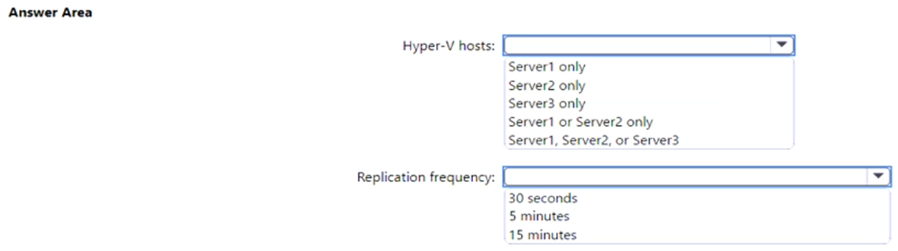
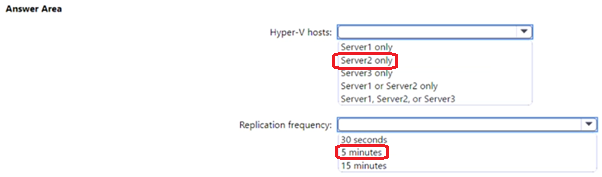
On which Hyper-V hosts should you configure the replication, and what is the minimum replication frequency you can use? To answer, select the appropriate options in the answer area.
NOTE: Each correct selection is worth one point.
Proposed answer
Suggested answer
ant_12
Highly Voted 1 year, 11 months ago
Extend Replication through UI: Before you Extend Replication to third site, you need to establish the replication between a primary server and replica server. Once that is done, go to replica site and from Hyper-V UI manager select the VM for which you want to extend the replication. Right click on VM and select “ **Replication- >Extend Replication …”. **This will open Extend Replication Wizard which is similar to Enable Replication Wizard. Few points to be taken care are: 1. In Configure Replication frequency screen , note that Extend Replication only supports 5 minute and 15 minute Replication frequency. Also note that replication frequency of extend replication should be at least equal to or greater than primary replication relationship. https://learn.microsoft.com/en-us/virtualization/community/team-blog/2013/20131209-hyper-v-replica-extend-replication
upvoted 8 times
starseed
Most Recent 4 months, 2 weeks ago
correct answer
upvoted 1 times
Kamal_SriLanka
1 year, 3 months ago
CORRECT ANSWER
upvoted 1 times
arnitjoe
1 year, 7 months ago
If 5 and 15 minutes are the only options for extended replication, wouldn't the minimum replication be 15 minutes and the maximum be 5? So that means the proposed answers should be server 2 and 15 minutes.
upvoted 1 times
raulgar
1 year, 8 months ago
I don't understand why server2.The logical says that extended must be in server3 https://learn.microsoft.com/es-es/windows-server/virtualization/hyper-v/manage/set-up-hyper-v-replica
upvoted 1 times
raulgar
1 year, 8 months ago
sorry, the answer is correct.The question is where you configure the replica, both answers are correct
upvoted 1 times
syu31svc
1 year, 9 months ago
Not going to repeat what ant_12 has already posted and that proves the provided answer is correct
upvoted 1 times
jecawi9630
2 years ago
Correct answers. http://www.msserverpro.com/configuring-hyper-v-replica-in-windows-server-2012-r2/
upvoted 4 times