
- 2 views
Your network contains an Active Directory Domain Services (AD DS) domain. The domain contains the servers shown in the following table.
Server3 contains a share named Share1.
On Server1, DHCP has the following configurations:
✑ Conflict detection attempts: 3
✑ An IPv4 scope named Scope1 that has the following settings:
1. Address Pool: 172.16.10.100 - 172.16.10.130
2. Address Leases:
- 172.16.10.100 computer1.contoso.com
- 172.16.10.101 computer2.contoso.com
✑ Reservations: 172.16.10.101 computer2.contoso.com
✑ Policies: Policy1
You perform the following actions:
On Server1, you run -
Export-DhcpServer -File \\Server3\Share1\File1.xml.
✑ On Server2, you run
Import-DhcpServer -File \\Server3\Share1\File1.xml
-BackupPath \\Server3\Share1.
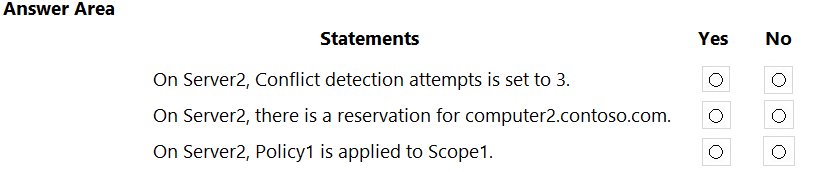
For each of the following statements, select Yes if the statement is true. Otherwise, select No.
NOTE: Each correct selection is worth one point.
Hot Area:
Reference:
https://docs.microsoft.com/en-us/powershell/module/dhcpserver/export-dhcpserver?view=windowsserver2022-ps https://docs.microsoft.com/en-us/powershell/module/dhcpserver/import-dhcpserver?view=windowsserver2022-ps
Josty
Highly Voted 2 years, 4 months ago
Yes Yes Yes Tested it in my Lab
upvoted 24 times
starseed
Most Recent 4 months, 2 weeks ago
YYY answer
upvoted 1 times
elizarov
10 months ago
I am not sure about on server2, conflict detection attemts is set to 3 in might be NO because of No. Explanation: The statement is false. In the provided scenario, there is no mention of changing the conflict detection attempts on Server2. The configuration details provided only specify actions related to the export and import of DHCP server configuration. Therefore, unless explicitly mentioned, the conflict detection attempts on Server2 would retain their default settings, which are typically set to 0 (zero) unless modified by an administrator.
upvoted 1 times
[Removed]
1 year, 2 months ago
Conflict detection on Server2 set to 3? Yes, because this setting gets copied over when you move DHCP settings from one server to another. Reservation for computer2 on Server2? Yes, because the reservation is part of the DHCP settings that were moved. Policy1 applied to Scope1 on Server2? Yes, because policies also get moved with the rest of the DHCP settings. So for each statement, the answer is Yes.
upvoted 3 times
syu31svc
1 year, 9 months ago
https://learn.microsoft.com/en-us/powershell/module/dhcpserver/import-dhcpserver?view=windowsserver2022-ps If you specify either the ScopeId or the Prefix parameter, or both, only the specified scopes or prefixes are imported. If you specify neither the ScopeId nor the Prefix parameter, all of the configurations that is contained in the file, and optionally any lease data, is imported. All Yes
upvoted 2 times
joehoesofat
2 years, 2 months ago
They are all yes - If you specify neither the ScopeId nor the Prefix parameter, all of the configurations that is contained in the file, and optionally any lease data, is imported. https://learn.microsoft.com/en-us/powershell/module/dhcpserver/import-dhcpserver?view=windowsserver2022-ps
upvoted 4 times
Teo
2 years, 2 months ago
If you specify the Leases parameter, the lease data in the specified file is imported in addition to configuration data. So, the correct answer is Y N Y
upvoted 4 times
rimvydukas
2 years, 1 month ago
Noone is talking about leases parameter. When import command is imported without any additional options, this command will happily import reservarions data. So second answer is Y
upvoted 5 times