
- 4 views
Case Study
-
This is a case study. Case studies are not timed separately. You can use as much exam time as you would like to complete each case. However, there may be additional case studies and sections on this exam. You must manage your time to ensure that you are able to complete all questions included on this exam in the time provided.
To answer the questions included in a case study, you will need to reference information that is provided in the case study. Case studies might contain exhibits and other resources that provide more information about the scenario that is described in the case study. Each question is independent of the other questions in this case study.
At the end of this case study, a review screen will appear. This screen allows you to review your answers and to make changes before you move to the next section of the exam. After you begin a new section, you cannot return to this section.
To start the case study
-
To display the first question in this case study, click the Next button. Use the buttons in the left pane to explore the content of the case study before you answer the questions. Clicking these buttons displays information such as business requirements, existing environment, and problem statements. If the case study has an All Information tab, note that the information displayed is identical to the information displayed on the subsequent tabs. When you are ready to answer a question, click the Question button to return to the question.
Overview
-
Company Information
-
ADatum Corporation is a manufacturing company that has a main office in Seattle and two branch offices in Los Angeles and Montreal.
Fabrikam Partnership
-
ADatum recently partnered with 2 company named Fabrikam, Inc.
Fabrikam is a manufacturing company that has a main office in Boston and a branch office in Orlando.
Both companies intend to collaborate on several joint projects.
Existing Environment
-
ADatum AD DS Environment
-
The on-premises network of ADatum contains an Active Directory Domain Services (AD DS) forest named adatum.com.
The forest contains two domains named adatum.com and east.adatum.com and the domain controllers shown in the following table.
Fabrikam AD DS Environment
-
The on-premises network of Fabrikam contains an AD DS forest named fabrikam.com.
The forest contains two domains named fabrikam.com and south.fabrikam.com.
The fabrikam.com domain contains an organizational unit (OU) named Marketing.
Server Infrastructure
-
The adatum.com domain contains the servers shown in the following table.
HyperV1 contains the virtual machines shown in the following table.
All the virtual machines on HyperV1 have only the default management tools installed.
SSPace1 contains the Storage Spaces virtual disks shown in the following table.
Azure Resources
-
ADatum has an Azure subscription that contains an Azure AD tenant. Azure AD Connect is configured to sync the adatum.com forest with Azure AD.
The subscription contains the virtual networks shown in the following table.
The subscription contains the Azure Private DNS zones shown in the following table.
The subscription contains the virtual machines shown in the following table.
All the servers are in a workgroup.
The subscription contains a storage account named storage1 that has a file share named share1.
Requirements
-
Planned Changes
-
ADatum plans to implement the following changes:
• Sync Data1 to share1.
• Configure an Azure runbook named Task1.
• Enable Azure AD users to sign in to Server1.
• Create an Azure DNS Private Resolver that has the following configurations:
• Name: Private1
• Region: West US
• Virtual network: VNet1
• Inbound endpoint: SubnetB
• Enable users in the adatum.com domain to access the resources in the south.fabrikam.com domain.
Technical Requirements
-
ADatum identifies the following technical requirements:
• The data on SSPace1 must be available always.
• DC2 must become the schema master if DC1 fails.
• VM3 must be configured to enable per-folder quotas.
• Trusts must allow access to only the required resources.
• The users in the Marketing OU must have access to storage1.
• Azure Automanage must be used on all supported Azure virtual machines.
• A direct SSH session must be used to manage all the supported virtual machines on HyperV1.
DC1 fails.
You need to meet the technical requirements for the schema master.
You run ntdsutil.exe.
Which five commands should you run in sequence? To answer, move the appropriate commands from the list of commands to the answer area and arrange them in the correct order?
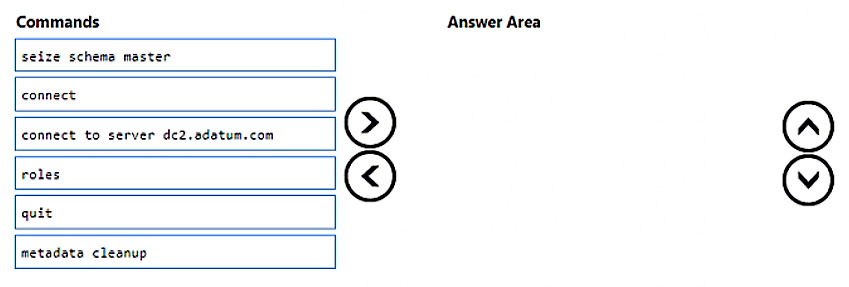
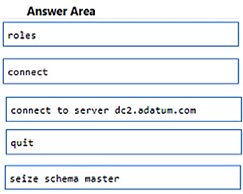
The suggested answer is incorrect
- roles
- connections
- connect
- seize <role>
- quit
To seize or transfer the Operation Master roles by using the Ntdsutil utility, follow these steps:
Sign in to a member computer that has the AD RSAT tools installed, or a DC that is located in the forest where Operation Master roles are being transferred.
Note
- We recommend that you log on to the DC to which you are assigning Operation Master roles.
- The signed-in user should be a member of the Enterprise Administrators group to transfer Schema master or Domain naming master roles, or a member of the Domain Administrators group of the domain where the PDC emulator, RID master and the infrastructure master roles are being transferred.
- Select Start > Run, type ntdsutil in the Open box, and then select OK.
Type roles, and then press Enter.
Note
To see a list of available commands at any one of the prompts in the Ntdsutil utility, type ?, and then press Enter.
- Type connections, and then press Enter.
Type connect to server <servername>, and then press Enter.
Note
In this command, <servername> is the name of the DC that you want to assign the Operation Master role to.
- At the server connections prompt, type q, and then press Enter.
Do one of the following actions:
To transfer the role: Type transfer <role>, and then press Enter.
Note
In this command, <role> is the role that you want to transfer.
To seize the role: Type seize <role>, and then press Enter.
Note
In this command, <role> is the role that you want to seize.
For example, to seize the RID master role, type seize rid master. Exceptions are for the PDC emulator role, whose syntax is seize pdc, and the Domain naming master, whose syntax is seize naming master.
To see a list of roles that you can transfer or seize, type ? at the fsmo maintenance prompt, and then press Enter, or see the list of roles at the start of this article.
- At the fsmo maintenance prompt, type q, and then press Enter to gain access to the ntdsutil prompt. Type q, and then press Enter to quit the Ntdsutil utility.
lucacose
Highly Voted 11 months, 1 week ago
- run Ntdsutil.exe as stated in the questione then: 1 Roles 2 Connections 3 Connect to server nameserver 4 quit 5 seize schema master
upvoted 7 times
Hull
Highly Voted 1 year, 1 month ago
Besides that "Connect" should be "Connections", it's correct.
https://learn.microsoft.com/en-us/troubleshoot/windows-server/identity/transfer-or-seize-operation-master-roles-in-ad-ds#seize-or-transfer-operation-master-roles
upvoted 6 times