
- 4 views
Exam
Answer needs confirmation
Question
You need to configure BitLocker on Server4.
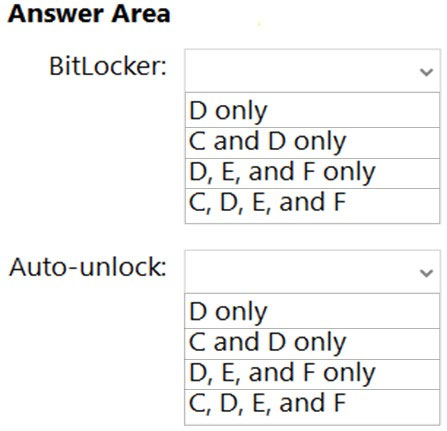
On which volumes can you turn on BitLocker, and on which volumes can you turn on auto-unlock? To answer, select the appropriate options in the answer area.
NOTE: Each correct selection is worth one point.
Hot Area:
Proposed answer
Suggested answer

Reference:
https://docs.microsoft.com/en-us/windows-server/storage/refs/refs-overview https://docs.microsoft.com/en-us/powershell/module/bitlocker/enable-bitlockerautounlock?view=windowsserver2022-ps
GoforIT21
Highly Voted 10 months, 1 week ago
Correct. "You can configure BitLocker to automatically unlock volumes that do not host an operating system." (https://learn.microsoft.com/en-us/powershell/module/bitlocker/enable-bitlockerautounlock?view=windowsserver2022-ps) Also, BitLocker is available on NTFS as well as ReFS, see the first link provided: https://learn.microsoft.com/en-us/windows-server/storage/refs/refs-overview
upvoted 9 times
BlackCat9588
Most Recent 1 day, 14 hours ago
C, D, E & F D, E & F
upvoted 1 times
syu31svc
3 months, 1 week ago
For BitLocker, volumes formatted with the Resilient File System (ReFS) on Windows Server 2016 and later versions can also be encrypted https://learn.microsoft.com/en-us/powershell/module/bitlocker/enable-bitlockerautounlock?view=windowsserver2022-ps You can configure BitLocker to automatically unlock volumes that do not host an operating system Answer is correct
upvoted 3 times