
Exam
Answer confirmed
Question
You have an on-premises server named Server1 that runs Windows Server and has internet connectivity.
You have an Azure subscription.
You need to monitor Server1 by using Azure Monitor.
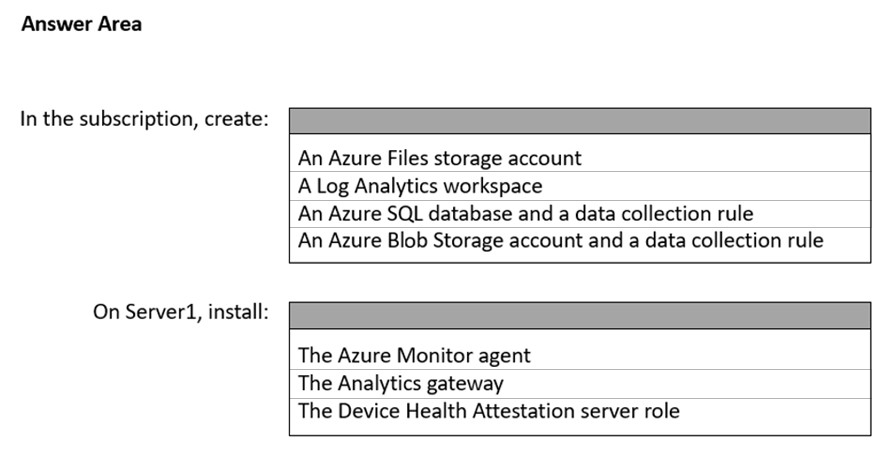
Which resources should you create in the subscription, and what should you install on Server1?
To answer, select the appropriate options in the answer area.
NOTE: Each correct selection is worth one point.
Proposed answer
Suggested answer
Correct answer
Suggested Answer is correct
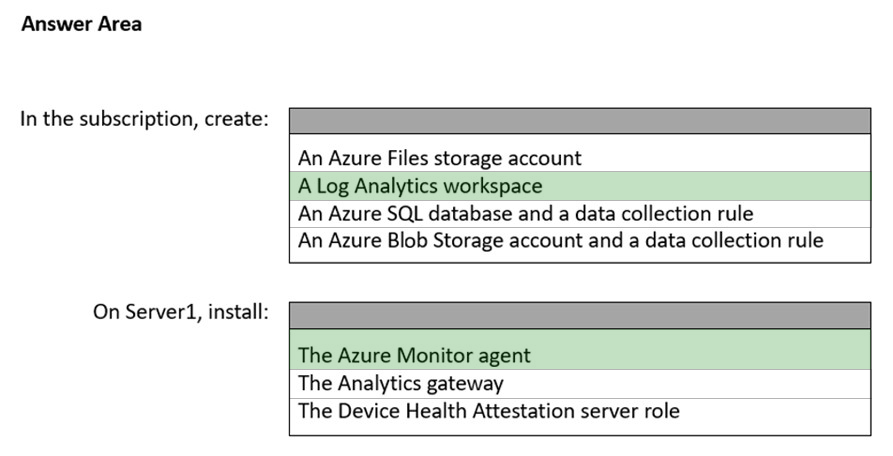
Data generated from on-premises Windows Servers is collected in a Log Analytics workspace in Azure Monitor. Within a workspace, you can enable various monitoring solutions—sets of logic that provide insights for a particular scenario. For example, Azure Update Management, Azure Security Center, and Azure Monitor for VMs are all monitoring solutions that can be enabled within a workspace.
To collect telemetry data on an on-premises server and push it to the Log Analytics workspace, Azure Monitor requires the installation of the Microsoft Monitoring Agent, or the MMA. Certain monitoring solutions also require a secondary agent. For example, Azure Monitor for VMs also needs on the Dependency agent for functionality that this solution provides.
examcrammer
Highly Voted 2 years, 6 months ago
If the server has internet connectivity, there is no need for a gateway. Gateways are for collecting and sending data to azure from non-internet-connected servers. Correct answers are A Log analytics workspace and The Azure monitor agent.
upvoted 36 times
odbjegli
Highly Voted 2 years, 6 months ago
Log analytics workspace & The Azure monitor agent.
https://docs.microsoft.com/en-us/windows-server/manage/windows-admin-center/azure/azure-monitor
upvoted 19 times
Bolo92
Most Recent 11 months, 4 weeks ago
valid 27.11.23
upvoted 2 times
syu31svc
1 year, 8 months ago
https://learn.microsoft.com/en-us/windows-server/manage/windows-admin-center/media/azure-monitor-diagram.png
Answer given is correct
upvoted 3 times
edykss
2 years, 2 months ago
For 1st - Log Analytics workspace
For 2nd - Azure monitor Agent
upvoted 6 times
Contactfornitish
2 years, 2 months ago
Still valid, in exam on 23rd Aug'22
upvoted 5 times
Contactfornitish
2 years, 3 months ago
Analytics gateways are required only when you don't have internet connectivity. In those cases, those gateways collect data from other servers and then send to log analytics. If the server has direct connection, there is no point to bother with gateway
upvoted 2 times
ANDREVOX
2 years, 4 months ago
https://docs.microsoft.com/en-us/windows-server/manage/windows-admin-center/azure/azure-monitor
upvoted 1 times
AmineHZ
2 years, 5 months ago
the rigth answer is Log analytics and Azure monitor Agent
upvoted 5 times
prepper666
2 years, 5 months ago
Answer is Wrong. Correct answer li Log Analytics Workspace and Monitor Agent (MMA)
upvoted 5 times
TheUltimateHac
2 years, 6 months ago
The Answer posted is correct. *Log Analytics Workspace *Analytics Gateway
upvoted 1 times
josepedroche
2 years, 4 months ago
Why Analytics Gateway? : Connect computers without internet access by using the Log Analytics gateway in Azure Monitor
upvoted 2 times
AvoKikinha
2 years, 6 months ago
Log Analytics workspace and install Azure Monitor agent
upvoted 8 times
orallony
2 years, 6 months ago
Log anaylitics workspace for anylizing logs & Azure monitor agent to collect this logs.
upvoted 9 times