
- 4 views
You have an Azure Active Directory Domain Services (Azure AD DS) domain.
You create a new user named Admin1.
You need Admin1 to deploy custom Group Policy settings to all the computers in the domain. The solution must use the principle of least privilege.
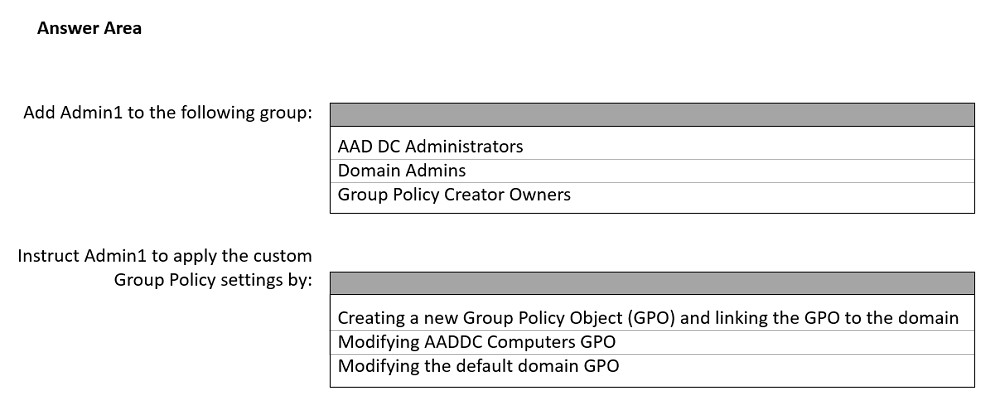
What should you include in the solution? To answer, select the appropriate options in the answer area.
NOTE: Each correct selection is worth one point
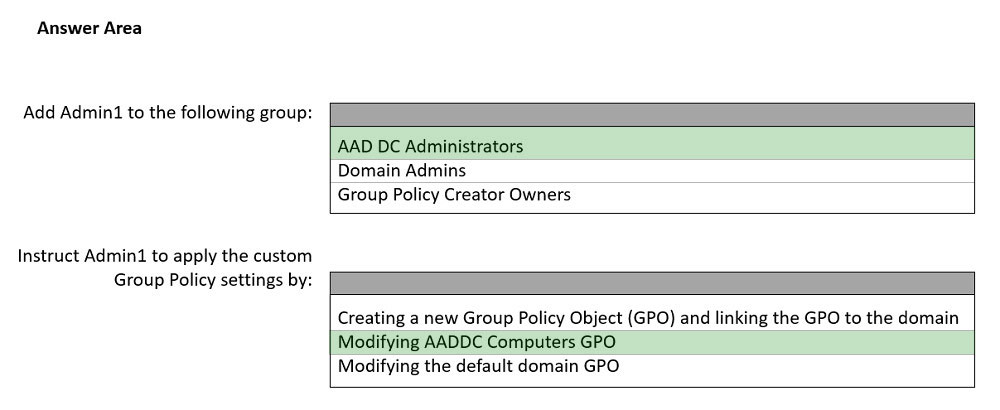
The suggested answer is correct
To administer Group Policy in a managed domain, you must be signed in to a user account that's a member of the AAD DC Administrators group.
Creating new GPO and link it to Domain is unnecessary, we need to apply setting only to Computers OU
There are two built-in Group Policy Objects (GPOs) in a managed domain - one for the AADDC Computers container, and one for the AADDC Users container. You can customize these GPOs to configure group policy as needed within your managed domain.
nefaxto
Highly Voted 1 year, 6 months ago
https://docs.microsoft.com/en-us/azure/active-directory-domain-services/manage-group-policy
The GPO can be linked on OU not to the domain
upvoted 28 times
olnn
Highly Voted 1 year, 7 months ago
bad: 1 ok but 2 creating a new GPO
upvoted 13 times
Josty
1 year, 3 months ago
the group policy can't be linked to the domain only to a OU -> so Modifying AADDC Computers GPO is the correct one
upvoted 5 times
tanoj
Most Recent 7 months, 2 weeks ago
deploy custom Group Policy settings to all the COMPUTERS in the domain. Answer : SO when you create a new gpo and link to the domain it will be applied to both users and computers. As it is required only for the computers in the domain you need to modify the existing Computers GPO which is the fit answer.
upvoted 1 times
syu31svc
8 months, 3 weeks ago
https://learn.microsoft.com/en-us/azure/active-directory-domain-services/manage-group-policy A user account that's a member of the Azure AD DC administrators group in your Azure AD tenant (Before you begin) hese built-in GPOs can be customized to configure specific group policies on your managed domain. Right-select one of the GPOs, such as AADDC Computers GPO, then choose Edit.... (Open the Group Policy Management Console and edit an object) Answer is correct
upvoted 2 times
Lu5ck
11 months, 4 weeks ago
Keyword is ADDS. Not on-on-premises DS or hybrid. Therefore, the only option is ADDS admin and AD GPO.
upvoted 3 times
Lu5ck
11 months, 4 weeks ago
AADDS. Missed out the A. :D
upvoted 5 times
giver
1 year, 3 months ago
https://docs.microsoft.com/en-us/azure/active-directory-domain-services/manage-group-policy -- clearly shows
upvoted 2 times
giver
1 year, 3 months ago
Given is Correct.
upvoted 2 times
dapkor
1 year, 4 months ago
Is a custom GPO thats requested. 1. = AADDC Admin 2. Creating a new gpo <--
upvoted 3 times