
- 7 views
Exam
Answer confirmed
Question
Your network contains two Active Directory Domain Services (AD DS) forests named contoso.com and fabrikam.com. A two-way forest trust exists between the forests. Each forest contains a single domain.
The domains contain the servers shown in the following table.
You need to configure resource based constrained delegation so that the users in contoso.com can use Windows Admin Center on Server1 to connect to Server2.
How should you complete the command? To answer, select the appropriate options in the answer area.
NOTE: Each correct selection is worth one point.
Proposed answer
Hot Area: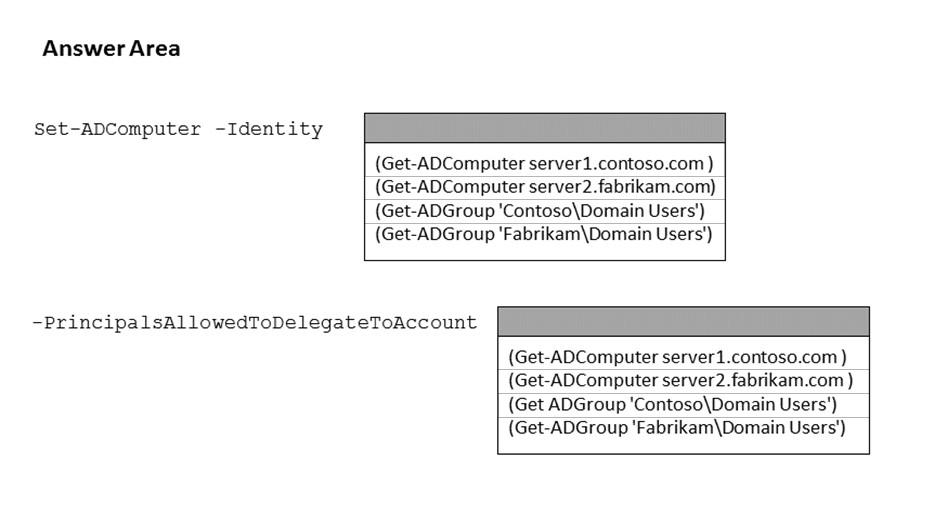
Suggested answer
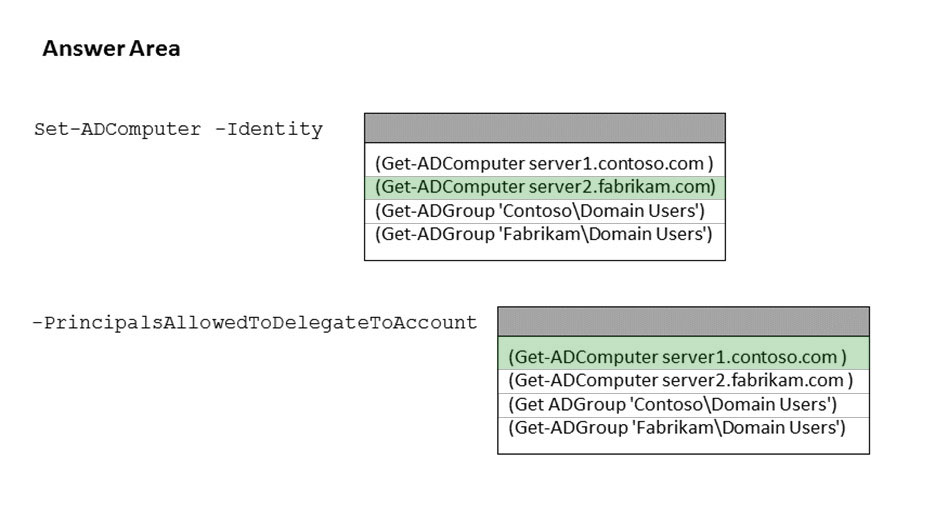
Correct answer
The suggested answer is incorrect
The answer should be:
Set-ADComputer -Identity (Get-ADComputer server2.fabrikam.com) -PrincipalsAllowedToDelegateToAccount (Get-ADComputer server1.contoso.com)Reference:
- https://docs.microsoft.com/en-us/windows-server/security/kerberos/kerberos-constrained-delegation-overview
- https://docs.microsoft.com/en-us/powershell/module/activedirectory/set-adcomputer?view=windowsserver2022-ps
- https://docs.microsoft.com/en-us/windows-server/manage/windows-admin-center/configure/user-access-control
VinoTee
Highly Voted 2 years, 6 months ago
The answer should be: Set-ADComputer -Identity (Get-ADComputer server2.fabrikam.com) -PrincipalsAllowedToDelegateToAccount (Get-ADComputer server1.contoso.com)
Explanation: https://docs.microsoft.com/en-us/windows-server/manage/windows-admin-center/configure/user-access-control#:~:text=To%20configure%20Resource,Get%2DADComputer%20wac)
upvoted 36 times
Lu5ck
1 year, 11 months ago
In general, what this command means is "server2.fabrikam.com" will accept any forwarded requests from "server1.contoso.com".
upvoted 8 times
sardonique
Most Recent 3 months, 1 week ago
looks correct to me
upvoted 2 times
phi3nix
1 year, 6 months ago
The answer is correct. I did this in prod. I usually do this way $MGMT = Get-ADComputer -Identity Server1 $h4 = Get-ADComputer -Identity Server2 Set-ADComputer -Identity $h4 -PrincipalsAllowedToDelegateToAccount $MGMT But you can write it: Set-ADComputer -Identity (get-adcomputer server2.fabrika.com) -PrincipalsAllowedToDelegateToAccount (get-adcomputer server1/contoso.com)
upvoted 2 times
syu31svc
1 year, 8 months ago
Get-ADGroup is completely wrong "Server1 to connect to Server2" Answer is correct
upvoted 2 times
Benjam
2 years ago
The correct answer is- Set-ADComputer -Identity (Get-ADComputer server2.fabrikam.com) PrincipalsAllowedToDelegateToAccoun(Get-ADGroup’Fabrikam\Domain Users’)
upvoted 4 times
Benjam
1 year, 11 months ago
Sorry I made a mistake the Given answer is correct Set-ADComputer -Identity $Server2 -PrincipalsAllowedToDelegateToAccount $Server1
upvoted 3 times
Verdural
2 years, 3 months ago
Correct answer is: Set-ADComputer -Identity (Get-ADComputer Server2.fabikam.com) -PrincipalsAllowedToDelegateToAccount (Get-ADComputer Server1.contoso.com) https://purple.telstra.com.au/blog/kerberos-constrained-delegation
upvoted 3 times
TheUltimateHac
2 years, 6 months ago
Answer is wrong. Should be *Server2.fabrikam *Contoso\Domain users
upvoted 3 times
AvoKikinha
2 years, 6 months ago
Wrong ! From: https://docs.microsoft.com/en-us/powershell/scripting/learn/remoting/ps-remoting-second-hop?view=powershell-7.2 For ServerC to allow delegation from a PowerShell remoting session on ServerB, we must set the PrincipalsAllowedToDelegateToAccount parameter on ServerC to the computer object of ServerB: PowerShell Copy # Grant resource-based Kerberos constrained delegation Set-ADComputer -Identity $ServerC -PrincipalsAllowedToDelegateToAccount $ServerB
upvoted 4 times
AvoKikinha
2 years, 6 months ago
Set-ADComputer -Identity server2..... -PrincipalsAllowedToDelegateToAccount server1.....
upvoted 10 times