
- 1 view
Your company has a main office and a branch office. The two offices are connected by using a WAN link. Each office contains a firewall that filters WAN traffic.
The network in the branch office contains 10 servers that run Windows Server. All servers are administered from the main office only.
You plan to manage the servers in the branch office by using a Windows Admin Center gateway.
On a server in the branch office, you install the Windows Admin Center gateway by using the defaults settings.
You need to configure the firewall in the branch office to allow the required inbound connection to the Windows Admin Center gateway.
Which inbound TCP port should you allow?
- A. 443
- B. 3389
- C. 5985
- D. 6516
- A. 443
The suggested answer is correct
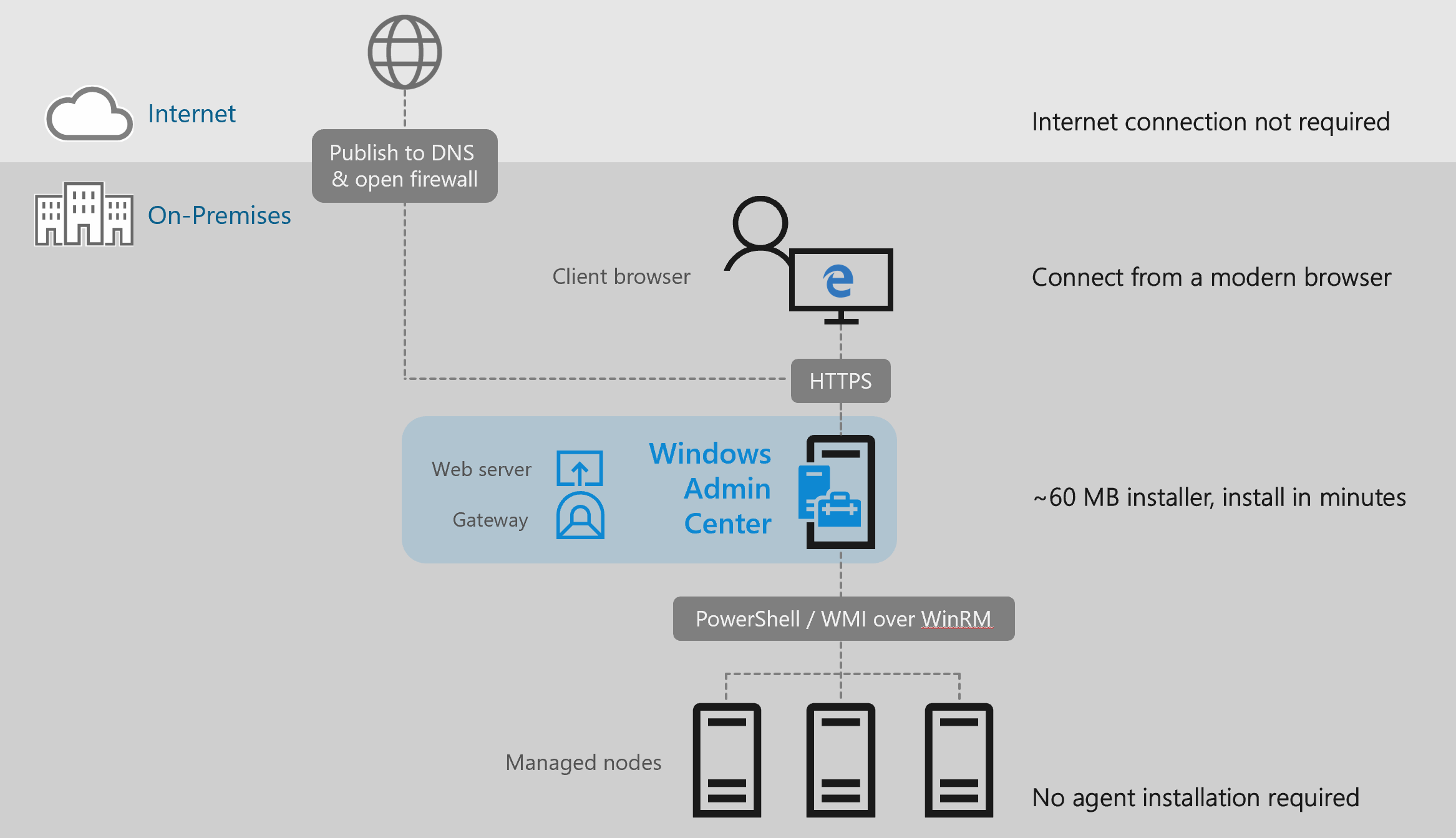
https://learn.microsoft.com/en-us/windows-server/manage/windows-admin-center/understand/what-is
DesolateMarauder
Highly Voted 1 year, 11 months ago
A: Inbound 443 for HTTPS
https://learn.microsoft.com/en-us/windows-server/manage/windows-admin-center/azure/deploy-wac-in-azure
upvoted 5 times
nawtitoo
Most Recent 5 months, 3 weeks ago
Selected Answer: A
Allowing inbound TCP traffic on port 443 will enable secure communication between the Windows Admin Center client (typically a web browser) in the main office and the Windows Admin Center gateway installed on the server in the branch office, facilitating remote management of the servers in the branch office.
upvoted 2 times
SIAMIANJI
6 months, 3 weeks ago
Selected Answer: A
To allow inbound connections to the Windows Admin Center gateway installed on a server in the branch office, you should configure the firewall to allow traffic on TCP port 443. Therefore, the correct answer is: A. 443
upvoted 2 times
Kuikz
7 months, 3 weeks ago
Selected Answer: A
correct
upvoted 1 times
rknichols01
10 months, 2 weeks ago
to access Windows Admin Center gateway it uses port TCP 443. from the gateway to the individual servers uses port 6516.
upvoted 1 times
RickySmith
1 year, 1 month ago
Selected Answer: D
D On a server in the branch office, you install the Windows Admin Center gateway by using the defaults settings. Acc to https://learn.microsoft.com/en-us/windows-server/manage/windows-admin-center/azure/manage-vm#creating-an-inbound-port-rule-for-connecting-from-specific-public-ip-addresses, The default is 6516
upvoted 1 times
RickySmith
1 year, 1 month ago
Please delete.
upvoted 1 times
afridi43
1 year, 2 months ago
Selected Answer: A
To configure the firewall in the branch office to allow the required inbound connection to the Windows Admin Center gateway, you should allow inbound traffic on port 443 (option A). Port 443 is the default port used for HTTPS traffic, and Windows Admin Center typically uses HTTPS for secure communication. So, the correct answer is: A. 443
upvoted 3 times
Returnerwesley
1 year, 4 months ago
PORT FOR TCP IS 443
upvoted 1 times
syu31svc
1 year, 8 months ago
Selected Answer: A
3389 is for RDP so B is wrong 5985 is for WinRM HTTPS so C is wrong 6516 is for Windows 10 so D is wrong A is the answer
upvoted 3 times
BryRob
1 year, 10 months ago
Selected Answer: A
Given answer is correct
upvoted 2 times
empee1977
1 year, 10 months ago
Selected Answer: A
A: Windows Admin Center Gateway listens on both ports 443 and 6516 by default. Port 443 is used for HTTPS connections, which encrypts the communication between the client and the gateway. Port 6516 is used for the Windows Remote Management (WinRM) protocol, which is a standard Simple Object Access Protocol (SOAP)-based, firewall-friendly protocol that allows you to remotely manage Windows-based servers and clients.
upvoted 3 times
cifofs
1 year, 11 months ago
Answer is A
upvoted 3 times
Benjam
2 years ago
Selected Answer: A
Answer is A Port 443
upvoted 2 times
JohnO1971
2 years, 1 month ago
Selected Answer: A
A is the answer based on The default port for the Windows Admin Center Gateway Installation is Port 443 – it is recommended to use this default port. https://www.manfredhelber.de/installing-and-configuring-windows-admin-center-for-windows-server-2022-management
upvoted 4 times
Jawad1462
2 years, 1 month ago
Selected Answer: D
Port 6516 used to open port in win admin center
upvoted 2 times
rimvydukas
2 years, 1 month ago
You are wrong. 6516 port is used only when WAC installed on Windows 10. When WAC is installed in gateway mode on windows server - 443 port is used.
upvoted 3 times
kordisma123
2 years ago
Labas, have you passed the exam? Are most of the questions here in this website?
upvoted 1 times