
Exam
Answer confirmed
Question
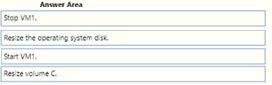
You have an Azure subscription. The subscription contains a virtual machine named VM1 that runs Windows Server. VM1 contains a 128-GB operating system disk.
You need to increase the size of volume C on VM1 to 250 GB.
Which four actions should you perform in sequence.
To answer, move the appropriate actions from the list of actions to the answer area and arrange them in the correct order.
Proposed answer

Suggested answer
Correct answer
syu31svc
Highly Voted 1 year, 8 months ago
https://learn.microsoft.com/en-us/azure/virtual-machines/windows/expand-os-disk Refer to PowerShell segment Answer is correct
upvoted 6 times
SIAMIANJI
Most Recent 6 months, 3 weeks ago
1) Stop VM1 2) Resize the operating system disk 3) Start VM1 4) Resize volume C:
upvoted 3 times
Kuikz
7 months, 2 weeks ago
Correct. Expanding without downtime is only supported for data disks.
https://learn.microsoft.com/en-us/azure/virtual-machines/windows/expand-os-disk
upvoted 3 times
fabilo
1 year, 1 month ago
Right!!!
upvoted 1 times
MR_Eliot
1 year, 1 month ago
Correct
upvoted 1 times
SJHCI
1 year, 8 months ago
Correct!
upvoted 2 times