
- 11 views
Exam
Answer confirmed
Question
Your network contains an Active Directory domain, a web app named App1, and a perimeter network. The perimeter network contains a server named Server1 that runs Windows Server.
You plan to provide external access to App1.
You need to implement the Web Application Proxy role service on Server1.
Which role should you add to Server1, and which role should you add to the network? To answer, drag the appropriate roles to the correct targets. Each role may be used once, more than once, or not at all. You may need to drag the split bar between panes or scroll to view content.
NOTE: Each correct selection is worth one point.
Proposed answer
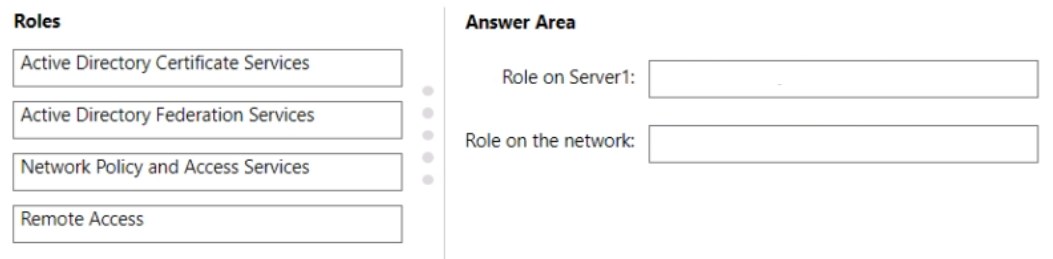
Suggested answer
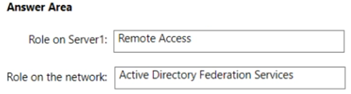
Correct answer
The suggested answer is correct
SJHCI
Highly Voted 1 year, 9 months ago
Correct Answer. See this https://learn.microsoft.com/en-us/previous-versions/windows/it-pro/windows-server-2012-r2-and-2012/dn383662(v=ws.11)#install-the-remote-access-role
upvoted 5 times
Ksk08
Most Recent 4 weeks ago
Role on Server1: Remote Access: This includes the Web Application Proxy service. Therefore, you should add the Remote Access role to Server1 to enable WAP functionality. Role on the Network: Active Directory Federation Services (AD FS): This is necessary for pre-authentication of users accessing applications through WAP. AD FS should be set up in the network to handle authentication requests.
upvoted 1 times
sardonique
3 months, 1 week ago
Why ADFS? isn't NPAS more than enough to acheive the Goal?
upvoted 1 times
Joedn
5 months, 3 weeks ago
Valid 05/28/2024
upvoted 1 times
syu31svc
1 year, 8 months ago
https://learn.microsoft.com/en-us/previous-versions/windows/it-pro/windows-server-2012-r2-and-2012/dn383662(v=ws.11) To deploy Web Application Proxy, you must install the Remote Access role with the Web Application Proxy role service on a server that will act as the Web Application Proxy server. You must configure Web Application Proxy to connect to an AD FS server. Answer is correct
upvoted 3 times