
Exam
Answer confirmed
Question
You need to ensure that DC2 is the schema master for contoso.com.
To complete this task, sign in the required computer or computers.
Suggested answer
Correct answer
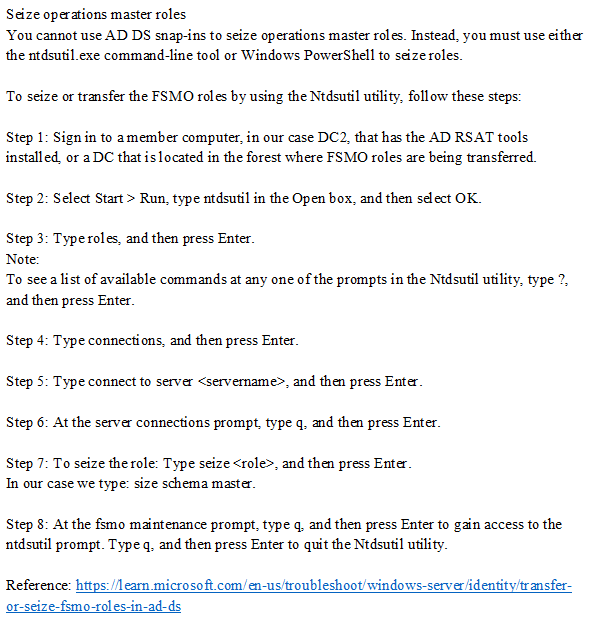
The suggested solution is incorrect.
The screenshot describing process of seizing of FSMO role, but in question is asked "ensure that DC2 is the schema master"
BJack
Highly Voted 1 year, 10 months ago
This answer describes seizing the Schema role. The role can be transferred by registering schmmgmt.dll (regsvr32 schmmgmt.dll) and using the Active Directory Schema console.
upvoted 10 times
Goofer
Highly Voted 1 year, 10 months ago
PowerShell: Move-ADDirectoryServerOperationMasterRole -Identity "DC2" -OperationMasterRole PDCEmulator
upvoted 8 times
Goofer
1 year, 10 months ago
PowerShell: Move-ADDirectoryServerOperationMasterRole -Identity "DC2" -OperationMasterRole SchemaMaster
upvoted 8 times
SantaClaws
1 year ago
This seems like the correct approach, but you need to add the -Force flag to seize the roll.
upvoted 2 times
sardonique
Most Recent 4 months, 2 weeks ago
here the logical steps:
1) Query Role Holder: Netdom query fsmo
2) if DC2 is the schema master holder, you're done. If another server is the schema role holder, you need to move the role.
3) try to gracefully move the role (there are more than 1 way to do that); if a graceful move of the role is not possible because role holder DC is not consistent, then you need to go to the following steps:
4) backup the role holder DC, turn it off, and detach the network card
5) login into DC2 and seize the role (seizing is a forceful action) 6) remove the DC from AD Users and Computers and perform a metadata clean up
7) never bring back to life the old role holder
8) query all the DCs to ensure they all are aware of the new role holder
upvoted 2 times
smorar
6 months, 2 weeks ago
Are there labs in the actual exam?
upvoted 6 times
skycrap
1 year, 5 months ago
Use AD Schema snap-in: https://activedirectorypro.com/transfer-fsmo-roles/#:~:text=To%20transfer%20the%20schema%20master%20role%20follow%20these%20steps.
upvoted 1 times
sa66ath
1 year, 9 months ago
To ensure that DC2 is the schema master for contoso.com using ntdsutil, you can perform the following steps: Log on to DC2 or any other domain controller that has the Active Directory Domain Services (AD DS) role installed. Open a Command Prompt window with administrative privileges. Type "ntdsutil" and press Enter to open the ntdsutil tool. Type "roles" and press Enter to switch to the "fsmo maintenance" prompt. Type "connections" and press Enter to switch to the "server connections" prompt. Type "connect to server DC2" (replace DC2 with the name of the DC you want to make the schema master) and press Enter to connect to the DC2 server. Type "q" and press Enter to return to the "fsmo maintenance" prompt. Type "seize schema master" and press Enter to make DC2 the schema master. Type "q" and press Enter to exit ntdsutil.
upvoted 4 times
pewpewvx
1 year, 7 months ago
Transferring and seizing are slightly different. Seizing should be done if a transfer is not possible. A transfer is where both DCs understand a change will take place, and a seize is where the one who is holding the role is offline or unavailable "usually". I think the Powershell method of Move-AD*Role would be more appropriate for that reason.
upvoted 6 times
Goofer
1 year, 10 months ago
1. Open - Active Directory Users and Computers (on DC2!) 2. Right Klik - contoso.com (domain) 3. Klik - Operations masters 4. Klik - Tab PDC 5. Klik - Change
upvoted 3 times
STFN2019
1 year, 10 months ago
Yes for PDC, Infra and RID it would work but not for schema - you have to use ntdsutil so: 1) Login to DC2 -> Start -> Run and type ntdsutil 2) Type 'roles' and then 'connections' 3) Type: connect to server DC1 (schema master) and then type: 'q' 4) Type: 'seize schema master' 5) Type 'q' twice to exit
upvoted 8 times
Goofer
1 year, 10 months ago
Yes, I need to read better
upvoted 1 times