
DRAG DROP
-
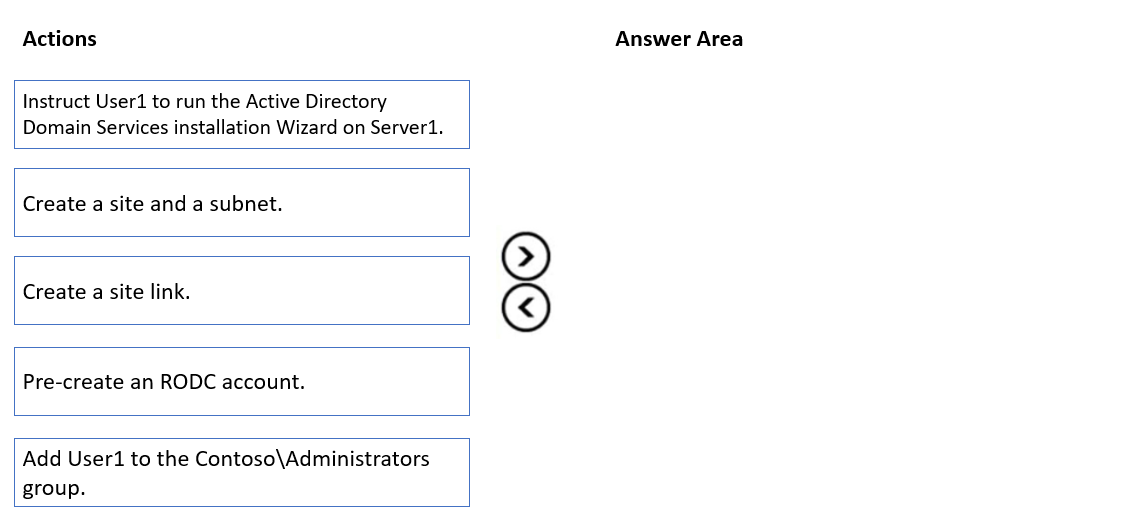
Your network contains a single domain Active Directory Domain Services (AD DS) forest named contoso.com. The forest contains a single Active Directory site.
You plan to deploy a read only domain controller (RODC) to a new datacenter on a server named Server1. A user named User1 is a member of the local Administrators group on Server1.
You need to recommend a deployment plan that meets the following requirements:
• Ensures that a user named User1 can perform the RODC installation on Server1
• Ensures that Server1 is in a new site named RemoteSite1
• Uses the principle of least privilege
Which three actions should you recommend performing in sequence? To answer, move the appropriate actions from the list of actions to the answer area and arrange them in the correct order.

Suggested answer is correct
LauLauLauw
Highly Voted 1 year, 8 months ago
Answer should be: - Create a site and a subnet - Pre-create RODC account - Instruct User 1 The site needs to be there when the RODC account gets created because it needs to be placed into the new site.
upvoted 30 times
Tiago_MP
1 year, 3 months ago
The Pre-creation of RODC account is already part of the wizard actions. The 2nd step should be adding Domain admin permissions to User 1.
upvoted 2 times
MR_Eliot
Highly Voted 1 year, 2 months ago
Correct Answer: 1. Create Site & Subnet 2. Add User1 to "contoso\administrators" 3. Instruct User1 to Run Active Direcotry Domain Services Installation Wizard on Server1. - Pre-create RODC account: -> this is not a valid answer, since user 1 also needs to be a domain admin.
upvoted 5 times
KXNG
Most Recent 2 weeks, 3 days ago
Clarification: 1. Create a site and subnet - Server1 is in a new datacenter, it will need to be in a new site, RemoteSite1. You need to create said site 2. Pre-create a RODC account - Pre-creating the RODC account in AD allows you to choose User1 as the delegated installer, this means they can complete the entire installation without needing elevated domain level privilege. 3.Instruct User1 to run ADDS installation wizard on Server1 - After pre-creating it and delegating User1 as the installer, you can continue in the wizard. All of this adheres to principle of least privilege.
upvoted 1 times
smorar
6 months ago
You cannot use a non-administrative account to create a RODC account in the domain, but you can, however, delegate the second part of the RODC installation. Then, the principle of least privileges: 1- Create a site and a subnet. 2- Pre-create an RODC account. 3- Instruct User1 to run the Active Directory Domain Services installation Wizard on Server1.
upvoted 2 times
Tiago_MP
1 year, 3 months ago
Its all documented here: https://learn.microsoft.com/en-us/windows-server/identity/ad-ds/deploy/rodc/install-a-windows-server-2012-active-directory-read-only-domain-controller--rodc---level-200- First, you will have to create the site and subnet previously (dah) Then, see the before mentioned link, "Your current credentials are used by default. If they don't include membership in the Domain Admins group, select Alternate Credentials, " So User1 needs to be in Domain Admins group. Lastly, "Instruct User 1..." as the wizard already contains the step to "Pre-create RODC account".
upvoted 3 times
deganis
1 year, 4 months ago
1 ) create site and subnet 2) pre-create an RODC account 3) instruct user1 to run the active directory domain services installation wizard on server 1
upvoted 3 times