
- 9 views
Exam
Answer confirmed
Question
You have a server named Server1 that runs Windows Server and contains three volumes named C, D, and E.
Files are stored on Server1 as shown in the following table.
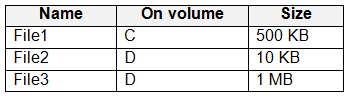
For volume D, Data Deduplication is enabled and set to General purpose file server.
You perform the following actions:
- Move File1 to volume D.
- Copy File2 to volume D and name the copy File4.
- Move File3 to volume E.
For each of the following statements, select Yes if the statement is true. Otherwise, select No.
NOTE: Each correct selection is worth one point.
Proposed answer
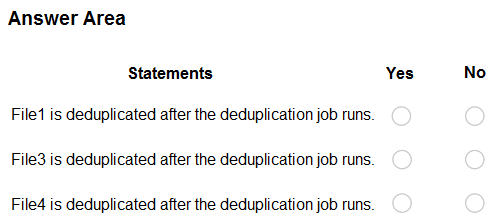
Suggested answer
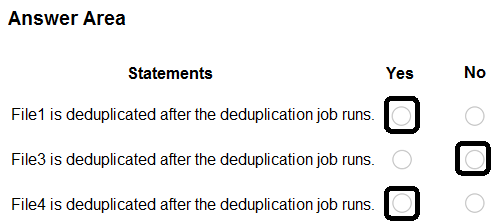
Correct answer
The suggested answer is incorrect
- N - File1 newly created on volume D, there is no copy of this file before
- N - File3 will no longer exist on volume D
- Y - File4 created identical to File3, so it will be deduplicated
Jester77
Highly Voted 1 year, 1 month ago
shouldn't it be Y N N? file4 is less than 32kb https://learn.microsoft.com/en-us/previous-versions/windows/desktop/dedup/about-data-deduplication
upvoted 12 times
Payday123
1 year ago
I guess you are right: "Deduplication skips over the following files: System-state files Encrypted files Files with extended attributes Files whose size is less than 32 KB Reparse points (that are not data deduplication reparse points)"
upvoted 2 times
Payday123
1 year ago
And one more thing :) "When new files are added to the volume, they are not optimized right away. Only files that have not been changed for a minimum amount of time are optimized. (This minimum amount of time is set by user-configurable policy.)"
upvoted 2 times
smorar
Highly Voted 6 months ago
- File1 is deduplicated after the deduplication job runs: Yes (its size is greater than 32 KB and it is located on volume D with deduplication enabled). - File3 is deduplicated after the deduplication job runs: No (it was moved to volume E where deduplication is not enabled). - File4 is deduplicated after the deduplication job runs: No (its size is less than 32 KB and it will be skipped by deduplication).
upvoted 5 times
formacaotismic
Most Recent 6 days, 10 hours ago
File1: Moved from volume C to volume D. Since File1 is now on volume D, where Data Deduplication is enabled, it will be deduplicated after the deduplication job runs. File2: Originally on volume D, and a copy named File4 is created on volume D. File2 is already on volume D and will be deduplicated. File4, being a copy of File2 on the same volume, will also be deduplicated. Deduplication will recognize the duplicate data between File2 and File4 and store it efficiently. File3: Moved from volume D to volume E. Since File3 is moved to volume E, and assuming volume E does not have Data Deduplication enabled, File3 will not be deduplicated. So, after the deduplication job runs: File1 and File4 will be deduplicated. File3 will not be deduplicated.
upvoted 1 times
formacaotismic
6 days, 10 hours ago
Correction: Files smaller than 32 KB are not deduplicated by Data Deduplication in Windows Server. So, after the deduplication job runs: File1 will be deduplicated. File3 and File4 will not be deduplicated.
upvoted 1 times
Ksk08
3 weeks ago
Yes No Yes
upvoted 1 times
AK_1234
6 months, 2 weeks ago
No No Yes
upvoted 2 times
AK_1234
7 months ago
answers : Y N Y
upvoted 1 times
JackBauer
1 year, 1 month ago
should be: Y N Y
upvoted 1 times
MR_Eliot
1 year, 2 months ago
I thinks the answer is correct. File1 & file4 are on the deduplication drive, after the job runs, it should be deduplicated. File3 hower is on another drive, so no deduplications, only garbage collection
upvoted 3 times
MR_Eliot
1 year, 2 months ago
tested this, my answers are correct.
upvoted 1 times
[Removed]
1 year, 2 months ago
N N Y replicated in LAB
upvoted 2 times
Payday123
1 year ago
What do you mean? File3 is no loner on D drive. How can it be deduplicated?
upvoted 1 times
DanielRO
1 year, 4 months ago
NNY No No Yes
upvoted 3 times