
- 12 views
Overview
Contoso, Ltd. is a company that has a main office in Seattle and two branch offices in Los Angeles and Montreal.
Existing Environment
AD DS Environment
The network contains an on premises Active Directory Domain Services (AD DS) forest named contoso.com.
The forest contains two domains named contoso.com and canada.contoso.com.
The forest contains the domain controllers shown in the following table.
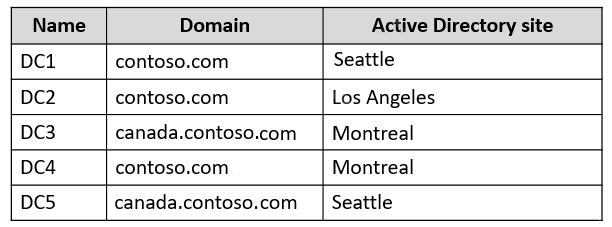
All the domain controllers are global catalog servers.
Server infrastructure
The network contains the servers shown in the following table.
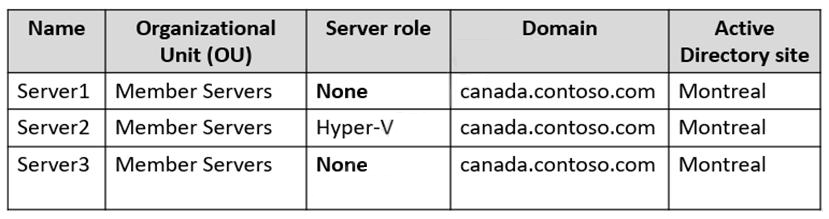
A server named Server4 runs Windows Server and is in a workgroup. Windows Firewall on Server4 uses the private profile.
Server2 hosts three virtual machines named VM1, VM2, and VM3.
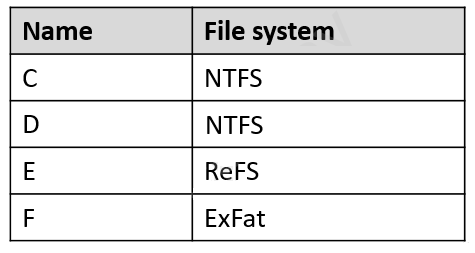
VM3 is a file server that stores data in the volumes shown in the following table.
Group Policies
The contoso.com domain has the Group Policies Objects (GPOs) shown in the following table.

Existing Identities
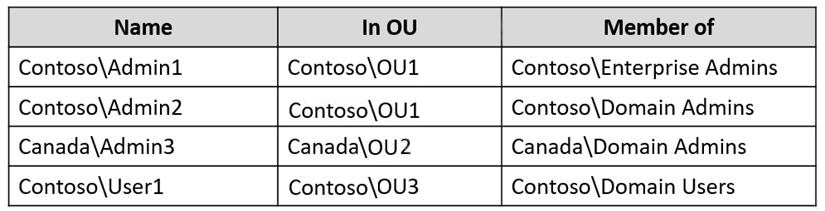
The forest contains the users shown in the following table.
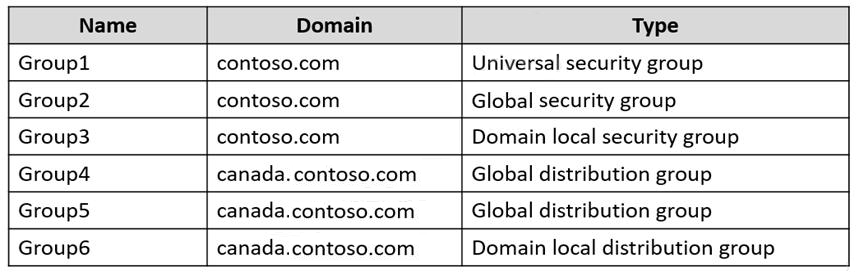
The forest contains the groups shown in the following table.
Current Problems
When an administrator signs in to the console of VM2 by using Virtual Machine Connection, and then disconnects from the session without signing out, another administrator can connect to the console session as the currently signed in user.
Requirements
Technical Requirements
Contoso identifies the following technical requirements:
- Change the replication schedule for all site links to 30 minutes.
- Promote Server1 to a domain controller in canada.contoso.com.
- Install and authorize Server3 as a DHCP server.
- Ensure that User1 can manage the membership of all the groups in Contoso\OU3.
- Ensure that you can manage Server4 from Server1 by using PowerShell remoting.
- Ensure that you can run virtual machines on VM1.
- Force users to provide credentials when they connect to VM2.
- On VM3, ensure that Data Deduplication on all volumes is possible.
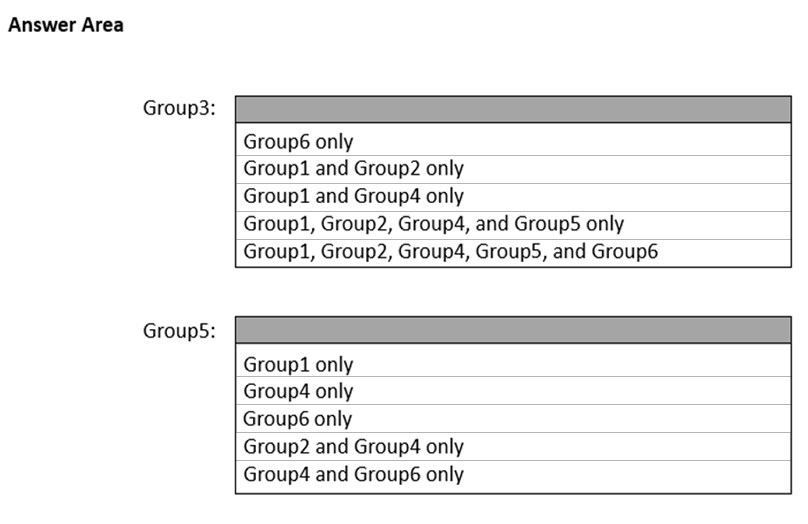
Which groups can you add to Group3 and Group5? To answer, select the appropriate options in the answer area.
NOTE: Each correct selection is worth one point.
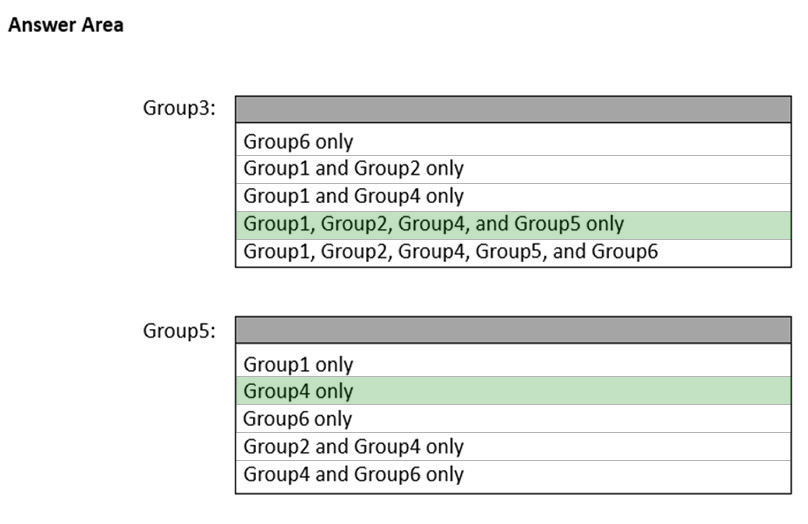
The suggested answer is correct
- Group3 - Group1, Group2, Group4, and Group5 only
- Accounts from any domain or any trusted domain
- Global groups from any domain or any trusted domain
- Universal groups from any domain in the same forest
- Other Domain Local groups from the same domain
- Accounts, Global groups, and Universal groups from other forests and from external domains
- Group5 - Group4 only
- Accounts from the same domain
- Other Global groups from the same domain
prepper666
Highly Voted 2 years, 5 months ago
Group 3 = Group 1, 2 4 and 5 only. Domain-Local groups can contain members from the "forest". Group 5 = Group 4 only. Global groups can only contain Users, Computers and Global groups from the "same" domain.
upvoted 28 times
HKEX388
2 years, 5 months ago
Just create a testing environment and prepper666 answer is correct.
upvoted 5 times
GoforIT21
2 years, 4 months ago
Well, that first box is a bit of a trick question, it turns out, no? Technically, you CAN add a distribution group to a security group - but it won't be effective for permissions management, until you convert the former to a security group (mail-enabled, if you like). So yes, adding groups 1, 2, 4 and 5 is possible. But as such it doesn't make any sense for group 4 and 5 really.
upvoted 5 times
WMG
2 years, 3 months ago
Problem is, we don't know if MS wants "intent" or the written word. Can you? Yes, but.. Okay, so answer is Yes? These pop up on every exam and since you cannot decipher by the exam score your answers, it's hard to answer. I tend to believe they are rigid thinking to see what you actually know and what's in the documentation. In Azure AD you can use a Dynamic User Group for Access Reviews. It doesn't work of course to PERFORM the review, just to assign it. So here I would go with what works technically, not the intent. Can you add these groups to this group? Yes, but.. So, yes.
upvoted 2 times
nazgul250
Highly Voted 2 years, 6 months ago
I think its wrong.
Group 3: Group1, Group 2, Group 4 and Group 5 only
Group 5: Group4 Only.
https://docs.microsoft.com/en-us/windows/security/identity-protection/access-control/active-directory-security-groups
upvoted 9 times
Joedn
Most Recent 6 months ago
Valid 05/28/2024
upvoted 1 times
syu31svc
1 year, 8 months ago
AGUDLP (All Good Users Download Patches is how you can remember this) Global, Universal, Domain Local in this order Grp3 members are 1,2,4 and 5 Grp 5 can only have Grp4 as member Answer is correct
upvoted 2 times
darshanajayathilake
1 year, 8 months ago
We can add global distribution groups to the local security groups, so we can add all the groups to Group3
upvoted 2 times
johosofat
2 years ago
I learned something new- easy to keep track of AGUDLP Account- where can it go? G then U then DL- then put the Permissions you need! pretty cool- https://social.technet.microsoft.com/Forums/en-US/fa66b5c5-3ed3-4700-b479-e036577e110b/can-we-add-universal-group-into-global-group?forum=winserverDS
upvoted 1 times
Contactfornitish
2 years, 3 months ago
Group 3 = 1,2,4,5 (Not 6) Group 5 = 4 only, can't have 6 as per below doc https://docs.microsoft.com/en-us/previous-versions/windows/it-pro/windows-server-2003/cc755692(v=ws.10)?redirectedfrom=MSDN
upvoted 2 times