
- 1 view
You have an Azure Active Directory Domain Services (Azure AD DS) domain named aadds.contoso.com.
You have an Azure virtual network named Vnet1. Vnet1 contains two virtual machines named VM1 and VM2 that run Windows Server. VM1 and VM2 are joined to aadds.contoso.com.
You create a new Azure virtual network named Vnet2. You add a new server named VM3 to Vnet2.
When you attempt to join VM3 to aadds.contoso.com, you get an error message that the domain cannot be found.
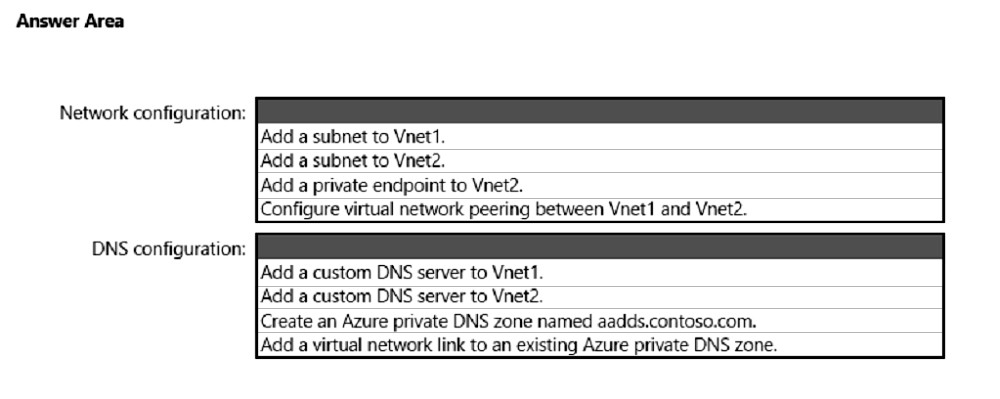
You need to ensure that you can join VM3 to aadds.contoso.com.
What should you do? To answer, select the appropriate options in the answer area.
NOTE: Each correct selection is worth one point.
Hot Area:
jecawi9630
Highly Voted 1 year, 6 months ago
for second part, I prefer adding custom DNS to vnet2. All you need to do, is to add the AAD instance's IP address to vnet2. The question did not say anything about already having a private DNS zone in place.
upvoted 13 times
jecawi9630
1 year, 6 months ago
You just have DNS like an on-prem AD DS server. You just use any other server to install DNS management tools, and point to the AAD DS instance to manage. Private DNS zone does not automatically get configured as part of AAD DS setup. https://learn.microsoft.com/en-us/azure/active-directory-domain-services/manage-dns
upvoted 2 times
cris66
1 year, 5 months ago
I´m no Azure expert, but if VM1 and VM2 are joined to aadds.contoso.com then you think that it should have been set up "correctly" and wouldn't that include setting up a private DNS Zone. "To start hosting your domain in Azure DNS, you need to create a DNS zone for that domain name. Each DNS record for your domain is then created inside this DNS zone."
upvoted 2 times
janshal
Most Recent 4 months, 1 week ago
Answer: Box 1: Network configuration Configure virtual network peering between Vnet1 and Vnet 2 Box 2: DNS Configuration Add a custom DNS Server to Vnet 2 Answer: Box 1: Network configuration Configure virtual network peering between Vnet1 and Vnet 2 Box 2: DNS Configuration Add a custom DNS Server to Vnet 2 https://learn.microsoft.com/en-us/entra/identity/domain-services/tutorial-configure-networking
upvoted 2 times
windowsmodulesinstallerworker
8 months ago
Its, peering & enter dns server on vnet https://learn.microsoft.com/en-us/entra/identity/domain-services/tutorial-configure-networking#configure-virtual-network-peering You may have an existing Azure virtual network for VMs, or wish to keep your managed domain virtual network separate. To use the managed domain, VMs in other virtual networks need a way to communicate with the Domain Services domain controllers. This connectivity can be provided using Azure virtual network peering. For VMs and applications in the peered virtual network to successfully talk to the managed domain, the DNS settings must be updated. The IP addresses of the Domain Services domain controllers must be configured as the DNS servers on the peered virtual network. There are two ways to configure the domain controllers as DNS servers for the peered virtual network: Configure the Azure virtual network DNS servers to use the Domain Services domain controllers.
upvoted 1 times
ala76nl
1 year ago
Second is adding custom dns to vnet2 https://learn.microsoft.com/en-us/azure/active-directory-domain-services/manage-dns
upvoted 4 times
raulgar
1 year, 2 months ago
It seems correct
upvoted 1 times
syu31svc
1 year, 3 months ago
https://learn.microsoft.com/en-us/azure/active-directory-domain-services/troubleshoot-domain-join Ensure the VM is connected to the same, or a peered, virtual network as the managed domain. https://learn.microsoft.com/en-us/azure/dns/private-dns-virtual-network-links After you create a private DNS zone in Azure, you'll need to link a virtual network to it Answer is correct
upvoted 4 times
Leocan
1 year, 7 months ago
Given answer is correct.
upvoted 2 times
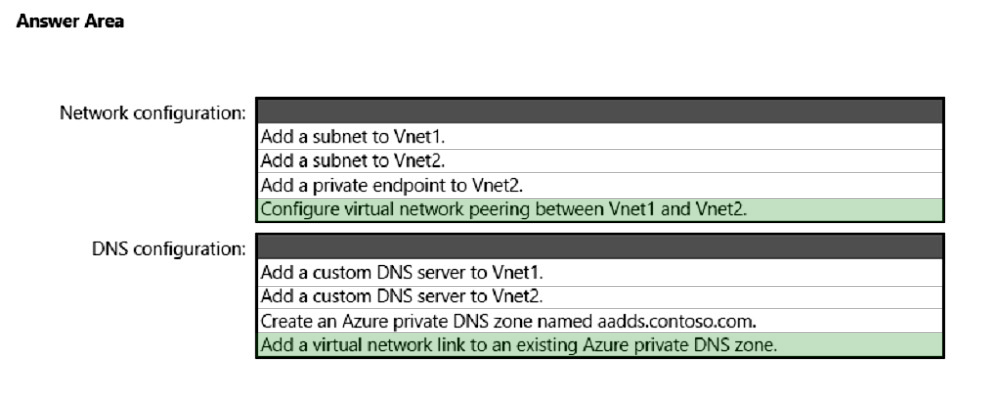
Box 1: Configure virtual network peering between Vnet1 and Vnet2.
Connectivity issues for domain-join.
If the VM can't find the managed domain, there's usually a network connection or configuration issue. Review the following troubleshooting steps to locate and resolve the issue:
1. Ensure the VM is connected to the same, or a peered, virtual network as the managed domain. If not, the VM can't find and connect to the domain in order to join.
If the VM isn't connected to the same virtual network, confirm that the virtual networking peering or VPN connection is Active or Connected to allow the traffic to flow correctly.
2. Try to ping the domain using the domain name of the managed domain, such as ping aaddscontoso.com.
* If the ping response fails, try to ping the IP addresses for the domain displayed on the overview page in the portal for your managed domain, such as ping
10.0.0.4.
* If you can successfully ping the IP address but not the domain, DNS may be incorrectly configured. Make sure that you've configured the managed domain DNS servers for the virtual network.
Box 2: Add a virtual network link to an existing Azure private DNS zone.
The private DNS zone already exists.
After you create a private DNS zone in Azure, you'll need to link a virtual network to it. Once linked, VMs hosted in that virtual network can access the private DNS zone. Every private DNS zone has a collection of virtual network link child resources. Each one of these resources represents a connection to a virtual network. A virtual network can be linked to private DNS zone as a registration or as a resolution virtual network.
Reference:
https://docs.microsoft.com/en-us/azure/active-directory-domain-services/troubleshoot-domain-join https://docs.microsoft.com/en-us/azure/dns/private-dns-virtual-network-links
jecawi9630
Highly Voted 1 year, 6 months ago
for second part, I prefer adding custom DNS to vnet2. All you need to do, is to add the AAD instance's IP address to vnet2. The question did not say anything about already having a private DNS zone in place.
upvoted 13 times
jecawi9630
1 year, 6 months ago
You just have DNS like an on-prem AD DS server. You just use any other server to install DNS management tools, and point to the AAD DS instance to manage. Private DNS zone does not automatically get configured as part of AAD DS setup. https://learn.microsoft.com/en-us/azure/active-directory-domain-services/manage-dns
upvoted 2 times
cris66
1 year, 5 months ago
I´m no Azure expert, but if VM1 and VM2 are joined to aadds.contoso.com then you think that it should have been set up "correctly" and wouldn't that include setting up a private DNS Zone. "To start hosting your domain in Azure DNS, you need to create a DNS zone for that domain name. Each DNS record for your domain is then created inside this DNS zone."
upvoted 2 times
janshal
Most Recent 4 months, 1 week ago
Answer: Box 1: Network configuration Configure virtual network peering between Vnet1 and Vnet 2 Box 2: DNS Configuration Add a custom DNS Server to Vnet 2 Answer: Box 1: Network configuration Configure virtual network peering between Vnet1 and Vnet 2 Box 2: DNS Configuration Add a custom DNS Server to Vnet 2 https://learn.microsoft.com/en-us/entra/identity/domain-services/tutorial-configure-networking
upvoted 2 times
windowsmodulesinstallerworker
8 months ago
Its, peering & enter dns server on vnet https://learn.microsoft.com/en-us/entra/identity/domain-services/tutorial-configure-networking#configure-virtual-network-peering You may have an existing Azure virtual network for VMs, or wish to keep your managed domain virtual network separate. To use the managed domain, VMs in other virtual networks need a way to communicate with the Domain Services domain controllers. This connectivity can be provided using Azure virtual network peering. For VMs and applications in the peered virtual network to successfully talk to the managed domain, the DNS settings must be updated. The IP addresses of the Domain Services domain controllers must be configured as the DNS servers on the peered virtual network. There are two ways to configure the domain controllers as DNS servers for the peered virtual network: Configure the Azure virtual network DNS servers to use the Domain Services domain controllers.
upvoted 1 times
ala76nl
1 year ago
Second is adding custom dns to vnet2 https://learn.microsoft.com/en-us/azure/active-directory-domain-services/manage-dns
upvoted 4 times
raulgar
1 year, 2 months ago
It seems correct
upvoted 1 times
syu31svc
1 year, 3 months ago
https://learn.microsoft.com/en-us/azure/active-directory-domain-services/troubleshoot-domain-join Ensure the VM is connected to the same, or a peered, virtual network as the managed domain. https://learn.microsoft.com/en-us/azure/dns/private-dns-virtual-network-links After you create a private DNS zone in Azure, you'll need to link a virtual network to it Answer is correct
upvoted 4 times
Leocan
1 year, 7 months ago
Given answer is correct.
upvoted 2 times