
- 5 views
Note: This question is part of a series of questions that present the same scenario. Each question in the series contains a unique solution that might meet the stated goals. Some question sets might have more than one correct solution, while others might not have a correct solution.
After you answer a question in this section, you will NOT be able to return to it. As a result, these questions will not appear in the review screen.
You have a failover cluster named Cluster1 that hosts an application named App1.
The General tab in App1 Properties is shown in the General exhibit. (Click the General tab.)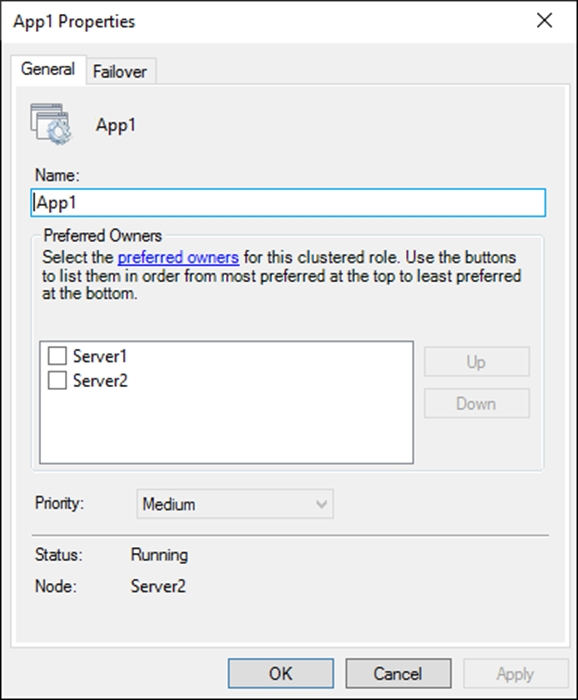
The Failover tab in App1 Properties is shown in the Failover exhibit. (Click the Failover tab.)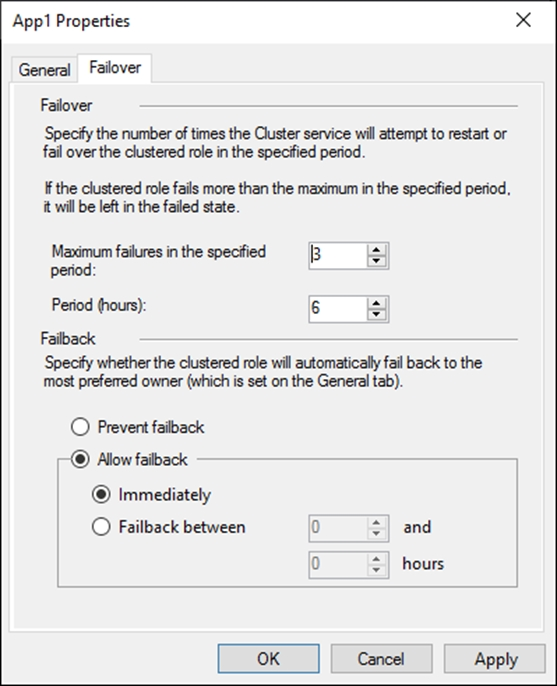
Server1 shuts down unexpectedly.
You need to ensure that when you start Server1, App1 continues to run on Server2.
Solution: From the General settings, you increase the priority of Server2 in the Preferred Owners list.
Does this meet the goal?
- A. Yes
- B. No
- A. Yes
terawatt
Highly Voted 1 year, 4 months ago
Selected Answer: B
because its unticked
upvoted 7 times
Fastdruid
Highly Voted 1 year, 8 months ago
A horribly worded question. You can only change the priority of the Preferred Owners if you tick them first, if you don't then any change in order isn't kept. So to actually increase the priority of Server2 you *have* to tick it. Otherwise you're *NOT* changing the priority. The question however doesn't state that you tick it. So is the question asking if you know this? Or is it assuming that you know that the only way to actually change the priority is to tick them first? As it stands, if you assume that you actually change the priority then you have to tick Server2 to do so and the answer is Yes. If you change the Priority order without ticking then it is the same as moving the server up, wont change the order, will leave it without a preferred owner (so it won't fail over to Server1 anyway) but it doesn't fulfil the requirement of *Ensuring* that it won't fail over to Server1 so the answer is No.
upvoted 5 times
starseed
Most Recent 3 months ago
Correct answer is Yes A
upvoted 1 times
smorar
6 months ago
Selected Answer: B
If server2 has to switch, it will do so whether it is priority or not. If server2 is struck by lightning and shattered into a thousand pieces, when you start Server1 it will have control. Only pausing Server1 in the cluster or checking "Prevent Failback" would prevent Server1 from taking control.
upvoted 1 times
ahenriquez02
7 months, 2 weeks ago
Even if the priority of server 2 is increased, this will have no effect because there are no servers marked as preferred owner. The correct answer is B --> NO
upvoted 2 times
004b54b
7 months, 2 weeks ago
Selected Answer: B
Same answer as in https://www.examtopics.com/discussions/microsoft/view/74235-exam-az-801-topic-2-question-3-discussion/ > because its unticked, so it has no effect
upvoted 2 times
[Removed]
1 year, 4 months ago
To be able to move up you need to tick and then click on the Move button...
upvoted 2 times
ala76nl
1 year, 5 months ago
If unticked would have worked with these settings “immediately fallback” and node 1 mentioned on top it would have been running on node 1. But it runs on node 2 as the preferred owner list works only when ticked.
upvoted 1 times
syu31svc
1 year, 7 months ago
Selected Answer: A
"App1 continues to run on Server2" Answer is Yes
upvoted 3 times
kijken
1 year, 9 months ago
Selected Answer: B
It is, people that say a talk about prefered owner. Tbis is about the priority option. Thats the prio in regard to other services. Not the prevered owner
upvoted 2 times
Telekon
1 year, 9 months ago
poorly worded question. Will only matter if Server2 is 'ticked off'
upvoted 2 times
Vitu
1 year, 11 months ago
Selected Answer: A
The prefer owner have priority
upvoted 4 times
Leocan
1 year, 12 months ago
Selected Answer: A
The current host is Server2. Increasing the priority of Server2 in the Preferred Owners list will keep the app running on Server2.
upvoted 3 times
GoforIT21
2 years, 2 months ago
Selected Answer: A
Basically the same question as question 3 of topic 2. Again, I believe this would be a way to prevent the workload from failing back to server1. See my comment on the earlier question.
upvoted 3 times