
- 5 views
Exam
Answer needs confirmation
Question
You have a generation 1 Azure virtual machine named VM1 that runs Windows Server and is joined to an Active Directory domain.
You plan to enable BitLocker Drive Encryption (Bit-Locker) on volume C of VM1.
You need to ensure that the BitLocker recovery key for VM1 is stored in Active Directory.
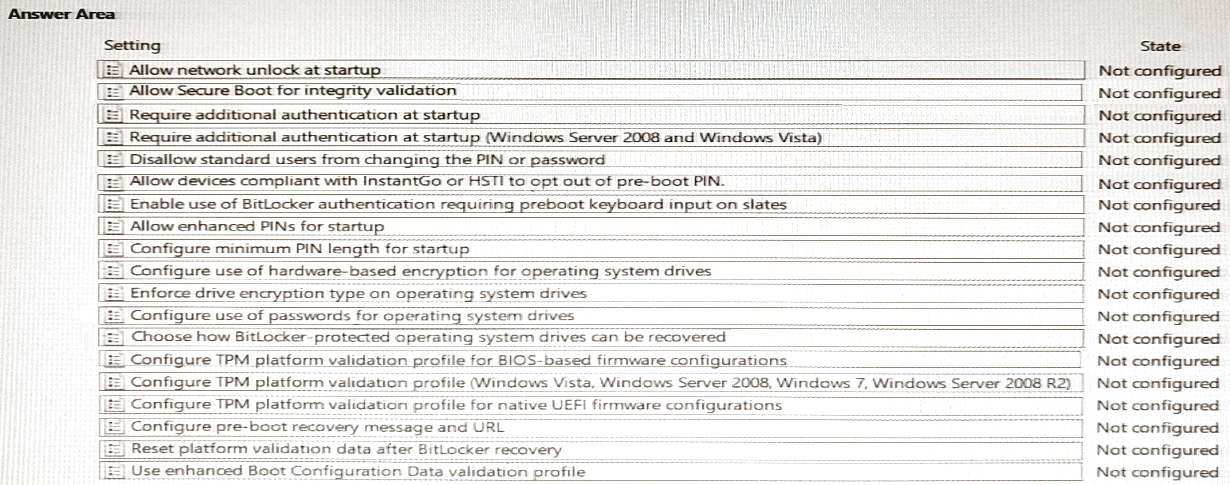
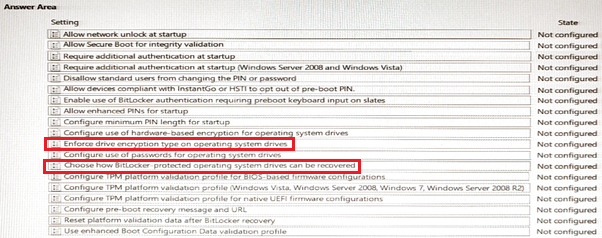
Which two Group Policy settings should you configure first? To answer, select the settings in the answer area.
NOTE: Each correct selection is worth one point.
Proposed answer
Suggested answer
phi3nix
Highly Voted 1 year, 6 months ago
Good read: https://learn.microsoft.com/en-us/azure/virtual-machines/windows/disk-encryption-overview We need: Allow BitLocker without a compatible TPM and Require additional authentication at startup "If BitLocker needs to be used on a computer without a TPM, select Allow BitLocker without a compatible TPM. In this mode, a password or USB drive is required for startup. The USB drive stores the startup key that is used to encrypt the drive. When the USB drive is inserted, the startup key is authenticated, and the operating system drive is accessible. If the USB drive is lost or unavailable, BitLocker recovery is required to access the drive."
upvoted 6 times
phi3nix
1 year, 6 months ago
If this question is about VM domain joined in Azure. Azure VM does not have TPM. We need to use a password to decrypt it. Azure Disk Encryption uses the BitLocker external key protector for Windows VMs. For domain joined VMs, don't push any group policies that enforce TPM protectors. For information about the group policy for "Allow BitLocker without a compatible TPM," see BitLocker Group Policy Reference. BitLocker policy on domain-joined virtual machines with custom group policy must include the following setting: Configure user storage of BitLocker recovery information -> Allow 256-bit recovery key.
upvoted 1 times
starseed
Most Recent 3 months ago
Correct answer
upvoted 1 times
smorar
6 months, 1 week ago
Require additional authentication at startup Choose how BitLocker-protected operating system drives can be recovered
upvoted 2 times
calotta1
1 year, 4 months ago
The answer is correct!
upvoted 1 times
syu31svc
1 year, 7 months ago
I half-agree with the answer https://learn.microsoft.com/en-us/windows/security/information-protection/bitlocker/bitlocker-group-policy-settings#choose-how-bitlocker-protected-operating-system-drives-can-be-recovered Reference: Choose how BitLocker-protected operating system drives can be recovered In Save BitLocker recovery information to Active Directory Domain Services, choose which BitLocker recovery information to store in Active Directory Domain Services (AD DS) for operating system drives. If Store recovery password and key packages is selected, the BitLocker recovery password and the key package are stored in AD DS. Storing the key package supports the recovery of data from a drive that is physically corrupted. If Store recovery password only is selected, only the recovery password is stored in AD DS.
upvoted 1 times
syu31svc
1 year, 7 months ago
Enforce drive encryption type on operating system drives This policy controls whether operating system drives utilize Full encryption or Used Space Only encryption
upvoted 1 times
syu31svc
1 year, 7 months ago
"enable BitLocker Drive Encryption (Bit-Locker) on volume C " Enforce drive encryption type on operating system drives would address this I guess
upvoted 1 times
prepper666
1 year, 8 months ago
Answer given is incorrect. The question is about a azure VM. VMs do not have TPM and so you must select "Require additional authentication at startup" and "not enforce drive encryption on OS drives".
upvoted 4 times
Verdural
1 year, 10 months ago
https://woshub.com/store-bitlocker-recovery-keys-active-directory/
upvoted 3 times
wyindualizer
1 year, 10 months ago
https://askme4tech.com/how-enable-bitlocker-group-policy#:~:text=How%20to%20configure%20the%20GPO%201%20Open%20the,BitLocker%20is%20the%20Require%20additional%20authentication%20at%20startup.
upvoted 3 times
nefaxto
1 year, 10 months ago
I think it's correct https://admx.help/?Category=Windows_10_2016&Policy=Microsoft.Policies.VolumeEncryption::OSEncryptionType_Name https://admx.help/?Category=MDOP&Policy=Microsoft.Policies.BitLockerManagement::RDVRecoveryUsagePolicy
upvoted 2 times