
- 11 views
Exam
Answer needs confirmation
Question
You have an Azure subscription named Sub1 that contains a resource group named RG1. RG1 contains the resources shown in the following table.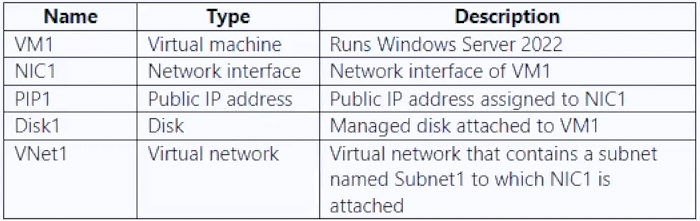
Sub1 has Microsoft Defender for Servers enabled. You are assigned the Contributor role for Sub1.
You need to implement just-in-time (JIT) VM access for VM1.
What should you do first?
Suggested answer
- A. Create a network security group (NSG).
- B. Enable enhanced security in Microsoft Defender for Cloud.
- C. Request the Owner role for Sub1.
- D. Create an application security group.
NotThatGuy242
Highly Voted 8 months, 3 weeks ago
Selected Answer: A
"JIT requires an NSG to be configured or a Firewall configuration (or both)" From here: https://learn.microsoft.com/en-us/azure/defender-for-cloud/just-in-time-access-usage There's no mention of Azure Firewall in the question, so an NSG would be required.
upvoted 7 times
starseed
Most Recent 3 months ago
answer is A
upvoted 1 times
smorar
6 months, 1 week ago
The answer is A. Owner: Has full access to all resources, including the right to delegate access to others. Contributor: You can create and manage all types of Azure resources, but you cannot grant access to others. You don't need to be an owner in this case.
upvoted 1 times
smorar
6 months, 1 week ago
The milk. Well, the correct answer is B: B. Enable enhanced security in Microsoft Defender for the cloud. It's true that when you configure JIT, you automatically need to configure NSG, but according to this URL, enabled Defender for Cloud enhanced security features are a prerequisite. https://learn.microsoft.com/en-us/azure/defender-for-cloud/tutorial-protect-resources
upvoted 3 times
NilsAbrahamsson
4 months, 2 weeks ago
Looks like you're right there. Sure, JIT uses NSG, but Enhanced Security is a prerequisite... and the question is "What should you do first?"
upvoted 1 times
bpaccount
6 months, 2 weeks ago
Selected Answer: A
I think its A, NSG
upvoted 1 times
mohamed1999
7 months ago
Selected Answer: C
contributor rights alone do not allow you to enable Just-In-Time (JIT) access in an Azure subscription. JIT access involves managing access to specific resources for a limited time window. To enable JIT, you need additional permissions related to security management and resource access control.
upvoted 1 times
Kuikz
7 months ago
Selected Answer: A
https://learn.microsoft.com/en-us/azure/defender-for-cloud/just-in-time-access-usage Just-in-time VM access shows your VMs grouped into: Configured - VMs configured to support just-in-time VM access, and shows: - the number of approved JIT requests in the last seven days - the last access date and time - the connection details configured the last user Not configured - VMs without JIT enabled, but that can support JIT. We recommend that you enable JIT for these VMs. Unsupported - VMs that don't support JIT because: - Missing network security group (NSG) or Azure Firewall - JIT requires an NSG to be configured or a Firewall configuration (or both) - Classic VM - JIT supports VMs that are deployed through Azure Resource Manager. - Other - The JIT solution is disabled in the security policy of the subscription or the resource group.
upvoted 1 times
AppieHappie
7 months ago
According to Copilot, The Contributor-role on the Subscription level should suffice to perform all the steps required to configure JIT. You do need to configure NSG rules though, so my answer would be A.
upvoted 3 times
Chrisvt
8 months, 3 weeks ago
Selected Answer: C
Owner role is required to enable JIT
upvoted 1 times
pnewcap
9 months, 1 week ago
Selected Answer: B
isn't it B?
upvoted 2 times
SanMan_NZ
9 months, 2 weeks ago
Selected Answer: C
Correct, below are the prerequisites: You’ll need: 1.) An Azure Subscription 2.) Logged into the Azure Portal with an Azure account with the Subscription Owner role. 3.) A Standard Azure Defender plan. You can sign up while logged into the Azure Portal via Azure Security Center. 4.) Azure Cloud Shell or PowerShell. Be sure you log in once to create the storage account it needs at least once. 5.) The Azure Defender service enabled. Part of Azure Security Center, you’ll need to first enable it on your subscription. Azure Security Permissions - https://learn.microsoft.com/en-us/azure/defender-for-cloud/permissions
upvoted 2 times