
- 6 views
Exam
Answer needs confirmation
Question
Your network contains an Active Directory Domain Services (AD DS) domain.
You need to implement a solution that meets the following requirements:
✑ Ensures that the members of the Domain Admins group are allowed to sign in only to domain controllers
✑ Ensures that the lifetime of Kerberos Ticket Granting Ticket (TGT) for the members of the Domain Admins group is limited to one hour
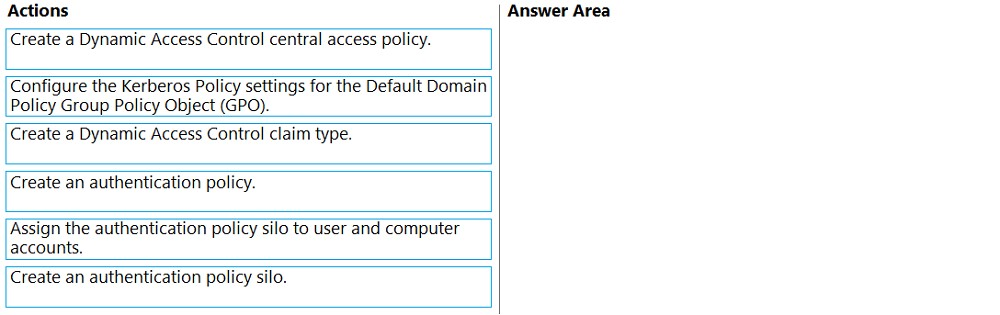
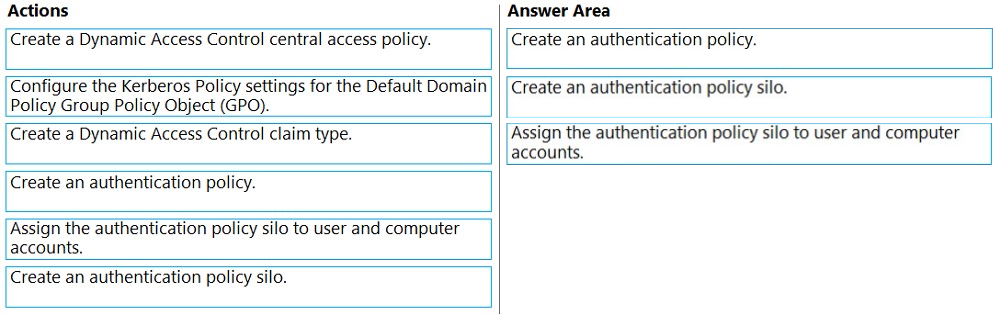
Which three actions should you perform in sequence? To answer, move the appropriate actions from the list of actions to the answer area and arrange them in the correct order.
Proposed answer
Suggested answer
Reference:
https://docs.microsoft.com/en-us/windows-server/identity/ad-ds/manage/how-to-configure-protected-accounts
allihadidave
Highly Voted 2 months, 3 weeks ago
Per the learn documentation: https://learn.microsoft.com/en-us/windows-server/identity/ad-ds/manage/how-to-configure-protected-accounts#BKMK_CreateAuthNPolicySilos, "At least one authentication policy must be created before an authentication policy silo can be created."
upvoted 8 times
starseed
Most Recent 3 months ago
correct answer
upvoted 1 times
smorar
6 months, 2 weeks ago
Why Not Configure the Kerberos Policy Settings in GPO? The Kerberos policy settings in the Default Domain Policy GPO are more general and apply domain-wide. To meet the specific requirements mentioned (restricting sign-ins and setting TGT lifetimes for a particular group), you need more granular control, which is provided by authentication policies and silos. 1- Create an authentication policy silo. 2- Create an authentication policy. 3- Assign the authentication policy silo to user and computer accounts. This sequence ensures that the Domain Admins group can only sign in to domain controllers and their TGT is limited to one hour.
upvoted 1 times
smorar
6 months, 2 weeks ago
Create an authentication policy silo: This groups accounts (such as Domain Admins) to which specific authentication policies will apply, helping to isolate and manage these policies effectively. Define the authentication policy: Once the silo is established, define the authentication policy specifying conditions and restrictions, such as TGT lifetime and sign-in restrictions to domain controllers. Assign the authentication policy silo: Link the defined policy to designated user and computer accounts, ensuring enforcement for those accounts, such as Domain Admins and domain controllers. By following this order, you establish the structure, define policies, and then apply them to the relevant accounts effectively.
upvoted 1 times
windowsmodulesinstallerworker
1 year ago
1) Configure the Kerberos Policy settings for the Default Domain Policy Group Policy Object (GPO). 2) Create an authentication policy. 3) Create an authentication policy silo.
upvoted 1 times
syu31svc
1 year, 7 months ago
https://learn.microsoft.com/en-us/windows-server/security/credentials-protection-and-management/authentication-policies-and-authentication-policy-silos An authentication policy silo controls which accounts can be restricted by the silo and defines the authentication policies to apply to the members. I would say 1) Create Authentication Policy silo 2) Create Authentication Policy 3) Assign Authentication Policy silo to user and computer accounts
upvoted 2 times
syu31svc
1 year, 7 months ago
Disregard my previous post. After reviewing URL https://learn.microsoft.com/en-us/windows-server/identity/ad-ds/manage/how-to-configure-protected-accounts My answer is 1) Configure the Kerberos Policy settings for the Default Domain Policy Group Policy Object (GPO). 2) Create an authentication policy. 3) Create an authentication policy silo.
upvoted 5 times
oro_blu
1 year, 5 months ago
Right answer, for Silos you need claims -> to enable claims you have to modify default domain policy
upvoted 2 times
GoforIT21
2 years, 2 months ago
The link provided by Spoonstabber (https://learn.microsoft.com/en-us/windows-server/security/credentials-protection-and-management/authentication-policies-and-authentication-policy-silos) seems to say that you need to create a silo first, before applying a policy to it: "[Y]ou could create a new Forest Administrators silo that contains enterprise, schema, and domain administrators. Then you could configure the silo with an authentication policy [...]"
upvoted 3 times
GoforIT21
2 years, 2 months ago
Correction: you need the authentication policy first to be able to assign it during the creation of the silo. So the answer provided is correct. Source: https://learn.microsoft.com/en-us/windows-server/identity/ad-ds/manage/how-to-configure-protected-accounts#to-create-an-authentication-policy-silo-by-using-active-directory-administrative-center
upvoted 7 times
Leocan
1 year, 12 months ago
At least one authentication policy must be created before an authentication policy silo can be created.
upvoted 2 times
Spoonstabber
2 years, 4 months ago
Seems correct: https://docs.microsoft.com/en-us/windows-server/security/credentials-protection-and-management/authentication-policies-and-authentication-policy-silos
upvoted 3 times