
- 3 views
Exam
Answer needs confirmation
Question
You have a Storage Spaces Direct configuration that has persistent memory and contains the data volumes shown in the following table.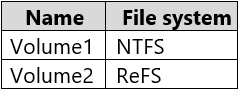
You plan to add data volumes to Storage Spaces Direct as shown in the following table.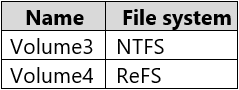
On which volumes can you use direct access (DAX)?
Proposed answer
- A. Volume3 only
- B. Volume4 only
- C. Volume1 and Volume3 only
- D. Volume2 and Volume4 only
- E. Volume3 and Volume4 only
Suggested answer
- A. Volume3 only
Spoonstabber
Highly Voted 2 years, 4 months ago
I would go for 1 and 3, as it states which volumes are possible, and they are both possible, just not at the same time.
upvoted 7 times
giver
2 years, 3 months ago
'Volume1 and Volume3' is incorrect because of the single volume limitation.
upvoted 3 times
syu31svc
Highly Voted 1 year, 7 months ago
Selected Answer: A
https://learn.microsoft.com/en-us/windows-server/storage/storage-spaces/persistent-memory-direct-access You can't use DAX across more than one persistent memory disk, and you can only use DAX with NTFS. Answer is A
upvoted 6 times
starseed
Most Recent 3 months ago
answer is A
upvoted 1 times
mohamed1999
7 months ago
Selected Answer: A
In Windows Server 2019 and later, you can only create a DAX volume on a Storage Spaces or Storage Spaces Direct configuration that uses a single persistent memory disk, with no parity and no redundancy. You can't use DAX across more than one persistent memory disk, and you can only use DAX with NTFS.
upvoted 1 times
mohamed1999
7 months ago
https://learn.microsoft.com/en-us/windows-server/storage/storage-spaces/persistent-memory-direct-access
upvoted 1 times
ahenriquez02
7 months, 2 weeks ago
You plan to add data volumes to Storage Spaces Direct as shown in the following table: You cannot use DAX on more than one persistent memory disk, and you can only use DAX with NTFS. Answer is A
upvoted 1 times
boapaulo
11 months, 3 weeks ago
since this example doesn't talk about which OS you're using, consider the correct answer to be A.
upvoted 1 times
boapaulo
11 months, 3 weeks ago
and Volume4 is using the ReFS file system, the correct answer would be "No. Volume Only4". However, this depends on the file system that each volume is using. As I mentioned before, Direct Access (DAX) is only supported on the ReFS file system on Windows. Therefore, you can only use DAX on volumes that are formatted with ReFS
upvoted 1 times
boapaulo
11 months, 3 weeks ago
Direct Access (DAX) is only supported on the Resilient File System (ReFS) file system on Windows. Therefore, you can only use DAX on volumes that are formatted with ReFS. If the volumes are using the NTFS file system, you cannot use DAX. Since dax can't be used on NTFS and on disks in use, we only have disk 4, so the correct answer is B
upvoted 1 times
Steve6203
1 year, 8 months ago
Correct Answer is A - Can only be on one Volume , its possible for this to be on 1 or 3 not 1 & 3 therefore C is incorrect
upvoted 3 times
nefaxto
1 year, 10 months ago
Correct A https://learn.microsoft.com/en-us/windows-server/storage/storage-spaces/persistent-memory-direct-access
upvoted 2 times
xxxxx85xx
2 years, 8 months ago
Correct Answer
upvoted 3 times