
- 3 views
Your network contains an Active Directory Domain Services (AD DS) domain that has the Active Directory Recycle Bin enabled. The domain contains two domain controllers named DC1 and DC2. The system state of the domain controllers is backed up daily at 23:00 by using Windows Server Backup.
You have an organizational unit (OU) named ParisUsers that contains 1,000 users.
At 08:00, DC1 shuts down for hardware maintenance. The maintenance completes, but DC1 remains shut down.
At 09:00, an administrative error causes the manager attribute of each user in ParisUsers to be deleted.
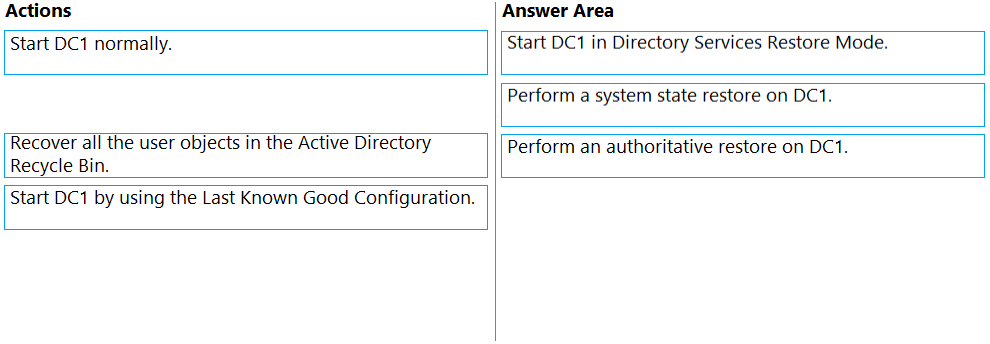
You need to recover the user account details as quickly as possible. The solution must minimize data loss.
Which three actions should you perform in sequence? To answer, move the appropriate actions from the list of actions to the answer area and arrange them in the correct order.
Select and Place:

The suggested answer is incorrect
Correct answer is:
- Start DC1 in directory restore mode
- Perform an authoritative restore on DC1
- Start DC1 normally.
arnitjoe
Highly Voted 1 year, 1 month ago
Two requirements make this proposed answer incorrect. First, you are being asked to minimize data loss. So restoring from 2300 the previous night as opposed to an hour old isn't minimizing data loss. Second, you're asked to get this fixed as quickly as possible. If you've ever done a system state restore on a DC with a lot of object, it's takes a long time. So: Boot into DSRM Authoritative restore Boot normally Is the only answer that makes sense
upvoted 22 times
SanMan_NZ
4 months, 2 weeks ago
I agree with above. Authoritative restore is not actually a restore so much as it is about replication and marking some current objects (or for that matter restored objects) with a higher value priority / timing stamp. This ensures that AD recognizes this object as most current and replicates it out to all partner DC's . What this means for our question is that running an authoritative restore on our healthy object on DC1 will suffice to mark it 'most current' therefore targeted for replication to DC2 and the entire AD without needing to restore first from an older backed up system state.
upvoted 1 times
xxxxx85xx
Highly Voted 2 years, 3 months ago
Correct Answers
upvoted 6 times
Kuikz
Most Recent 2 months, 1 week ago
I think the answers are correct https://itingredients.com/perform-authoritative-restore-active-directory-objects-2012-r2/
upvoted 1 times
calotta1
11 months, 3 weeks ago
Agree with arnitjoe
upvoted 1 times
Tylosh
1 year, 1 month ago
Case 1 : I start DC1 Directory Service Restore Mode , perform a system state restore on DC1 , perform an authoritative restore on DC1 .
Case 2 : I start DC1 Directory Service Restore Mode, perform authoritative restore , reboot normally. ChatGPT : If the primary goal is to recover the user account details as quickly as possible and minimize data loss, case 2 would be the preferred choice.
In case 2, you directly perform an authoritative restore targeting the specific objects or data (user account details) that need to be recovered. This approach skips the system state restore, which can be a time-consuming process, especially if the domain controller has a large database or additional components. By focusing on the authoritative restore alone, you can quickly restore the specific data you need without waiting for the entire system state restore to complete. This minimizes downtime and reduces the risk of potential issues that could arise during the system state restore process.
upvoted 4 times
oro_blu
1 year, 1 month ago
Dc2 is still down, you don't need to restore from backup, just mark its state as good with autohiritative restore
upvoted 3 times
phi3nix
1 year, 1 month ago
Why not recover it from AD recycle bin? I did so many times it is the fastest way.
upvoted 1 times
oro_blu
1 year, 1 month ago
you din't delete a user account, you just modify en attribute, there's nothing in the bin
upvoted 5 times
syu31svc
1 year, 3 months ago
https://learn.microsoft.com/en-us/previous-versions/windows/it-pro/windows-server-2012-r2-and-2012/cc732211(v=ws.11) Restores domain controllers to a specific point in time https://www.itprotoday.com/active-directory/how-can-i-perform-authoritative-restoration-active-directory-ad-windows-server-2003 From the Windows Advanced Options Menu, select Directory Services Restore Mode Select the Restore option, then select the media where the backup is stored and ensure that the System State To access the authoritative restore mode, type ntdsutil: authoritative restore Answer is correct
upvoted 4 times
Leocan
1 year, 7 months ago
The given answer is correct. https://www.serverbrain.org/active-directory-2008/authoritative-restore-of-active-directory-domain-services.html
upvoted 3 times
joehoesofat
1 year, 8 months ago
Contactfornitish has a point- so autorative restore is replication not backup- you have to start the server in regular mode to do a d4 burglags (or equivalent)- so start the DC normally would come before the current last step of the question- so my contention is there is really 4 steps - or this is really asking only for the restore steps- the replication issue not be considered here- strictly speaking - be aware of this for testing purposes
upvoted 2 times
Justin0020
1 year, 9 months ago
Given answer is correct, check this guide out: https://www.itprotoday.com/active-directory/how-can-i-perform-authoritative-restoration-active-directory-ad-windows-server-2003
upvoted 3 times
ProfileX
1 year, 10 months ago
Why would you need to perform a system state restore? That would set your recovery point back to 23:00 the previous day, instead of 8:00 which is only an hour before the attribute was changed. The requirements state: Recover the user account details as quickly as possible. The solution must minimize data loss.
upvoted 5 times
GoforIT21
1 year, 10 months ago
What's your alternative, given the options provided?
upvoted 2 times
azubi
1 year, 4 months ago
Start DC1 in directory restore mode Perform an authoritative restore on DC1 Start DC1 normally.
upvoted 11 times
Contactfornitish
1 year, 11 months ago
Don't think it's correct Since changes done on another DC have incremented the number, without authoritative restore it won't work. For that, you need to start the unchanged DC in directory restore mode, perform restore and then start normally so that changes get synced across. System state restore has no role in this
upvoted 2 times
Contactfornitish
1 year, 11 months ago
Plz ignore silly me. We have system state backup only which we are marking as auth restore. so the given options are correct
upvoted 3 times