
- 1 view
Exam
Answer confirmed
Question
You plan to deploy an Azure virtual machine that will run Windows Server.
You need to ensure that an Azure Active Directory (Azure AD) user named user1@contoso.com can connect to the virtual machine by using the Azure Serial
Console.
What should you do? To answer, select the appropriate options in the answer area.
NOTE: Each correct selection is worth one point.
Proposed answer
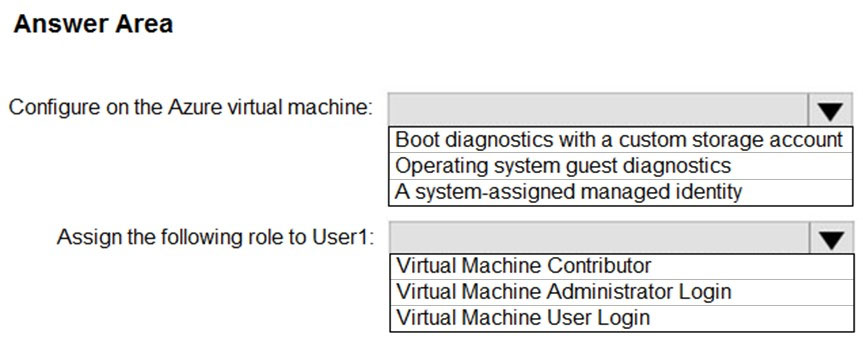
Suggested answer
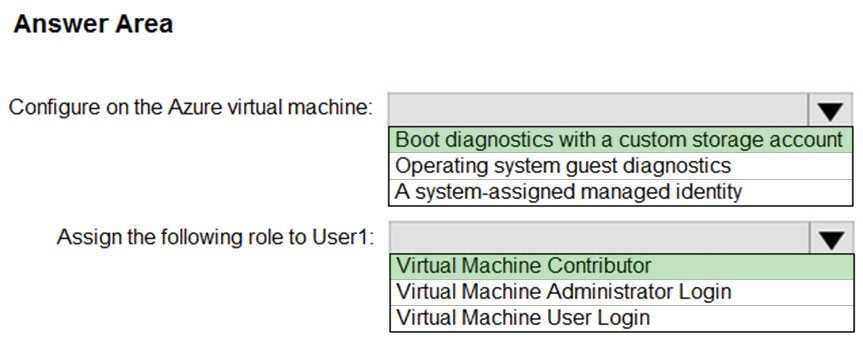
Correct answer
The suggested answer is correct
Prerequisites to access the Azure Serial Console
To access the Serial Console on your VM or virtual machine scale set instance, you will need the following:
- Boot diagnostics must be enabled for the VM
- A user account that uses password authentication must exist within the VM. You can create a password-based user with the reset password function of the VM access extension. Select Reset password from the Help section.
- The Azure account accessing Serial Console must have Virtual Machine Contributor role for both the VM and the boot diagnostics storage account
- Classic deployments aren't supported. Your VM or virtual machine scale set instance must use the Azure Resource Manager deployment model.
- Serial Console is not supported when the storage account has Allow storage account key access disabled.
sloky
Highly Voted 2 years ago
Answer is correct: https://docs.microsoft.com/en-us/troubleshoot/azure/virtual-machines/serial-console-overview
upvoted 9 times
Ksk08
Most Recent 4 weeks ago
answer is correct
upvoted 1 times
Ksk08
4 weeks ago
Answer is boot diagnostics and administrator login.
upvoted 1 times
leegend
1 year, 5 months ago
Got this question 28-5-23
upvoted 4 times
syu31svc
1 year, 8 months ago
Answer is correct From link Prerequisites to access the Azure Serial Console To access the Serial Console on your VM or virtual machine scale set instance, you will need the following: Boot diagnostics must be enabled for the VM A user account that uses password authentication must exist within the VM. You can create a password-based user with the reset password function of the VM access extension. Select Reset password from the Help section. The Azure account accessing Serial Console must have Virtual Machine Contributor role for both the VM and the boot diagnostics storage account
upvoted 3 times