
Exam
Answer confirmed
Question
You have an Azure subscription that contains the virtual networks shown in the following table.
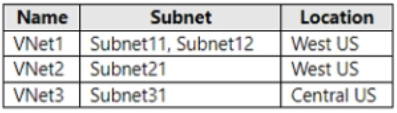
You deploy a virtual machine named VM1 that runs Windows Server. VM1 is connected to Subnet11.
You plan to add an additional network interface named NIC1 to VM1.
To which subnets can NIC1 be attached?
Proposed answer
- A. Subnet11 only
- B. Subnet12 only
- C. Subnet11 and Subnetl2 only
- D. Submet12 and Subnet21 only
- E. Subnet11, Subnet12, Subnet21, and Subnet31
Suggested answer
- C. Subnet11 and Subnetl2 only
Correct answer
The suggested answer is correct
All IP configurations on a single NIC must be associated to the same subnet. If multiple IPs on different subnets are desired, multiple NICs on a VM can be used. To learn more about multiple NICs on a VM in Azure, see Create VM with Multiple NICs.
sa66ath
Highly Voted 1 year, 8 months ago
C: is correct, it is possible to attach many NICs to the same subnet so additional NIC to subnet11 is also possible.
upvoted 9 times
Ksk08
Most Recent 3 weeks, 6 days ago
C is correct answer
upvoted 1 times
sardonique
3 months, 1 week ago
you should not attach 2 nics within the same subnet, try that in a physical switch you're going to have troubles.
upvoted 2 times
SIAMIANJI
6 months, 3 weeks ago
Selected Answer: C
Subnet21 and Subnet31 do not belong to VNet1. Thank you for pointing that out! 😅 To clarify, NIC1 can only be attached to Subnet12 within VNet1.
upvoted 2 times
Kuikz
7 months, 2 weeks ago
Selected Answer: C
C. Subnet11 and Subnetl2 only
upvoted 2 times
PapaLion
10 months ago
the best practices say that do not make sense to have 2 NIC on an Azure VM connected to the same Subnet (Subnet11) , is better to configure multiple IP addresses on the same NIC instead....so for me the correct answer is the B only Subnet12. https://learn.microsoft.com/en-us/azure/virtual-machines/windows/multiple-nics
upvoted 2 times
mohamed1999
6 months ago
but it says "CAN". you can attach to both 11 and 12
upvoted 2 times
RickySmith
10 months, 3 weeks ago
Selected Answer: C
Can be connected to any non-Bastion\Gateway Subnet in the same vnet.
upvoted 2 times
Aliabdo
1 year ago
Selected Answer: B
Answer is correct. you cant add second interface to the same subnet. VM cant be on other than one VNET.
upvoted 2 times
MattR2
5 months, 2 weeks ago
"you cant add second interface to the same subnet." yes you can. Should you? probably not. but you can do it.
upvoted 2 times
fabilo
1 year, 1 month ago
Selected Answer: C
C: is the most obvious solution for me
upvoted 1 times
afridi43
1 year, 2 months ago
Selected Answer: C
Correct Answer: C. Subnet11 and Subnetl2 only VM1 is connected to Subnet11 in VNet1. When adding NIC1 to VM1, NIC1 can be attached to subnets within the same VNet as VM1 (VNet1) because VM1 is in VNet1. So, NIC1 can be attached to: C. Subnet11 and Subnetl2 only It cannot be attached to Subnet21 in VNet2 or Subnet31 in VNet3 directly, as they are in different VNets.
upvoted 4 times
Tiago_MP
1 year, 3 months ago
Selected Answer: C
https://learn.microsoft.com/en-us/azure/virtual-machines/windows/multiple-nics C!
upvoted 2 times
fran199
1 year, 6 months ago
Selected Answer: C
C... correct answer
upvoted 4 times
phi3nix
1 year, 6 months ago
One VM can be only in one VNET! This means that only the C option is valid. You can assign VNIC to both of the subnets.
upvoted 4 times
dan2dam
1 year, 7 months ago
Note All IP configurations on a single NIC must be associated to the same subnet. If multiple IPs on different subnets are desired, multiple NICs on a VM can be used. To learn more about multiple NICs on a VM in Azure, see Create VM with Multiple NICs.
upvoted 1 times
syu31svc
1 year, 8 months ago
Selected Answer: C
https://learn.microsoft.com/en-us/azure/virtual-machines/windows/multiple-nics You can associate multiple NICs on a VM to multiple subnets, but those subnets must all reside in the same virtual network (vNet) Answer is C
upvoted 4 times
sa66ath
1 year, 8 months ago
Selected Answer: C
of course C: - it is possible to attach many NICs to the same subnet
upvoted 1 times
kbertrand
1 year, 8 months ago
Selected Answer: C
C: should be correct, as you can connect multiple NICs to the same subnet https://petri.com/configure-multiple-nics-in-an-azure-virtual-machine/
upvoted 2 times
Telekon
1 year, 9 months ago
Selected Answer: B
Multiple NICs must reside in same Vnet
upvoted 4 times