
Exam
Answer confirmed
Question
You have an Azure subscription that contains a virtual machine named VM1 as shown in the following exhibit.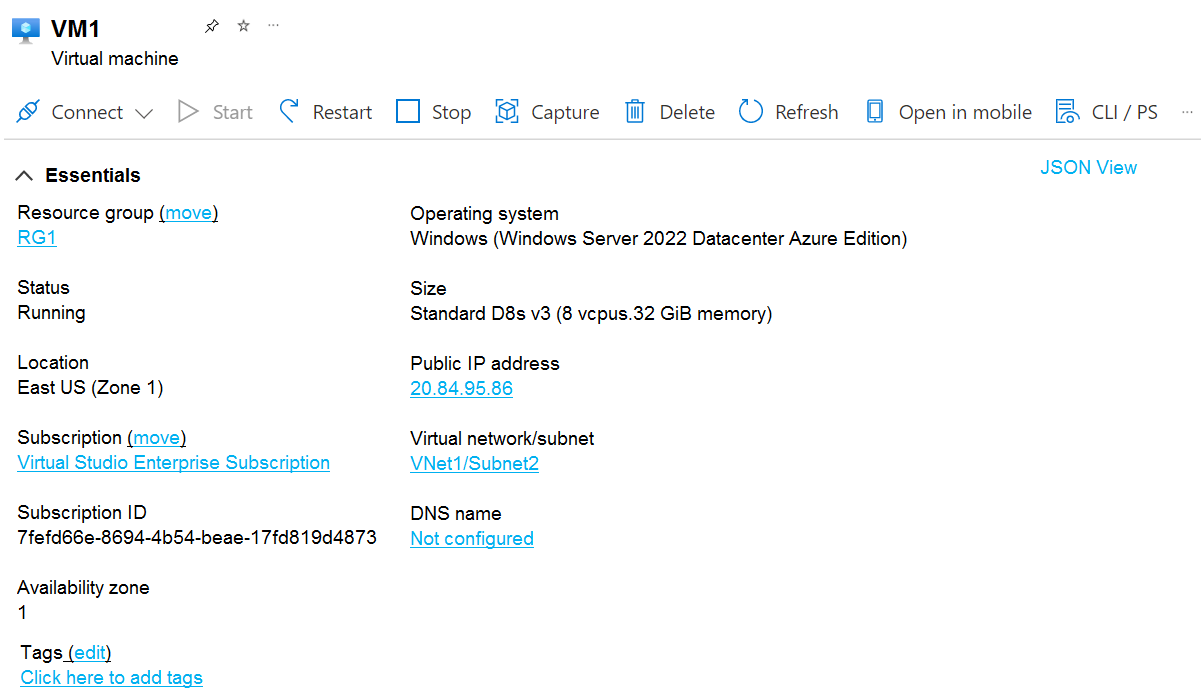
The subscription has the disks shown in the following table.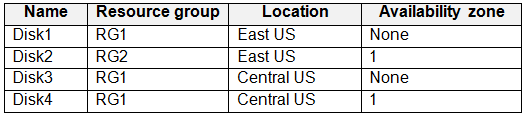
Which disks can you attach as data disks to VM1?
Proposed answer
- A. Disk2 only
- B. Disk4 only
- C. Disk1 and Disk2 only
- D. Disk2 and Disk4 only
- E. Disk1, Disk3, and Disk4 only
- F. Disk1, Disk2, Disk3, and Disk4
Suggested answer
- A (58%)
- C (42%)
Correct answer
Correct answer A. Disk2 only
Can I attach a disk to a VM in another region?
No. All managed disks, even shared disks, must be in the same region as the VM they're attaching to.
nap61
Highly Voted 1 year, 4 months ago
I have build the lab and allowed to attach only the disk in the same location + availability zone, so only disk 2, even in another RG.
upvoted 26 times
fabilo
1 year, 1 month ago
yeah it's true
upvoted 2 times
Krayzr
Most Recent 20 hours, 12 minutes ago
Selected Answer: C
its C unfortunately
upvoted 1 times
004b54b
2 months, 3 weeks ago
Selected Answer: A
Can I attach a disk to a VM in another region? No.
All managed disks, even shared disks, must be in the same region as the VM they're attaching to. (
https://learn.microsoft.com/en-us/azure/virtual-machines/faq-for-disks?tabs=azure-portal#can-i-attach-a-disk-to-a-vm-in-another-region
-)
For VMs and disks distributed across multiple availability zones, the disks and their parent VMs are respectively collocated in the same zone, which prevents multiple VMs from going down even if an entire zone experiences an outage. (
https://learn.microsoft.com/en-us/azure/virtual-machines/disks-high-availability#distribute-vms-and-disks-across-availability-zones
) So for me the correct answer is A, as Disk 3 & Disk 4 are not in same region, and if Availability zone = None for Disk 1, it's not the same zone as the VM.
upvoted 1 times
TONPL_Team
5 months, 3 weeks ago
Disk 2 only can existing attach from RG2 so Correct answer: A , tested in Lab
upvoted 2 times
SIAMIANJI
6 months, 2 weeks ago
Selected Answer: C
C is correct. Only they should be in the same region. Other parameters do not matter. Disk 1 & Disk 2
upvoted 1 times
Kuikz
7 months, 2 weeks ago
Selected Answer: A
I also tested it and i can only choose the disk in the same availability zone. Correct answer is A.
upvoted 4 times
jp01021234555
8 months, 2 weeks ago
correct answer is A. tested in Lab
upvoted 3 times
Payday123
1 year ago
Selected Answer: A
If no zone is specified for the resource it can be placed in any availability zone and this means the disk can be in a different zone then Zone1 I vote for A
upvoted 2 times
infavolante
1 year ago
Selected Answer: A
A is the correct answer
upvoted 3 times
NazerRazer
1 year, 1 month ago
Selected Answer: C
To attach data disks to VM1 in Azure, you need to consider the following factors: The disks must be in the same location (East US, Zone 1 in this case) as the virtual machine to ensure low-latency access. Azure Virtual Machines in availability zones can attach data disks that are located in the same availability zone or "None" availability zone. Disk 1 is in the same location (East US), but it has "availability zone None," which is compatible with VM1's "availability zone 1." You can attach Disk 1 to VM1. Disk 2 is in the same location (East US) and is in "availability zone 1," which is compatible with VM1's "availability zone 1." You can attach Disk 2 to VM1. C. Disk1 and Disk2 only
upvoted 3 times
mossrin
1 year, 3 months ago
Selected Answer: A
maybe A
upvoted 1 times
Joepelus
1 year, 4 months ago
Going with B because of the availability zone.
upvoted 2 times
joesmith99
1 year, 5 months ago
Selected Answer: C
As long as the location is good you can attach
upvoted 3 times