
- 10 views
Exam
Answer confirmed
Preamble
You have an Active Directory Domain Services (AD DS) domain that contains the member servers shown in the following table.
Server3 contains a data disk named Disk1 that has Data Deduplication installed. Disk1 contains the files shown in the following table.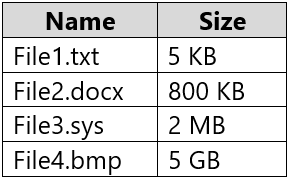
Server3 fails.
Question
You need to recover the files on Disk1.
Which files can you recover if you attach Disk1 to Server1, and which files can you recover if you attach Disk1 to Server2? To answer, select the appropriate options in the answer area.
NOTE: Each correct selection is worth one point.
Proposed answer
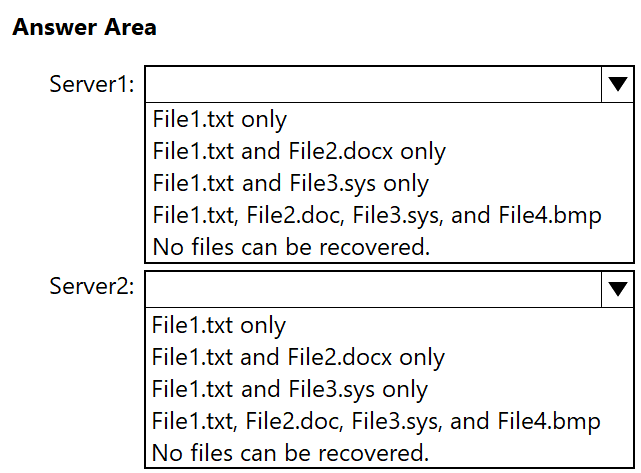
Suggested answer
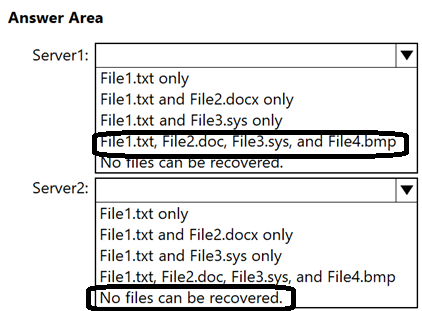
Correct answer
The suggested answer is incorrect
- Server1: - all files will be recovered
- Server2: - File1.txt is because it's size is less than 32 KB and File3.sys because it is system file (hope in this context authors implied this)
Data deduplication is supported only on the following:
- Windows Server operating systems beginning with Windows Server 2012
- NTFS data volumes
- Cluster shared volume file system (CSVFS) supporting virtual desktop infrastructure (VDI) workloads beginning with Windows Server 2012 R2
Deduplication is not supported on:
- System or boot volumes
- Remote mapped or remote mounted drives
- Cluster shared volume file system (CSVFS) for non-VDI workloads or any workloads on Windows Server 2012
- Files approaching or larger than 1 TB in size.
- Volumes approaching or larger than 64 TB in size.
Deduplication skips over the following files:
- System-state files
- Encrypted files
- Files with extended attributes
- Files whose size is less than 32 KB
- Reparse points (that are not data deduplication reparse points)
RemmyT
Highly Voted 4 months, 3 weeks ago
The file extension is not specified randomly, but with a purpose, namely to highlight the type of files. File3.sys implies from the start that it is a system file.
Server1: - File1.txt, File2.doc, File3.sys, and File4.bmp
Server2: - File1.txt and File3.sys only
File1.txt : is not deduplicated (size less than 32kb)
File3.sys : is not deduplicated (system file) Data deduplication is supported only on the following: - Windows Server operating systems beginning with Windows Server 2012 - NTFS data volumes - Cluster shared volume file system (CSVFS) supporting virtual desktop infrastructure (VDI) workloads beginning with Windows Server 2012 R2 Deduplication skips over the following files: - System-state files - Encrypted files - Files with extended attributes - Files whose size is less than 32 KB - Reparse points (that are not data deduplication reparse points)
https://learn.microsoft.com/en-us/previous-versions/windows/desktop/dedup/about-data-deduplication
upvoted 10 times
HateExamsAllTheTime
Highly Voted 1 year ago
minimum for dedup is size 32kb, File1.txt can be recovered on server2, because is not deduplicated
upvoted 10 times
Gabyc18
Most Recent 7 months, 2 weeks ago
We need more answers to this
upvoted 1 times
cj3131
9 months ago
Deduplication skips over system state files. The .sys extension is usually used for operating system files. So if they're trying to imply that File3.sys is a system file, that would be ignored by deduplication, so the answer would be Server 2: File1.txt and File3.sys?
upvoted 5 times
bpaccount
6 months, 1 week ago
Correct. option 1, all files (because of the already installed dedup feature) and option 2, file1 and file3.
upvoted 3 times