
- 10 views
Overview
Fabrikam, Inc is a manufacturing company that has a main office in New York and a branch office in Seattle.
Existing Environment
On-premises Servers
The on-premises network contains servers that run Windows Server as shown in the following table.
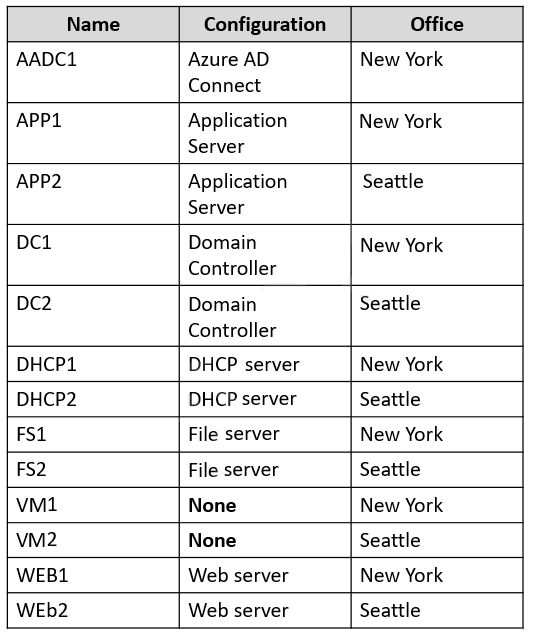
DC1 hosts all the operation master roles.
WEB1 and WEB2 run an Internet Information Services (IIS) web app named Webapp1.
On-premises Network
The New York and Seattle offices are connected by using redundant WAN links.
The client computers in each office get IP addresses from their local DHCP server.
DHCP1 contains a scope named Scope1 that has addresses for the New York office, DHCP2 contains a scope named Scope2 that has addresses for the Seattle office.
Identity Infrastructure
The network contains a single on-premises Active Directory Domain Services (AD DS) domain named corp.falbrikam.com. Currently, all the service accounts use individual domain user accounts.
All domain controllers have the DNS Server role installed and host a copy of the Active Directory integrated DNS zone of corp.fabrikam.com.
The corp.fabrikam.com AD DS domain syncs with an Azure Active Directory (Azure AD) tenant.
Group Policy Objects (GPOs)
The corp.fabrikam.com domain contains the organizational units (OUs) and custom Group Policy Objects (GPOs) shown in the following table.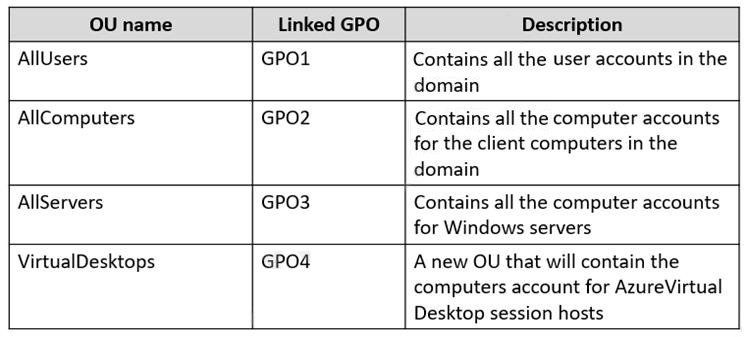
Requirements
Planned Changes
Fabrikam identifies the following planned changes:
- Create a single Azure subscription named Sub1 that will contain a single Azure virtual network named Vnet1.
- Replace the WAN links between the Seattle and New York offices by using Azure Virtual WAN and FxpressRoute. Both on premises offices will be conected to Vnet1 by using ExpressRoute.
- Create three Azure file shares named newyorkhiles, seattlefiles, and companyfiles.
- Create a domain controller named dc3.corp.fabrikam.com in Vnet1.
- Deploy an Azure Virtual Desktop host pool to Vnet1. The Azure Virtual Desktop session hosts will be hybrid Azure AD-joined.
- License all servers for Microsoft Defender for servers.
- Use Azure Policy to enforce configuration management policies on the servers in Azure and on-premises.
Networking Requirements
Fabrikam identifies the following networking requirements:
- Implement Virtual WAN and ensure that all the network traffic between the sites uses Virtual WAN. All communications must occur over ExpressRoute.
- If a DHCP server fails, ensure that the client computers can continue to receive their dynamic IP address and renew their existing lease.
- Ensure that the resources in Vnet1 can resolve the names of the on-premises servers in the corp.fabrikam.com domain.
Security Requirements
Fabrikam identifies the following security requirements:
- Apply GPO4 to the Azure Virtual Desktop session hosts. Ensure that Azure Virtual Desktop user sessions lock after being idle for 10 minutes. Users must be able to control the lockout time manually from their client computer.
- Ensure that server administrators request approval before they can establish a Remote Desktop connection to an Azure virtual machine. If the request is aproved, the connection must be established within two hours.
- Prevent user passwords from containing all or part of words that are based on the company name, such as Fab, f@br1kAm or fabr!|.
- Ensure that all instances of Webapp1 use the same service account. The password of the service account must change automatically every 30 days.
- Prevent domain controllers from directly contacting hosts on the internet.
File Sharing Requirements
You need to configure the synchronization of Azure files to meet the following requirements:
- Ensure that seattlefiles syncs to FS2.
- Ensure that newyorkfiles syncs to FS1.
- Ensure that companyfiles syncs to both FS1 and FS2.
You need to configure remote administration to meet the security requirements.
What should you use?
- A. an Azure Bastion host
- B. Azure AD Privileged Identity Management (PIM)
- C. the Remote Desktop extension for Azure Cloud Services
- D. just in time (JIT) VM access
- D. just in time (JIT) VM access
The suggested answer is correct
You can use Microsoft Defender for Cloud's just-in-time (JIT) access to protect your Azure virtual machines (VMs) from unauthorized network access. Many times firewalls contain allow rules that leave your VMs vulnerable to attack. JIT lets you allow access to your VMs only when the access is needed, on the ports needed, and for the period of time needed.
syu31svc
1 year, 8 months ago
Selected Answer: D
"Ensure that server administrators request approval before they can establish a Remote Desktop connection to an Azure virtual machine. If the request is approved, the connection must be established within two hours"
https://learn.microsoft.com/en-us/azure/defender-for-cloud/just-in-time-access-usage
JIT lets you allow access to your VMs only when the access is needed, on the ports needed, and for the period of time needed. D is correct
upvoted 2 times
johosofat
2 years ago
Selected Answer: D
This is defender for cloud now- it has more features possible - you can go to security center and add JIT now and you can also go to the vm properties and ask that way- these are the links that start down the foxhole- but im saving this for az-104
https://learn.microsoft.com/en-us/azure/defender-for-cloud/just-in-time-access-usage?tabs=jit-config-asc%2Cjit-request-asc
https://learn.microsoft.com/en-us/azure/defender-for-cloud/just-in-time-access-overview?tabs=defender-for-container-arch-aks
upvoted 2 times
kijken
2 years ago
The question is what you should use. You use PIM = B to configure jit. It's a misleading question, but D cannot be used. It's a concept in PIM
upvoted 2 times
kijken
2 years ago
I change my mind. PIM is not needed, check this demo: https://www.youtube.com/watch?v=l-geFrA73mw
upvoted 2 times
Jawad1462
2 years, 1 month ago
Selected Answer: D
Ensure that server administrators request approval before they can establish a Remote Desktop connection to an Azure virtual machine. If the request is approved, the connection must be established within two hours.
upvoted 3 times
Joystickj
2 years, 1 month ago
Selected Answer: D
With JIT VM you can request RDP access to a VM. With PIM you set RBAC roles.
upvoted 3 times
GoforIT21
2 years, 4 months ago
Selected Answer: D
JIT VM access seems to be more specifically targeted at what is needed here. (Although answer B (PIM) is bit confusing, I must admit.) See https://docs.microsoft.com/en-us/azure/defender-for-cloud/just-in-time-access-usage
for the capabilities of JIT VM access.
upvoted 2 times
nefaxto
2 years, 5 months ago
B https://docs.microsoft.com/it-it/azure/active-directory/privileged-identity-management/pim-configure
upvoted 3 times
AnonymousJhb
2 years, 4 months ago
B is correct. JIT does not require request approval. PIM requires an approval by a 3rd person before you receive elevated perms. Ensure that server administrators request approval before they can establish a Remote Desktop connection to an Azure virtual machine. If the request is approved, the connection must be established within two hours.
upvoted 1 times
lukiduc9625
2 years, 2 months ago
It looks like the JIT require request approval...
upvoted 1 times