
- 14 views
Overview
Contoso, Ltd. is a company that has a main office in Seattle and two branch offices in Los Angeles and Montreal.
Existing Environment
AD DS Environment
The network contains an on premises Active Directory Domain Services (AD DS) forest named contoso.com.
The forest contains two domains named contoso.com and canada.contoso.com.
The forest contains the domain controllers shown in the following table.
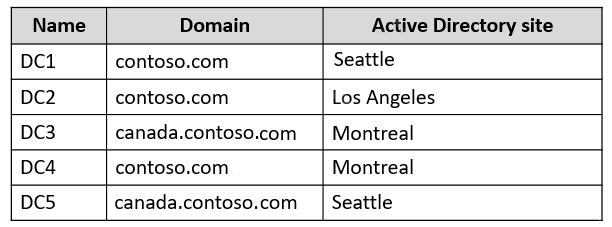
All the domain controllers are global catalog servers.
Server infrastructure
The network contains the servers shown in the following table.
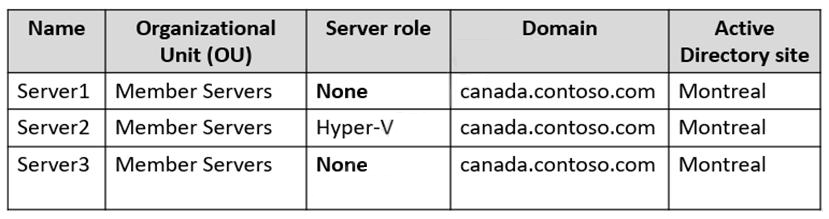
A server named Server4 runs Windows Server and is in a workgroup. Windows Firewall on Server4 uses the private profile.
Server2 hosts three virtual machines named VM1, VM2, and VM3.
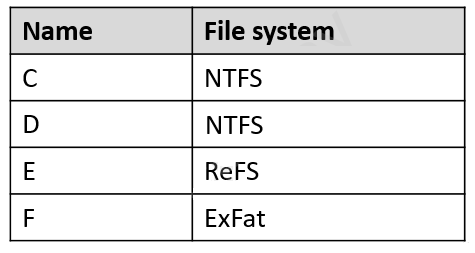
VM3 is a file server that stores data in the volumes shown in the following table.
Group Policies
The contoso.com domain has the Group Policies Objects (GPOs) shown in the following table.

Existing Identities
The forest contains the users shown in the following table.
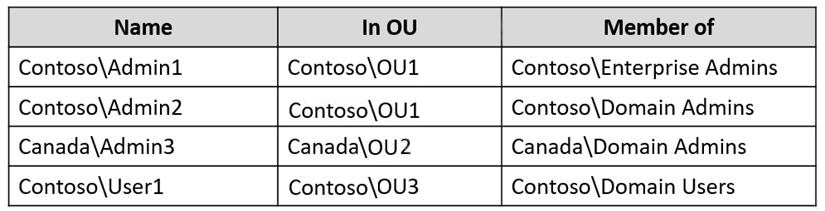
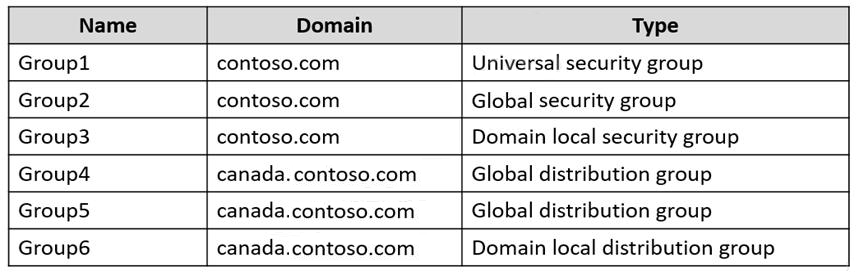
The forest contains the groups shown in the following table.
Current Problems
When an administrator signs in to the console of VM2 by using Virtual Machine Connection, and then disconnects from the session without signing out, another administrator can connect to the console session as the currently signed in user.
Requirements
Technical Requirements
Contoso identifies the following technical requirements:
- Change the replication schedule for all site links to 30 minutes.
- Promote Server1 to a domain controller in canada.contoso.com.
- Install and authorize Server3 as a DHCP server.
- Ensure that User1 can manage the membership of all the groups in Contoso\OU3.
- Ensure that you can manage Server4 from Server1 by using PowerShell remoting.
- Ensure that you can run virtual machines on VM1.
- Force users to provide credentials when they connect to VM2.
- On VM3, ensure that Data Deduplication on all volumes is possible.
You need to meet the technical requirements for VM3.
On which volumes can you enable Data Deduplication?
- A. C and D only
- B. D only
- C. C, D, E, and F
- D. D and E only
- E. D, E, and F only
- D. D and E only
The suggested answer is correct
ReFS
Data Deduplication is supported starting with Windows Server 2019.
Deduplication is not supported on:
- System or boot volumes
- Remote mapped or remote mounted drives
- Cluster shared volume file system (CSVFS) for non-VDI workloads or any workloads on Windows Server 2012
- Files approaching or larger than 1 TB in size.
- Volumes approaching or larger than 64 TB in size.
AvoKikinha
Highly Voted 2 years, 6 months ago
Selected Answer: D
Wait! ReFS - Data Deduplication is supported starting with Windows Server 2019. From: https://docs.microsoft.com/en-us/windows-server/storage/data-deduplication/interop D E
upvoted 17 times
AvoKikinha
2 years, 6 months ago
More info why is D) D and E only You can't include C (Boot drive)
https://docs.microsoft.com/en-us/previous-versions/windows/desktop/dedup/about-data-deduplication
Deduplication is not supported on: System or boot volumes Remote mapped or remote mounted drives Cluster shared volume file system (CSVFS) for non-VDI workloads or any workloads on Windows Server 2012 Files approaching or larger than 1 TB in size. Volumes approaching or larger than 64 TB in size.
upvoted 9 times
smith288
1 year, 3 months ago
Got this question on 7/31/23. Didn't have the option to choose D and E only. I even left feedback that ReFS now supports Data Deduplication at the end of the exam. So, I just chose D only.
upvoted 3 times
flim322
Most Recent 4 months, 1 week ago
Answer D. ''Data Deduplication is fully supported on Storage Spaces Direct with ReFS or NTFS-formatted volumes (mirror or parity). ReFS-formatted volumes are supported starting with Windows Server 2019. Deduplication is not supported on volumes with multiple tiers.''
upvoted 1 times
SirSanti
6 months, 3 weeks ago
Data Dedup is supported starting with Server 2019 but how do we know Server 2019 is being used here? Am I missing something?
upvoted 2 times
phi3nix
1 year, 6 months ago
Tricky question: Introduction blog post stands that OS is not supported: https://techcommunity.microsoft.com/t5/storage-at-microsoft/introduction-to-data-deduplication-in-windows-server-2012/ba-p/424257 Documentation for 2012 R2 stands that is not supported: https://learn.microsoft.com/en-us/previous-versions/windows/it-pro/windows-server-2012-R2-and-2012/hh831700(v=ws.11)?redirectedfrom=MSDN#BKMK_Step1 New documentation "Data Deduplication interoperability" doesn't mention anything about the OS drive: https://learn.microsoft.com/en-us/windows-server/storage/data-deduplication/interop ChatGPT says that it is possible but not recommended. D and E
upvoted 1 times
syu31svc
1 year, 8 months ago
Selected Answer: D
https://learn.microsoft.com/en-us/windows-server/storage/data-deduplication/interop Data Deduplication is fully supported on Storage Spaces Direct with ReFS or NTFS-formatted volumes https://learn.microsoft.com/en-us/previous-versions/windows/desktop/dedup/about-data-deduplication Deduplication is not supported on: System or boot volumes D is the answer
upvoted 1 times
AleDrinker
2 years, 6 months ago
Selected Answer: D
https://docs.microsoft.com/en-us/windows-server/storage/refs/refs-overview Functionality The following features are available with ReFS and NTFS: Feature ReFS NTFS BitLocker encryption Yes Yes Data Deduplication Yes1 Yes note 1 Available on Windows Server, version 1709 and later, Windows Server 2019 (1809) LTSC or later.
upvoted 3 times
TheUltimateHac
2 years, 6 months ago
Selected Answer: A
Answer is A. C & D Only
upvoted 1 times
prepper666
2 years, 5 months ago
Wrong. You cannot dedup the OS volume, only data volume. Thats why its called DataDedup! So many of your answers are incorrect.
upvoted 9 times
AnonymousJhb
2 years, 4 months ago
Data deduplication is not supported on boot or system drives: Deduplication was built for NTFS data volumes and it does not support boot or system drives
upvoted 2 times
WMG
2 years, 3 months ago
The kind of guys that show up at interviews with a Cert but cannot for their life answer a few simple questions about the area.
upvoted 1 times
Bojana
2 years, 6 months ago
Selected Answer: A
C and D because both of filesystems are NTFS
upvoted 1 times
Safi_jan
2 years, 6 months ago
C and D is the correct answer because both of filesystem are NTFS
upvoted 3 times
prepper666
2 years, 5 months ago
Wrong. You cannot dedup the OS volume, only data volume. Thats why its called DataDedup!
upvoted 6 times
AvoKikinha
2 years, 6 months ago
Agree! https://docs.microsoft.com/en-us/windows-server/storage/data-deduplication/understand File system The file system is the software and on-disk data structure that the operating system uses to store files on storage media. Data Deduplication is supported on NTFS formatted volumes.
upvoted 2 times
JackBauer
1 year, 1 month ago
C is boot vol. You cannot dedupe the boot vol. Common guys. Ez question.
upvoted 2 times