
- 3 views
Exam
Answer needs confirmation
Question
You have an Azure virtual machine named VM1 that runs Windows Server. VM1 has boot diagnostics configured to use a managed storage account.
You are troubleshooting connectivity issue on VM1.
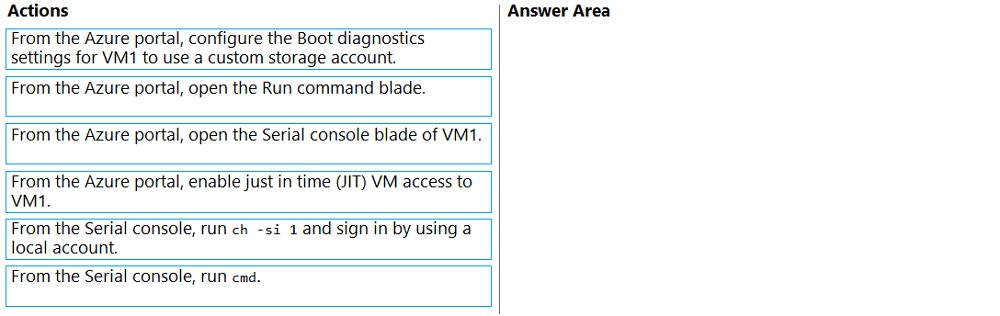
You need to run a PowerShell cmdlet on VM1 by using the Azure Serial Console.
Which four actions should you perform in sequence? To answer, move the appropriate actions from the list of actions to the answer area and arrange them in the correct order.
Select and Place:
Proposed answer
Suggested answer
Reference:
https://docs.microsoft.com/en-us/troubleshoot/azure/virtual-machines/serial-console-overview https://docs.microsoft.com/en-us/troubleshoot/azure/virtual-machines/serial-console-windows
arnitjoe
1 month, 3 weeks ago
The answers do seem weird because the requirements are to run a PowerShell cmdlet and after the last answer step, you still can't run one lol. You would still need to type powershell at the cmd prompt. Also like others have said, there isn't a requirement for a custom storage for boot diagnostics. So its unclear if this is correct but seems like making the best of what is available.
upvoted 1 times
MiMojo
2 months, 2 weeks ago
Does anyone have any justification to change the boot diagnostics settings to a Custom storage account? I am not finding any justification to do this in the question. Changing to custom appears to be an unnecessary step without any value to me.
upvoted 1 times
syu31svc
3 months, 1 week ago
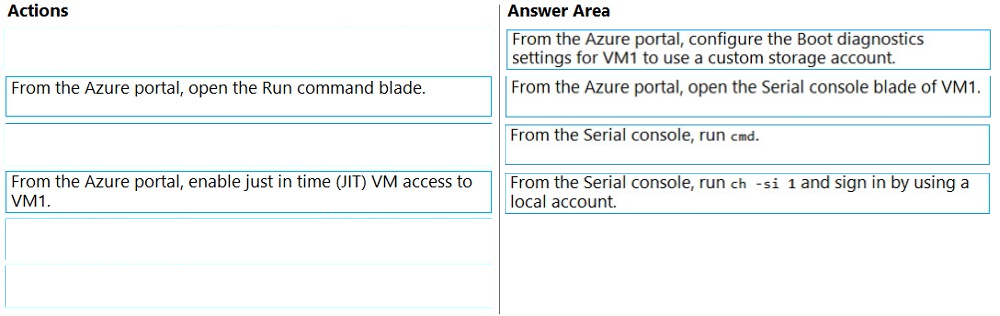
https://learn.microsoft.com/en-us/troubleshoot/azure/virtual-machines/serial-console-windows Your account that uses serial console must have the Virtual Machine Contributor role for the VM and the boot diagnostics storage account (Prerequisites) Under Use Serial Console Enter cmd to create a channel that has a CMD instance. Enter ch -si 1 or press the <esc>+<tab> shortcut keys to switch to the channel that's running the CMD instance. Answer is correct
upvoted 4 times
Leocan
7 months, 2 weeks ago
The answer given is the best four because other two are completely wrong.
upvoted 3 times
joehoesofat
8 months ago
In fact this article says that managed is the one to use with serial connection so that would make the first answer totally wrong- use managed stroage account for serial connection https://learn.microsoft.com/en-us/troubleshoot/azure/virtual-machines/serial-console-windows
upvoted 3 times
joehoesofat
8 months ago
Troubleshooting boot diagnostics- #1 - May use a CUSTOM Storage account or a managed storage account- This will likley not be one of the answers Boot diagnostics for VMs in Azure - Virtual Machines | Microsoft Learn #2 From the azure portal, open the serial console blade of vm1 #3 from the serial console run cmd #4 from the serial console run ch -si and sign in using a local account
upvoted 3 times
Jkilonzo
10 months, 3 weeks ago
https://docs.microsoft.com/en-us/troubleshoot/azure/virtual-machines/serial-console-windows
upvoted 2 times
GoforIT21
10 months ago
For the last two items: 1. Connect to the serial console. If you successfully connect, the prompt is SAC>: 2. Enter cmd to create a channel that has a CMD instance. 3. Enter ch -si 1 or press the <esc>+<tab> shortcut keys to switch to the channel that's running the CMD instance. 4. Press Enter, and then enter sign-in credentials with administrative permissions. 5. After you've entered valid credentials, the CMD instance opens. 6. To start a PowerShell instance, enter PowerShell in the CMD instance, and then press Enter. (https://learn.microsoft.com/en-us/troubleshoot/azure/virtual-machines/serial-console-windows)
upvoted 3 times
xxxxx85xx
1 year, 3 months ago
Correct Answer
upvoted 2 times