
Exam
Answer confirmed
Question
You have an Azure subscription that contains a virtual network named VNet1. Vnet1 contains three subnets named Subnet1, Subnet2, and Subnet3.
You deploy a virtual machine that has the following settings:
- Name:VM1
- Subnet: Subnet2
- Network interface name: NIC1
- Operating system: Windows Server 2022
You need to ensure that VM1 can route traffic between Subnet1 and Subnet3. The solution must minimize administrative effort.
What should you do? To answer, select the appropriate options in the answer area.
NOTE: Each correct selection is worth one point.
Proposed answer
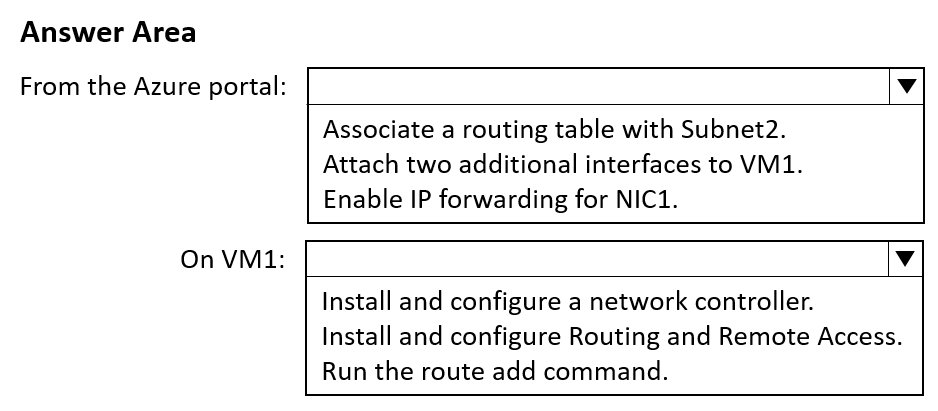
Suggested answer
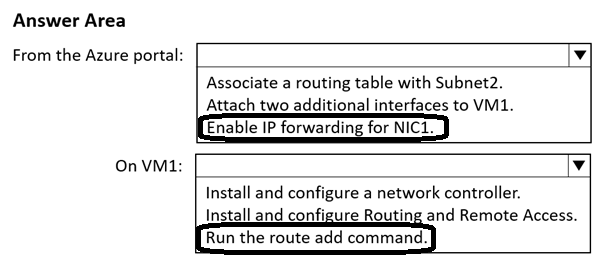
Correct answer
The suggested answer is correct
Ksk08
3 weeks, 6 days ago
To ensure that VM1 can route traffic between Subnet1 and Subnet3 with minimal administrative effort, follow these steps:
These actions will allow VM1 to act as a router between the subnets. Enabling IP forwarding allows the VM to forward traffic, and configuring Routing and Remote Access sets up the necessary routing functionality.
upvoted 1 times
Ksk08
2 days, 7 hours ago
Sorry, provided answer should be correct
upvoted 1 times
nap61
4 months, 3 weeks ago
Answers are correct! https://learn.microsoft.com/en-us/azure/virtual-network/tutorial-create-route-table-portal
upvoted 3 times
Kuikz
7 months, 2 weeks ago
Box 1: It has to be IP forwarding for NIC1 because a routing table would be assigne to subnet 1 and 3. Here i only have the option to assign it to subnet 2.
Box 2: with the step "run the route add command" they assume there is already a routing table and you are adding a route to the table.
upvoted 3 times
MR_Eliot
1 year, 2 months ago
DYOR, answer seems correct: https://learn.microsoft.com/en-us/azure/virtual-network/virtual-network-network-interface?tabs=azure-portal
upvoted 2 times