
Exam
Answer confirmed
Question
You have a Group Policy Object (GPO) named GPO1 that contains user settings only.
You plan to apply GPO1 to a global security group named Group1.
You link GPO1 to the domain, and you remove all the permissions granted to the Authenticated Users group.
You need to configure permissions for GPOI to meet the following requirements:
✑ GPO1 must apply only to the users in Group1.
✑ The solution must use the principle of least privilege.
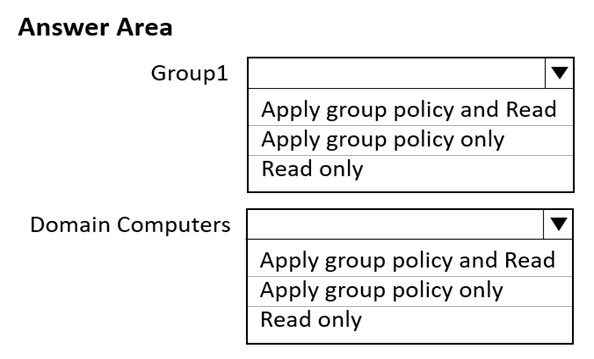
Which permissions should you grant to Group1 and the Domain Computers group? To answer, select the appropriate options in the answer area.
NOTE: Each correct selection is worth one point.
Hot Area:
Proposed answer
Suggested answer
Correct answer
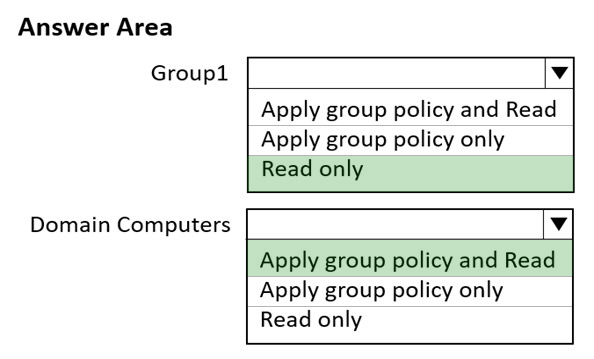
The suggested answer is absolutely wrong:
- Group1: Apply and Read
- Domain computers: Read only
Trupix
Highly Voted 2 years ago
Group1 > "Apply group policy and Read" | Domain Computers > Read only"
upvoted 26 times
JPO2021
2 months, 4 weeks ago
https://learn.microsoft.com/en-us/troubleshoot/windows-server/group-policy/cannot-apply-user-gpo-when-computer-objects-dont-have-read-permissions
upvoted 2 times
lukiduc9625
Highly Voted 2 years, 2 months ago
suggested answer is wrong: Permissions for Group1 are correct, but for Domain Computers correct permissions are "Read only". When you choose "Apply group policy only" GPO will not be applied for users - I have checked it in my lab
upvoted 5 times
lukiduc9625
2 years, 2 months ago
I'm wrong! I should write: Permissions for Group1 should be "Apply group policy and Read" and for Domain Computers correct permissions are "Read only". When you choose "Read only"for Group1 GPO will not be applied for members of Group1. You shouldn't choose "Apply group policy" specific permission for Domain Computers group, because this GPO is not designed for this group, but this group have to have Read specific permission - I have checked it in my lab
upvoted 11 times
formacaotismic
Most Recent 6 days, 9 hours ago
Group1: Apply group policy and Read For Group1, you need to grant both "Apply group policy" and "Read" permissions to ensure the GPO is applied correctly. This combination allows the users in Group1 to read the GPO settings and have them applied. Domain Computers: Read only This configuration ensures that only the users in Group1 will have the GPO applied to them, while the Domain Computers group will have the necessary read permissions to process the GPO without applying it.
upvoted 1 times
SIAMIANJI
6 months, 3 weeks ago
To meet the requirements, you should configure permissions for GPO1 as follows: Grant Apply Group Policy Permission to Group1: Grant the Apply Group Policy permission to the Group1 security group. This permission allows the members of Group1 to apply the settings within GPO1. Ensure that no other permissions are granted to Group1 on the GPO. Grant Read Permission to Domain Computers: Grant the Read permission to the Domain Computers group. This permission allows the computers in the domain to read the GPO settings but not apply them. Ensure that no other permissions are granted to Domain Computers on the GPO.
upvoted 1 times
rknichols01
10 months, 2 weeks ago
this is from Co-Pilot Therefore, to meet the requirements, you should grant the following permissions: Group1: Apply Group Policy permission only. Domain Computers: Read and Apply Group Policy permissions 1.
upvoted 2 times
MR_Eliot
1 year, 2 months ago
Answers are as follows: Group1: Apply & Read Computer Group: Read
upvoted 3 times
MR_Eliot
1 year, 2 months ago
Group policy requires each computer account to have permission to read GPO data from a domain controller for User Group Policy settings to be successfully applied.
upvoted 1 times
amartinsalves
1 year, 3 months ago
I believe the required permission for Domain Computer is "Read Only" and maybe the explanation is in this article: https://support.microsoft.com/en-us/topic/ms16-072-security-update-for-group-policy -june-14-2016-7570425d-d460-3003-b2ac-a464c874725d
upvoted 1 times
syu31svc
1 year, 8 months ago
https://www.grouppolicy.biz/2010/05/how-to-apply-a-group-policy-object-to-individual-users-or-computer/ Group 1 should be read and apply Computers read only since "must apply only to the users in Group1"
upvoted 2 times
elmertar
1 year, 10 months ago
Group 1 => apply and read Domain computers (imho better to use authenticated users) => read
upvoted 4 times
johosofat
2 years ago
I dont like this answer at all- this question says the policy must apply to the users not the computer- the computers would need to be ready and the group1 would need to be apply- that is what i am going with - https://www.freepdfdumps.com/Microsoft.AZ-800.v2022-08-15.q92.html?p=2#
upvoted 3 times
ProfileX
2 years, 2 months ago
This wasn't the case in the past, so on older / unpatched systems this might not be correct. But a change was made to improve security, "Prior to the update, domain joined computers used the user's security context to make the connection and retrieve the policies. After the update is applied, domain joined computers will now retrieve all policies using the computer security context" https://techcommunity.microsoft.com/t5/core-infrastructure-and-security/who-broke-my-user-gpos/ba-p/258781
upvoted 3 times