
Exam
Answer confirmed
Question
You have an on-premises DNS server named Server1 that runs Windows Server. Server1 hosts a DNS zone named fabnkam.com.
You have an Azure subscription that contains the resources shown in the following table.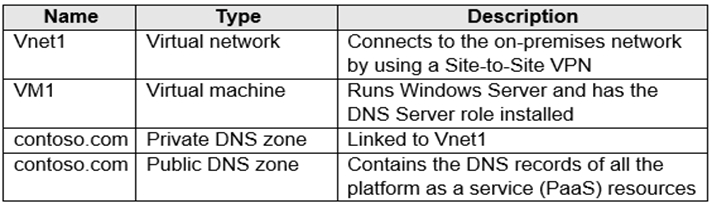
You need to design a solution that will automatically resolve the names of any PaaS resources for which you configure private endpoints in Vnet1.
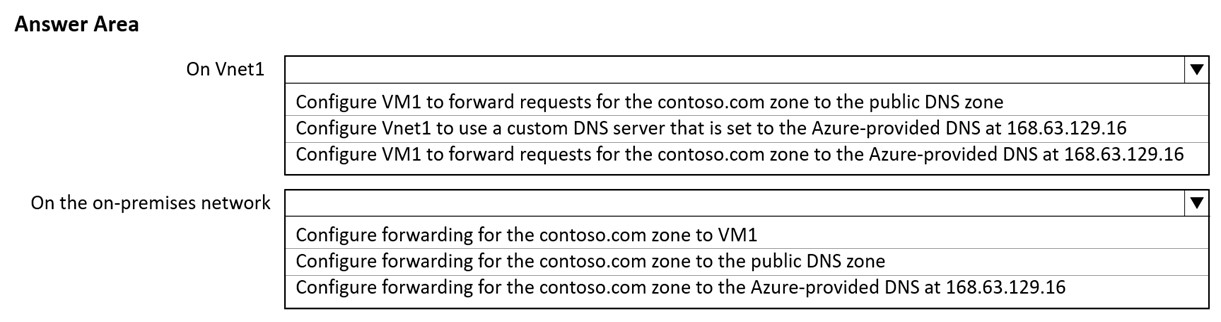
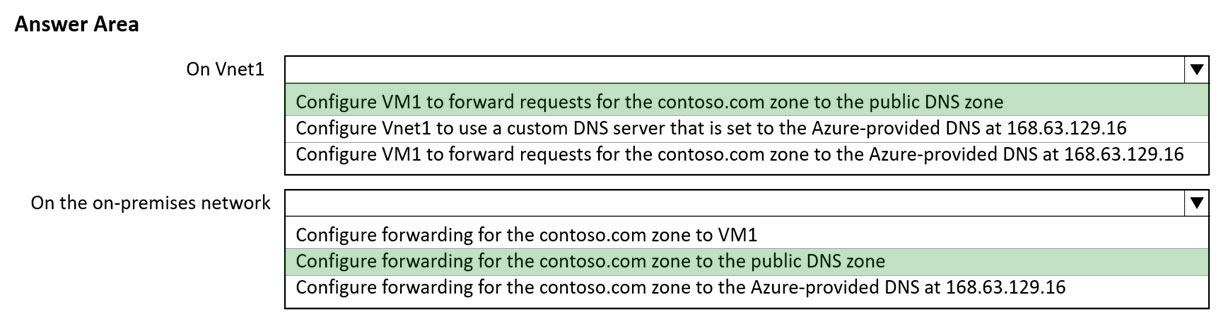
How should you configure the name resolution? To answer, select the appropriate options in the answer area.
NOTE: Each correct selection is worth one point.
Proposed answer
Correct answer
- Configure VM1 to fordward request for the contoso.com zone to the Azure-provided DNS at 168.63.129.16
- Configure fordwarding for the contodo.com zone to VM1
[Removed]
Highly Voted 2 years, 1 month ago
I think the correct answer is: -Configure VM1 to fordward request for the contoso.com zone to the Azure-provided DNS al 168.63.129.16 -Configure fordwarding for the contodo.com zone to VM1 The public DNS zone don´t have nothing to do here. https://learn.microsoft.com/en-us/azure/private-link/private-endpoint-dns#on-premises-workloads-using-a-dns-forwarder
upvoted 22 times
Trupix
Highly Voted 2 years ago
- Configure VM1 to fordward request for the contoso.com zone to the Azure-provided DNS at 168.63.129.16 - Configure fordwarding for the contodo.com zone to VM1
upvoted 16 times
dolphan904
Most Recent 11 months, 1 week ago
SINCE PRIVATE ENDPOINTS HAVE BEEN CREATED FOR THE PAAS RESOURCES THE PUBLIC DNS RECORDS IN THE PUBLIC DNS ZONE ARE NO LONGER USEFUL. THE ON-PREM USERS MUST NOW ACCESS THEM INTERNALLY VIA SOME TYPE OF PRIVATE CONNECTION LIKE VPN OR EXPRESS ROUTE. IN ORDER FOR THEM TO DO SO THEY MUST FORWARD THEIR REQUESTS TO A THE VM IN AZURE THAT HAS DNS INSTALLED WHICH IN TURN WILL ANSWER THEIR QUERIES N FORWARD THEM OUT TO AZURE DNS. CURRENTLY THIS IS THE ONLY WAY TO FORWARD FROM ON-PREM TO AZURE DNS. IT CANNOT BE DONE DIRECTLY. AN AZURE VM WITH DNS INSTALLED MUST BE AVAILABLE TO FORWARD TO AZURE DNS AFTER OM-PREM HAS FORWARDED TO IT. -ON ON-PREM FORWARD TO VM1 >IN AZURE FORWARD TO AZURE DNS WHICH WILL BE HOSTING THE NEWLY ADDED RECORDS FOR THE NEWLY ADDED PRIVATE ENDPOINTS
upvoted 2 times
NazerRazer
1 year ago
On Vnet1: Configure VM1 to forward requests for the contoso.com zone to the public DNS zone: This choice ensures that VM1 in Vnet1 forwards DNS requests for the contoso.com zone to the public DNS zone. Since the public DNS zone contains the DNS records of all the platform as a service (PaaS) resources, it allows VM1 to resolve names for these PaaS resources. On the on-premises network: Configure forwarding for the contoso.com zone to VM1: This choice sets up forwarding for the contoso.com zone on your on-premises DNS server (Server1) to VM1 in Vnet1. It means that DNS requests originating from your on-premises network for names in the contoso.com zone will be forwarded to VM1 for resolution. VM1 can then use its DNS forwarding configuration to resolve names for PaaS resources using the public DNS zone. These selections ensure that both Vnet1 and the on-premises network can resolve names for PaaS resources with private endpoints by forwarding DNS requests to the appropriate DNS servers that can resolve those names.
upvoted 1 times
dolphan904
11 months, 1 week ago
PRIVATE ENDPOINT REMOVES ACCESSIBILITY TO THE PAAS RESOURCES VIA PUBLIC IPs SO THEREFORE PUBLIC DNS RECORDS ARE USEFUL.
upvoted 1 times
ahenriquez02
1 year, 4 months ago
For on-premises workloads to resolve the FQDN of a private endpoint, use a DNS forwarder to resolve the Azure service public DNS zone in Azure. A DNS forwarder is a Virtual Machine running on the Virtual Network linked to the Private DNS Zone that can proxy DNS queries coming from other Virtual Networks or from on-premises. This is required as the query must be originated from the Virtual Network to Azure DNS. A few options for DNS proxies are: Windows running DNS services, Linux running DNS services, Azure Firewall. The following scenario is for an on-premises network that has a DNS forwarder in Azure. This forwarder resolves DNS queries via a server-level forwarder to the Azure provided DNS 168.63.129.16.
upvoted 3 times
phi3nix
1 year, 6 months ago
I am not sure what this answer is, but I know that MS tells you not to set up any network configuration inside VM. Everything should be done from Azure Portal (setup static IP on VNIC) and DNS should be set up on VNET. MS always test for best practices.
upvoted 2 times
syu31svc
1 year, 8 months ago
https://learn.microsoft.com/en-us/azure/private-link/media/private-endpoint-dns/on-premises-using-azure-dns.png Vnet1 to have VM1 forward request for the contoso.com zone to the Azure-provided DNS at 168.63.129.16 On prem network Configure forwarding for the contoso.com zone to VM1
upvoted 4 times
chadamantium
1 year, 9 months ago
Because it specifies "Private Endpoints in VNet1", it is assumed that it only needs to resolve resources within that VNet and would use the VNet's private DNS zone. Configure VM1 to forward contoso.com requests to Azure provided DNS, then configure forwarding to VM1 on-prem.
upvoted 2 times
empee1977
1 year, 10 months ago
The answer is correct : On vnet1, configure VM1 to forward requests for the contoso.com zone to the public DNS zone. On the on-premises network, configure forwarding for the contoso.com zone to VM1. This solution uses the public DNS zone to resolve the names of PaaS resources and the forwarding on the on-premises network to forward the requests to the VM1 which is connected to the Vnet1 and has the DNS server role installed, this will ensure that the names of any PaaS resources with private endpoints in Vnet1 are automatically resolved.
upvoted 4 times
ant_12
1 year, 10 months ago
Configure on-prem DNS to forward constoso.com to Azure VM (DNS). Configure Azure VM (DNS) to forward to Azure public DNS forwarders.
upvoted 2 times