
- 6 переглядів
Overview
Contoso, Ltd. is a company that has a main office in Seattle and two branch offices in Los Angeles and Montreal.
Existing Environment
AD DS Environment
The network contains an on premises Active Directory Domain Services (AD DS) forest named contoso.com. The forest contains two domains named contoso.com and canada.contoso.com.
The forest contains the domain controllers shown in the following table.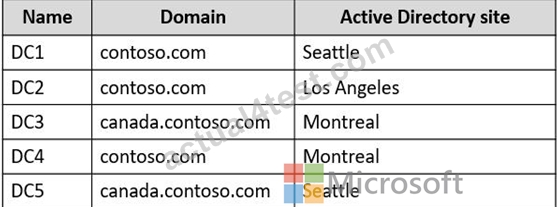
All the domain controllers are global catalog servers.
Server infrastructure
The network contains the servers shown in the following table.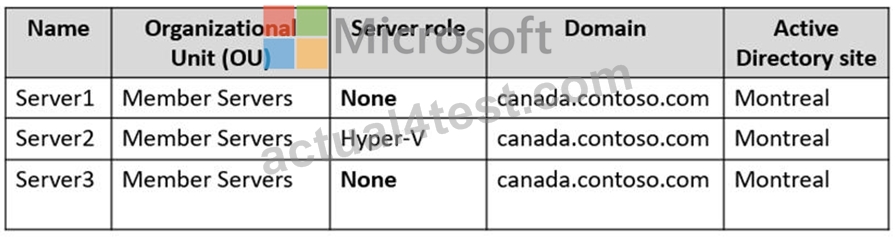
A server named Server4 runs Windows Server and is in a workgroup. Windows Firewall on Server4 uses the private profile.
Server2 hosts three virtual machines named VM1, VM2, and VM3.
VM3 is a file server that stores data in the volumes shown in the following table.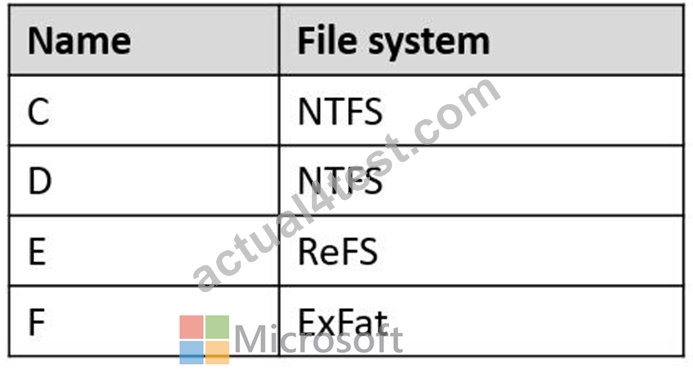
Group Policies
The contoso.com domain has the Group Policies Objects (GPOs) shown in the following table.
Existing Identities
The forest contains the users shown in the following table.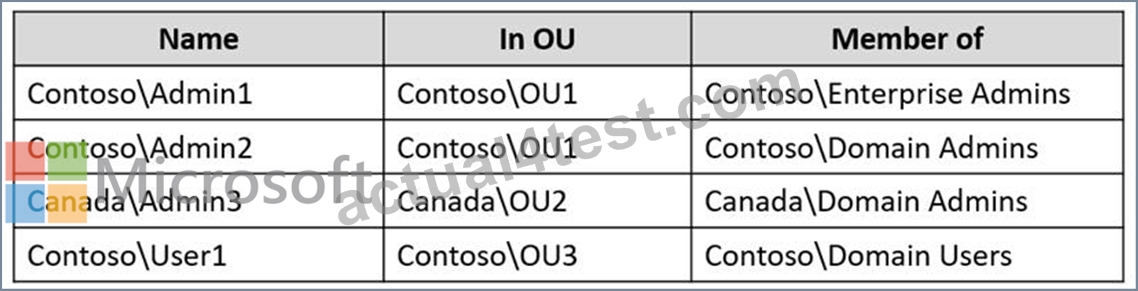
The forest contains the groups shown in the following table.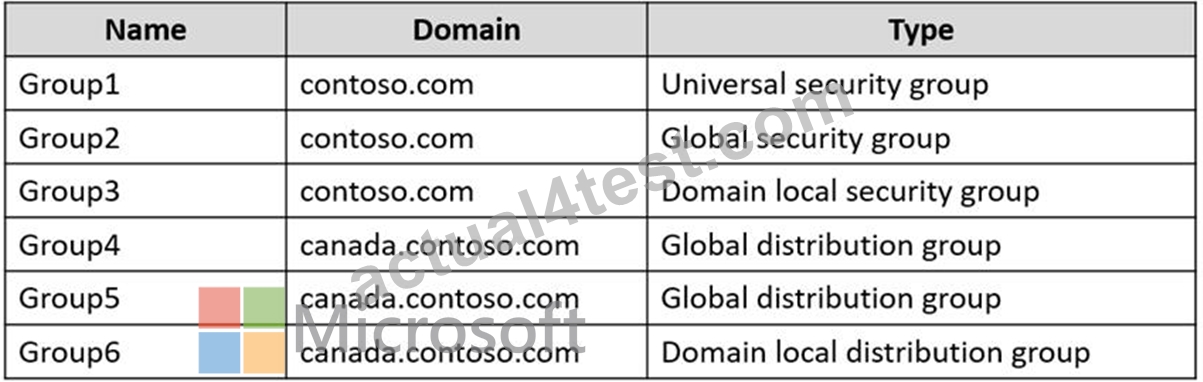
Current Problems
When an administrator signs in to the console of VM2 by using Virtual Machine Connection, and then disconnects from the session without signing out, another administrator can connect to the console session as the currently signed in user.
Requirements
Technical Requirements
Contoso identifies the following technical requirements:
Change the replication schedule for all site links to 30 minutes.
Promote Server1 to a domain controller in canada.contoso.com.
Install and authorize Server3 as a DHCP server.
Ensure that User1 can manage the membership of all the groups in Contoso\OU3.
Ensure that you can manage Server4 from Server1 by using PowerShell remoting.
Ensure that you can run virtual machines on VM1.
Force users to provide credentials when they connect to VM2.
On VM3, ensure that Data Deduplication on all volumes is possible.
Question
Hotspot Question
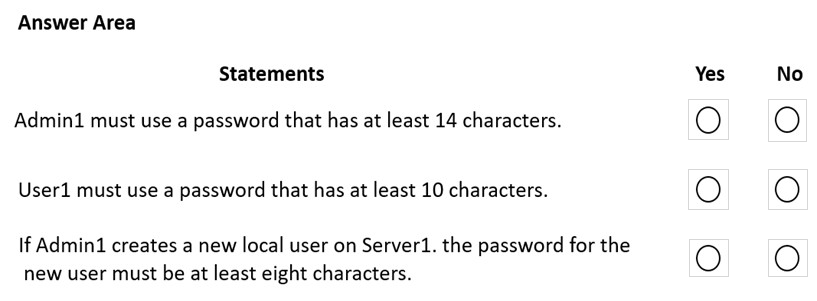
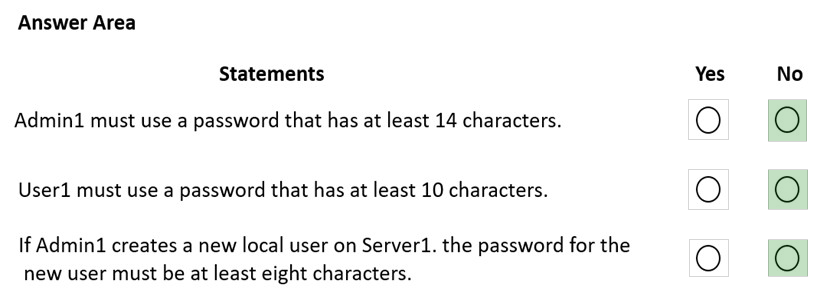
For each of the following statements, select Yes if the statement is true. Otherwise, select No.
NOTE: Each correct selection is worth one point.
The suggested answer is incorrect
- N - (due to Default Domain Policy minimum 10 characters)
- Y - (due to Default Domain Policy minimum 10 characters)
- N - (due to Default Domain Policy minimum 10 characters)
Password policy applied only once in default domain policy. If you need to specify separate password policy you should use Fine Grained Password Policies
Rel2002
Highly Voted 2 years, 2 months ago
I am confused... I thought that the only place where you set the password policies is the default domain policy. And is applicable for all users. If you want to refine the password policies you can use Fine Grained Password policy. This should be enabled for specific users and groups. (NO OU's) So that means the answers should be: NYN So
upvoted 25 times
Leocan
2 years ago
You're right. The password settings in a group policy object (GPO) are applied at the domain level only. If you have multiple organizational units (OU or departments) or groups, you cannot enforce password settings at the OU or group level. That’s why the fine-grained policy comes in.
https://blogs.manageengine.com/corporate/general/2017/01/13/microsoft-password-policies-gpo-based-vs-fine-grained-policies.html
upvoted 6 times
MarkusSan
1 year, 11 months ago
i think you're right! Password policy can only be changed in the efault domain policy, which needs to apply on the DC with the PDC emulator role http://woshub.com/password-policy-active-directory/
upvoted 6 times
lukiduc9625
Highly Voted 2 years, 2 months ago
Box1: No - Admin1 is a domain user, thus only password settings which are applied on DCs will work in this case. From given GPOs only Default Domain Policy are applied on DCs, so minimum passwords length = 10 -> Admin1 does not have to use longer password Box2: Yes - User1 is a domain user too so we have same situation as above: minimum passwords length = 10 -> User1 must use a password that has at least 10 characters Box3: Password settings for local users on Server1 are comming from GPO which is applied to Server1. Server1 is in OU=Member Servers. OU is linked with GPO2 thus local users on Server1 must use a password that has at least 8 characters
upvoted 8 times
lukiduc9625
2 years, 2 months ago
I forgot to add: Box3: Yes
upvoted 5 times
ProfileX
2 years, 2 months ago
Maybe it's N Y N I agree with Admin1 & User1, but Server1 is being promoted to a DC so it will probably get moved to the Domain Controllers OU, and no longer get GPO from Member Servers
upvoted 1 times
Leocan
2 years ago
It's a trick. If you create a new user account before server1 is promoted, GPO2 applies. And you cannot create a "local" user after server1 is promoted. So I prefer "Yes."
upvoted 2 times
Leocan
2 years ago
Correction: NYN. not because Server1 is being promoted to a DC. The password settings in a group policy object (GPO) are applied at the domain level only. If you have multiple organizational units (OU or departments) or groups, you cannot enforce password settings at the OU or group level. That’s why the fine-grained policy comes in. https://blogs.manageengine.com/corporate/general/2017/01/13/microsoft-password-policies-gpo-based-vs-fine-grained-policies.html
upvoted 1 times
SwissGuy
1 year, 10 months ago
Basic stuff - GPO's are applied in the order Local, Site, Domain, OU. Local policy password length defaults to 8, but this is irrelevant because Server1 is in the domain, so it gets Default Domain policy. Point 1 - password settings for anything that's in a domain can only be set in the Default Domain Policy. Trying to set different lengths at a lower level is a nice idea but simply does not work. Default Domain Policy states 10 character passwords, so Admin1/User1 get that setting. Point 2 - if there's a need for (say) admins to have longer passwords, you need fine-grained password policies, as others here have pointed out. This is the only way! So N, Y, N.
upvoted 7 times
neilkraftmann
Most Recent 3 months, 1 week ago
Had this on my exam recently.
upvoted 1 times
syu31svc
1 year, 8 months ago
You can only have one password policy in AD and that is the default domain policy https://learn.microsoft.com/en-us/windows-server/identity/ad-ds/get-started/adac/introduction-to-active-directory-administrative-center-enhancements--level-100- You can use fine-grained password policies to specify multiple password policies within a single domain and apply different restrictions for password and account lockout policies to different sets of users in a domain Answer is No Yes No
upvoted 3 times
raulgar
1 year, 8 months ago
NYN You only can have more than 1 policy for password if you are using Policy Granular, so if you have 1 policy for password at domain level, the others doesn't do nothing. So 1 and 2 question is No.The 3 question is about local user, so is N
upvoted 2 times
BJack
1 year, 9 months ago
3. should be Yes. The GPO won't apply to Domain Users but it will apply to Local Users and that's what the question refers to.
upvoted 2 times
Goofer
1 year, 10 months ago
Yes - Admin1 in OU1 = GPO1 = 14 (GPO1 overwrites Default Domain Policy) Yes - NO GPO1 or GPO2 = Default Domain Policy = 10 No - New local User - Domain Policies not working - Need Local Policy = No password policy
upvoted 5 times
johosofat
2 years ago
Wow this is all mixed up. -- ok simple talk - there is some basic information here we cant change - Admin1 and User 1 both have Password policies set in stone- so it Y and Y for the first 2. Only Default Password policy is applied to DC? LOL Admin1 is a domain user? LOL - Ok so any way Yes , yes and the last one would be Y as well accept for the fact that that server is becoming a DC -- so my bet is this is the final : Y Y N The last one is up to your interpretation - its in the member servers ou unless it becomes a DC- then it wont be and that GPO would not apply. Good luck all
upvoted 5 times