
- 8 переглядів
Your network contains an Active Directory Domain Services (AD DS) domain. The domain contains a server named Server1 that runs Windows Server.
You run Get-BitLockerVolume -MountPoint C,D | fl *, which generates the following output.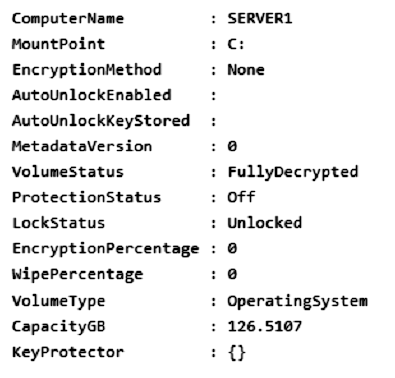
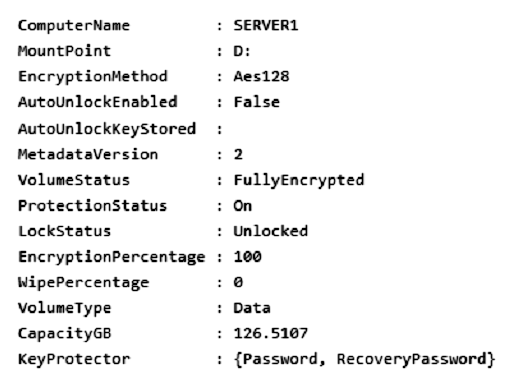
You need to ensure that volume D will be unlocked automatically when Server1 restarts.
How should you complete the command? To answer, select the appropriate options in the answer area.
NOTE: Each correct selection is worth one point.


Box 1: Add-BitLockerKeyProtector
From the exhibit we see for volume D that AutoUnlockEnabled is False, and AutoUnlockKeyStored is empty.
The Add-BitLockerKeyProtector cmdlet adds a protector for the volume key of the volume protected with BitLocker Drive Encryption.
Example: The following example adds an ADAccountOrGroup protector to the previously encrypted operating system volume using the SID of the account:
Add-BitLockerKeyProtector C: -ADAccountOrGroupProtector -ADAccountOrGroup S-1-5-21-3651336348-8937238915-291003330-500
Active Directory-based protectors are normally used to unlock Failover Cluster enabled volumes.
Box 2: Service -
The -Service parameter indicates that the system account for this computer unlocks the encrypted volume.
Add-BitLockerKeyProtector syntax with use of the ADAccountOrGroupProtector parameter:
Add-BitLockerKeyProtector -
[-MountPoint] <String[]>
[-ADAccountOrGroupProtector]
[-ADAccountOrGroup] <String>
[-Service]
[-WhatIf]
[-Confirm]
[<CommonParameters>]
Incorrect:
* Enable-BitLockerAutoUnlock
The Enable-BitLockerAutoUnlock cmdlet enables automatic unlocking for a volume protected by BitLocker Disk Encryption.
The command has no -ADAccountOrGroupProtector parameter.
Syntax:
Enable-BitLockerAutoUnlock -
[-MountPoint] <String[]>
[-WhatIf]
[-Confirm]
[<CommonParameters>]
* The Clear-BitLockerAutoUnlock cmdlet removes all automatic unlocking keys used by BitLocker Drive Encryption. BitLocker stores these keys for the fixed data drives of a system on a volume that hosts a BitLocker-enabled operating system volume so that it can automatically unlock the fixed and removable data volumes in a system. This makes it easier for users to access data volumes.
Syntax: Clear-BitLockerAutoUnlock []
Reference:
https://docs.microsoft.com/en-us/windows/security/information-protection/bitlocker/bitlocker-use-bitlocker-drive-encryption-tools-to-manage-bitlocker https://docs.microsoft.com/en-us/powershell/module/bitlocker/add-bitlockerkeyprotector
starseed
3 months ago
Correct Answer
upvoted 1 times
syu31svc
1 year, 7 months ago
https://learn.microsoft.com/en-us/powershell/module/bitlocker/add-bitlockerkeyprotector?view=windowsserver2022-ps -Service Indicates that the system account for this computer unlocks the encrypted volume. Answer is right
upvoted 2 times
SJHCI
1 year, 8 months ago
correct
upvoted 3 times
SJHCI
1 year, 8 months ago
https://learn.microsoft.com/en-us/powershell/module/bitlocker/add-bitlockerkeyprotector?view=windowsserver2022-ps
upvoted 3 times