
- 8 переглядів
Your network contains an Active Directory domain named contoso.com. The domain contains group managed service accounts (gMSAs). You have a server named Server1 that runs Windows Server and is in a workgroup. Server1 hosts Windows containers.
You need to ensure that the Windows containers can authenticate to contoso.com.
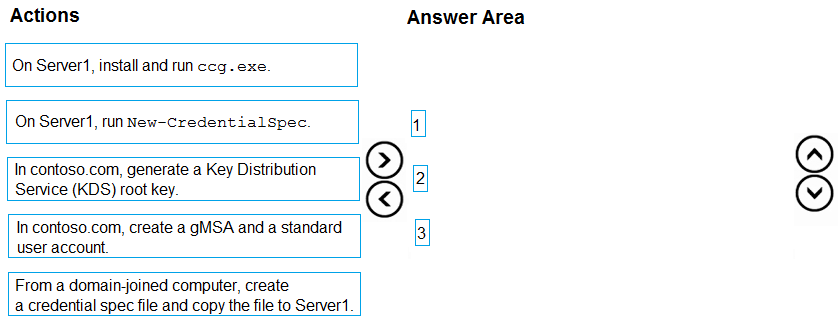
Which three actions should you perform in sequence? To answer, move the appropriate actions from the list of actions to the answer area and arrange them in the correct order.
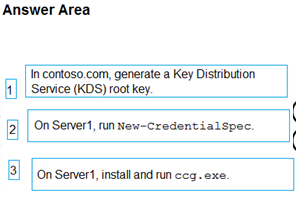
The suggested answer is incorrect
In the question mentioned that:
The domain contains group managed service accounts (gMSAs)
So there is no need to run cmdlet Add-KdsRootKey
When using gMSA for containers with non-domain-joined hosts, instead of adding container hosts to the
WebApp01Hostssecurity group, create and add a standard user account.# Create the security group New-ADGroup # Create the gMSA New-ADServiceAccount # Create the standard user account. This account information needs to be stored in a secret store and will be retrieved by the ccg.exe hosted plug-in to retrieve the gMSA password. Replace 'StandardUser01' and 'p@ssw0rd' with a unique username and password. We recommend using a random, long, machine-generated password. New-ADUser # Add your container hosts to the security group Add-ADGroupMember
Install CCG
When using gMSA for Windows containers on non-domain-joined container hosts, each container host must have a plug-in for ccg.exe installed which will be used to retrieve the portable user account and credentials specified in the previous step. Plug-ins are unique to the secret store used to protect the portable user account credentials. For example, different plug-ins would be needed to store account credentials in Azure Key Vault versus in a Kubernetes secret store.
Windows does not currently offer a built-in, default plug-in. Installation instructions for plug-ins will be implementation specific. For more information on creating and registering plug-ins for ccg.exe, see ICcgDomainAuthCredentials interface.
And then run New-CredentialSpec to create the new credential spec file
skycrap
Highly Voted 1 year, 5 months ago
I think: Create a gMSA and a standard user account From a domain-joined computer, cerate a credential spec file and copy the file to Server1 On Server1, install and run ccg.exe https://learn.microsoft.com/en-us/virtualization/windowscontainers/manage-containers/manage-serviceaccounts#use-case-for-creating-gmsa-account-for-non-domain-joined-container-hosts
upvoted 27 times
Tiago_MP
1 year, 3 months ago
You nailed it! Nothing to add!
upvoted 4 times
MR_Eliot
1 year, 2 months ago
I agree
upvoted 1 times
Dools
12 months ago
Your comment is correct From the MS doco. The credential spec file is created using the CredentialSpec PowerShell module on a domain-joined machine.
upvoted 3 times
albert_oc
Most Recent 2 months, 3 weeks ago
As per Copilot: To ensure that the Windows containers on Server1 can authenticate to contoso.com, follow these steps in sequence: 1. In contoso.com, generate a Key Distribution Service (KDS) root key: This is necessary to create group Managed Service Accounts (gMSAs). 2. In contoso.com, create a gMSA and a standard user account: This will provide the necessary accounts for authentication. 3. From a domain-joined computer, create a credential spec file and copy the file to Server1: This file will be used by the containers to authenticate using the gMSA12. https://learn.microsoft.com/en-us/virtualization/windowscontainers/manage-containers/gmsa-run-container https://learn.microsoft.com/en-us/virtualization/windowscontainers/manage-containers/manage-serviceaccounts
upvoted 1 times
rknichols01
10 months, 3 weeks ago
the kds key is already created, because there are already gMSA accounts. 1) create a new gMSA account 2) from a domain joined computer create a credential spec file and copy to server 1. this can only be created from a domain joined computer. 3) run ccg.exe using the credentials file.
upvoted 4 times
Bolo92
11 months, 4 weeks ago
valid 27.11.23
upvoted 4 times
Jothar
1 year ago
Server 1 is NOT on the domain so it can't run new-credentialspec. https://www.fearofoblivion.com/running-a-windows-container-under-gmsa So that can be rules out.
upvoted 1 times
NazerRazer
1 year, 1 month ago
To enable Windows containers hosted on Server1 to authenticate to contoso.com using group Managed Service Accounts (gMSAs), you should perform the following actions in sequence:
upvoted 1 times
Burkidur
11 months ago
It says that the domain ALREADY contains gMSAs. That means KDC was already created.
upvoted 3 times
NazerRazer
1 year, 1 month ago
The other answers are incorrect for the following reasons: On Server1, install and run ccg.exe: This action is not needed to set up gMSA-based authentication for Windows containers. The "ccg.exe" tool (Container Credential Guard) is related to credential protection and is not directly involved in the process of configuring gMSAs. From a domain-joined computer, create a credential spec file and copy the file to Server1: While creating a credential spec file is part of the process, it should be performed on Server1, not on a domain-joined computer.
The correct sequence of actions involves
creating the credential spec file on Server1 after the necessary gMSA and KDS root key have been set up in the domain . Copying the file to Server1 is typically part of the final steps in configuring the container for gMSA-based authentication.
upvoted 3 times