
- 1 перегляд
Exam
Answer needs confirmation
Question
You have an on-premises IIS web server that hosts a web app named App1.
You plan to migrate App1 to a container and run the container in Azure.
You need to perform the following tasks:
• Export App1 to a ZIP file.
• Create a container image based on App1.
The solution must minimize administrative effort.
Which tool should you use for each task? To answer, drag the appropriate tools to the correct tasks. Each tool may be used once, more than once, or not at all. You may need to drag the split bar between panes or scroll to view content.
NOTE: Each correct selection is worth one point.
Proposed answer
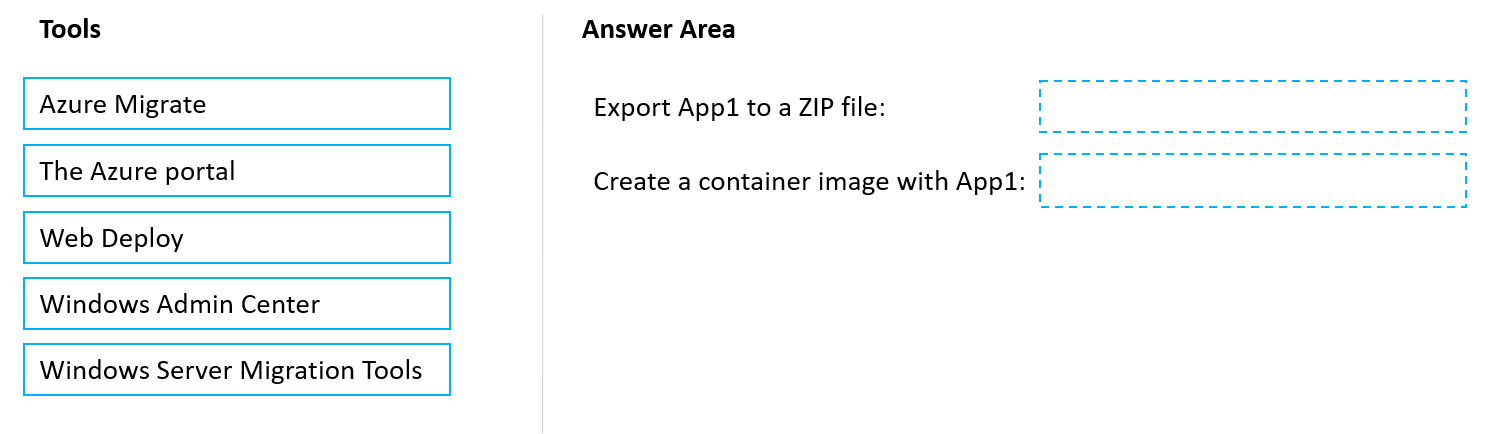
Suggested answer
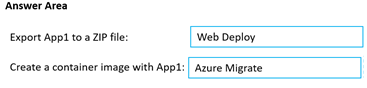
windowsmodulesinstallerworker
Highly Voted 1 year, 1 month ago
web deploy and windows admin center https://techcommunity.microsoft.com/t5/iis-support-blog/how-to-migrate-a-website-using-web-deploy/ba-p/852244 https://learn.microsoft.com/en-us/virtualization/windowscontainers/wac-tooling/wac-images
upvoted 8 times
starseed
Most Recent 4 months, 2 weeks ago
Box 1: Web deploy Box 2: Windows Admin Center
upvoted 1 times
SanMan_NZ
11 months ago
Answer stated is correct. here is a link to a video demo by MS Azure Migrate team where they use Azure Migrate to create a container image : https://techcommunity.microsoft.com/t5/containers/a-closer-look-into-azure-migrate-app-containerization/ba-p/2543797
upvoted 1 times
Kuikz
8 months, 1 week ago
According to the video provided it is a nice and simple way to migrate Apps with Azure Migrate but in no step they created/exported the App to a ZIP file and then used it to build the image. That is why i also say Box 1: Web deploy Box 2: Windows Admin Center https://learn.microsoft.com/en-us/virtualization/windowscontainers/wac-tooling/wac-images IIS web application/Web Deploy (exported Zip file): Use this option to create a container image from the artifacts exported from a running server. You can use Web Deploy to export the application into a Zip file and then use Windows Admin Center to create a new container image based on the exported Zip file. The ASP.NET container image is used as the base image.
upvoted 1 times