
- 3 перегляди
Exam
Answer confirmed
Question
Your on-premises network contains an Active Directory Domain Services (AD DS) domain. The domain contains the servers shown in the following table.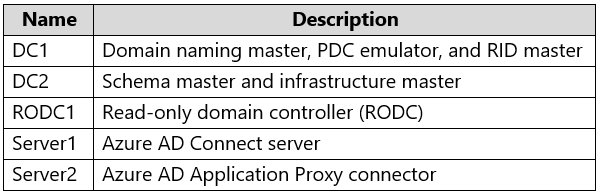
The domain controllers do NOT have internet connectivity.
You plan to implement Azure AD Password Protection for the domain.
You need to deploy Azure AD Password Protection agents. The solution must meet the following requirements:
• All Azure AD Password Protection policies must be enforced.
• Agent updates must be applied automatically.
• Administrative effort must be minimized.
What should you do? To answer, select the appropriate options in the answer area.
NOTE: Each correct selection is worth one point.
Proposed answer
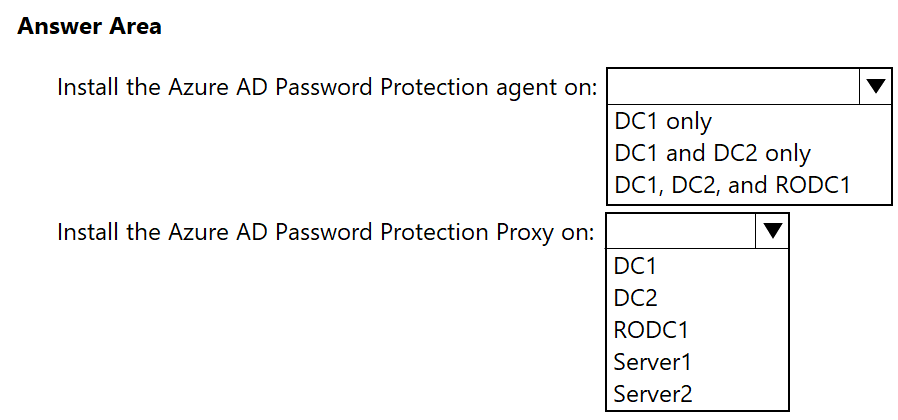
Suggested answer
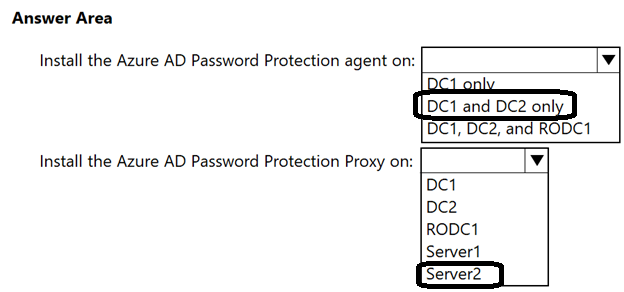
Correct answer
The suggested answer is incorrect
- Agent needed only on Writable DCs (DC1 and DC2)
- Proxy we install on Server1 (Application proxy updater is incompatible with password protection proxy updater)
lucacose
Highly Voted 11 months, 2 weeks ago
Look for the prerequisite at this page: https://learn.microsoft.com/en-us/entra/identity/authentication/howto-password-ban-bad-on-premises-deploy
upvoted 5 times
RickySmith
Highly Voted 11 months ago
Azure AD Password Protection agent - Only DC1 and DC2. Agents need to be on full DC's as RODC's cannot process all password changes. https://learn.microsoft.com/en-us/entra/identity/authentication/howto-password-ban-bad-on-premises-deploy#read-only-domain-controller-considerations Azure AD Password Protection Proxy - Server1 -Needs to be on Member Server only -Not compatible with RODC. - Not compatible with AAD App Proxy. https://learn.microsoft.com/en-us/entra/identity/authentication/howto-password-ban-bad-on-premises-deploy#microsoft-entra-connect-agent-updater-prerequisites
upvoted 5 times
Krayzr
4 months, 2 weeks ago
True. found on RickySmith's link . Warning Microsoft Entra Password Protection proxy and Microsoft Entra application proxy install different versions of the Microsoft Entra Connect Agent Updater service, which is why the instructions refer to Application Proxy content. These different versions are incompatible when installed side by side and doing so will prevent the Agent Updater service from contacting Azure for software updates, so you should never install Microsoft Entra Password Protection Proxy and Application Proxy on the same machine.
upvoted 3 times
Ksk08
Most Recent 3 weeks, 1 day ago
Dc1 and dc2 Server 1
upvoted 1 times
Jools_SP
10 months ago
Incorrect answer. Microsoft Entra Password Protection proxy and Microsoft Entra application proxy install different versions of the Microsoft Entra Connect Agent Updater service, which is why the instructions refer to Application Proxy content. These different versions are incompatible when installed side by side and doing so will prevent the Agent Updater service from contacting Azure for software updates, so you should never install Microsoft Entra Password Protection Proxy and Application Proxy on the same machine.
upvoted 2 times
Payday123
1 year ago
Is it a new question?
upvoted 1 times